
 Need help?
Do you have a question about the Lexie B1 and is the answer not in the manual?
Contact Lexie support via phone or website for assistance.
Lists required items: receiver wire, hearing aids, and optional dome kit.
Locate the red/blue receiver end and clear plastic end of the receiver wire.
Find the old receiver wire on the hearing aid matching the new cable's color.
Firmly pull the old receiver wire to detach it from the hearing aid body.
Align the new wire's clear plastic end with the hearing aid port, matching color indicators.
Insert the new receiver wire into the hearing aid body until it clicks.
Select a dome from a kit or remove it from the old receiver wire.
Align the dome opening with the receiver and slide it on securely.
Gently tug the dome to ensure it's fastened, preventing loss in the ear canal.
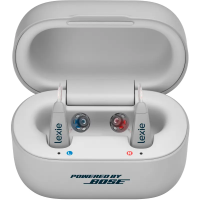
This document outlines the process for replacing the receiver wire on Lexie Hearing Aids, which are powered by Bose technology. The guide is designed to be user-friendly, providing clear, step-by-step instructions to ensure proper maintenance and continued functionality of the hearing aids.
Lexie Hearing Aids are designed to assist individuals with hearing impairment by amplifying sounds and improving sound clarity. The receiver wire is a critical component of these hearing aids, responsible for transmitting amplified sound from the main hearing aid body into the ear canal. This guide specifically addresses the replacement of this wire, ensuring that users can maintain their devices effectively and continue to experience optimal hearing performance. The hearing aids themselves are compact, designed to fit comfortably behind the ear, with the receiver wire extending into the ear canal.
The Lexie Hearing Aids are intended for daily use, providing consistent sound amplification. The design emphasizes ease of use, both in terms of wearing the device and performing basic maintenance tasks like receiver wire replacement. The receiver wire comes in different lengths and is color-coded (red for the right ear, blue for the left) to ensure correct placement and comfortable fit. The domes, which attach to the end of the receiver wire, are available in various sizes to provide a secure and comfortable fit within the ear canal, optimizing sound delivery and preventing feedback.
The receiver wire is a replaceable component, indicating that Lexie Hearing Aids are designed with user-serviceability in mind for common wear-and-tear parts. The replacement process is straightforward and can be performed by the user without specialized tools or professional assistance.
Here's a detailed breakdown of the maintenance steps for replacing the receiver wire:
Identify the Receiver Wire Ends: The new receiver wire has two distinct ends. One end is the "receiver" (speaker) itself, which is color-coded red or blue to match the corresponding hearing aid. The other end is a "clear plastic end" that connects to the main hearing aid body. Understanding these two ends is crucial for correct installation.
Match the Old Wire to the New: Before removing anything, the user identifies the old receiver wire on the hearing aid that corresponds to the color of the new cable (red for the right hearing aid, blue for the left). This ensures that the correct wire is replaced for the appropriate ear.
Detach the Old Receiver Wire: To remove the old wire, the user firmly pulls the clear plastic end of the receiver wire away from the hearing aid body. A key note here is that it may require more force than anticipated, indicating a secure connection designed to prevent accidental detachment during normal use. This firm pull ensures a clean separation without damaging the hearing aid's port.
Align the New Receiver Wire: The clear plastic end of the new receiver wire needs to be carefully aligned with the port on the hearing aid body. The red or blue marks on the wire and the hearing aid body serve as alignment indicators, ensuring that the wire is inserted in the correct orientation. This alignment is critical for establishing a proper electrical connection and preventing damage to the port.
Insert the New Receiver Wire: Once aligned, the user inserts the clear plastic end of the new receiver wire into the hearing aid body. The instruction specifies to push until a "click" is heard or felt. This audible or tactile feedback confirms that the receiver wire is securely seated and properly connected to the hearing aid's internal circuitry.
Select a Dome: After the receiver wire is attached, a dome needs to be placed on the speaker end. Users can either select a new dome from an optional dome kit (available separately) or carefully remove the dome from the old receiver wire. The availability of a dome kit highlights the modularity of the hearing aid components, allowing users to replace parts as needed.
Attach the Dome to the Receiver: The dome is then aligned with the opening of the receiver (speaker) end of the new wire. The user slides the dome onto the receiver, ensuring a snug fit. This step is important for both comfort and acoustic performance, as the dome directs sound into the ear canal and helps to seal it, preventing sound leakage and improving sound quality.
Secure the Dome: Finally, the user gently tugs on the dome to confirm that it is securely fastened to the receiver. This crucial step prevents the dome from accidentally detaching and falling into the ear canal during use, which could be a safety concern and would disrupt the hearing aid's function.
The entire process is designed to be intuitive, with clear visual aids accompanying each step in the manual. The emphasis on firm pulling for removal and listening for a "click" during insertion underscores the importance of secure connections for optimal performance and durability. The availability of replacement parts and clear instructions empowers users to maintain their Lexie Hearing Aids, extending their lifespan and ensuring consistent hearing support. For further assistance, Lexie provides a dedicated support line and online resources, emphasizing their commitment to user satisfaction and device longevity.
 General
| Type | Behind-the-ear (BTE) |
|---|---|
| Bluetooth | Yes |
| Noise Reduction | Yes |
| Technology | Digital |
| Rechargeable | No |
| Battery Size | 312 |
| App Compatibility | Lexie App |

 To Next Page