• Pairing Bluetooth GPS Navigation
1. You can listen to Bluetooth voice instructions from Bluetooth GPS navigation.
2. The paring procedure is the same with the procedure of “Pairing Mobile Phone”.
3. Please refer to the manual of the Bluetooth GPS navigation for details.
5. Controls and Functions
5.1 Volume and Music Control
You can easily adjust the volume by short pressing Volume + & Volume - buttons.
You will hear a tone when the volume reaches maximum or minimum level.
- Press Volume + or Volume – button to adjust the volume
- Press Function button to play/pause the music
- Press & hold the Volume + or Volume – buttons to skip tracks forward or back.
5.2 Safe Mobile Phone Calls - Incoming and Outgoing
5.2.1 Answer incoming call:
When you have an incoming call, you can either wait 3-5 seconds for the headset to
automatically answer the call, or short press the Function button to answer
immediately.
Note: You can turn off or on the Auto Answer feature by pressing and holding both
the Volume + and Volume - buttons.when you can red light flash 3 times when
disabled, when you see blue light flash 3 time when enabled.
5.2.2 Reject incoming call
:
press & hold the Function button for 2 seconds while the phone is ringing.
5.2.3 End active phone call
:
short press the Function button
5.2.4 Voice Dial
:
When in standby mode, press and hold the Intercom button for 2 seconds to activate
Siri or S-Voice. You will hear a beep sound, and then there will be a voice prompt
from the mobile phone. You can say aloud the name from your phone list to dial.
5.3 Bluetooth Intercom Talk
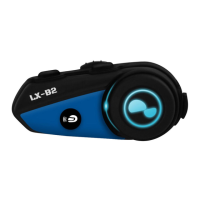
5.3.1 Pairing with the other LX-B2 headsets for Intercom Conversation
The LX-B2 can be paired with the other headsets for a rider to passenger or bike to
bike Bluetooth Intercom conversation.
1. Take out the two headsets (A and B) that you would like to pair with each other.
2. Enter Pairing Mode on both headsets (A and B).
3. Short press the Intercom button of either headset A or B (It doesn’t matter which
you choose A or B) and wait until the LEDs of both headsets are blinking blue. This
indicates that the intercom connection has been established. (Headset A is paired with
Headset B.)
5.3.2 Start Intercom Talk
To activate an intercom conversation, short press the Intercom button on either unit
when within a range of 10M.


 To Next Page