Vítejte.
Před prvním použitím plně nabijte LEZYNE GPS pomocí přiloženého USB
kabelu připojením k počítači nebo do konektoru pro nabíjení z elektrické
sítě.
Vyjíždíme
Přidržením horního levého tlačítka zapněte Lezyne GPS. Vyčkejte
vyhledání signálu GPS. Záznam jízdy spustíte stlačením pravého dolního
tlačítka. Užijte si jízdu.
Pravým
horním tlačítkem můžete během jízdy procházet další data v
přístroji.
Pro pauzu záznamu podržte pravé dolní tlačítko. Pro pokračování v
nahrávání zvolte možnost RESUME stisknuím levého dolního tlačítka
ENTER, nebo zvolte jinou možnost posunutím tlačítkem na pravé straně
(nahoru/dolu).
Zvolete možnost END (konec) pro návrat do menu. Nyní zvolte pro svoji
aktivitu SAVE (uložit) nebo DISCARD (neuložit).
Analýza
Pomocí mikro SUB připojte svůj Lezyne GPS k počítači. V přístroji Lezyne
GPS ve složce Activities najdete svůj záznam s příponou .FIT. Ten můžete
nahrát, shlédnout či sdílet zdarma na: www.lezyne.com/gpsroot
Více informací
Instrukce a informace o bezpečnosti naleznete v uživatelském manuálu,
který naleznete na: www.lezyne.com/support-downloads.php
Obrazovka při jízdě - funkce tlačítek
Stiskněte
Držte
English Quick Start Français démarrage rapide
Český návod - Quick start
FILES
Lezyne GPS
Lezyne
Activities
Soubory
Lezyne GPS
Lezyne
Aktivity
FILES
Lezyne GPS
Lezyne
Activities
MICRO USB MICRO USB
MICRO USB
COMPUTER MOUNT
Push & turn
into mount
Welcome.
Fully charge your Lezyne GPS with the included USB cable plugged into a computer
or wall charger before using it the rst time.
It is also recommended to visit lezyne.com/gpsroot and update your GPS device to
the latest software to maintain the best compatibility with your phone and sensors.
Go ride
Turn on your Lezyne GPS by holding the top left button. Wait for a GPS signal to
register.
Start recording by pressing the bottom right button and enjoy your ride.
Page through other data elds while recording by pressing the top right button .
Enter the pause menu by holding the bottom right button . To continue recording,
select the option RESUME by pressing the bottom left button ENTER or scroll
through other options by pressing one of the top or bottom right buttons.
Select the option END to go to the le menu. Now choose to SAVE or DISCARD
your le.
Analyze
Connect your Lezyne GPS to a computer via Micro USB cable. Within the Lezyne
GPS folder nd your .FIT ride les in the Activities folder to upload, view, and share
for free at: www.lezyne.com/gpsroot
More Info
For instructions and safety information, see the User Guide. Download the .PDF at:
www.lezyne.com/support-downloads.php
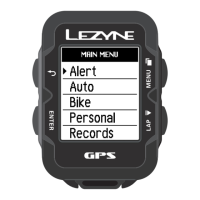
Menu Outline:
Alert
Ride Distance
Ride Time
Calories
Min HR (Heart Rate)
Max HR (Heart Rate)
Speaker
Time Out
Auto
Scroll
Pause
Lap
Light
Bike
Wheel Circ.
Bike Weight
Personal
Sport Type
Language¹
Age¹
Weight¹
Height¹
Gender¹
Records
Erase All
Erase Oldest
Memory Free
Reset Trip 1
Reset Trip 2
Reset Odo (Odometer)
Phone
iPhone
Android
Navigation
Rerouting
Sensors
Heart Rate
Speed
Cadence
Speed & Cadence
Power
Shifting
Screen
Data Pages
No. Of Pages
No. Of Fields
Fields
Unit Format
Backlight
Contrast
Notications
Time
Time Format
Time Zone¹
Daylight Saving¹
Info
Device
Firmware
Gps Mode
Satellites
HDOP
VDOP
Battery
FCC ID
IC
RCM
Bluetooth LE
Ant+
1. Required Fields
2. Ant+ is only supported on
ENHANCED GPS units.
Menu:
Alerte
Distance
Temps
Calories
FC. Min
FC. Max
Haut-parleur
Montée
Auto
Délement
Pause
Tour
Éclairage
Vélo
Circ. roue
Poids vélo
Personnel
Discipline
Langue¹
Âge¹
Poids¹
Taille¹
Sexe¹
Fichiers
Tout effacer
Eff + ancien
Mémoire
Réinit. T1
Réinit. T 2
Réinit. Cptr
Téléphone
iPhone
Android
Navigation
Changement d'itinéraire
Capteurs
Fréq. Card.
Vitesse
Cadence
Vit & Cad
Puissance
Changement de position
Écran
Pages de données
Nbre pages
Nbre champs
Champs
Unité mesure
Rétroéclairage
Contraste
Notications
Temps
Format Heure
Fus. horaire¹
Heure d'été¹
Infos
Appareil
Microlog.
Mode GPS
Satellites
HDOP
VDOP
Batterie
FCC ID
IC
RCM
Bluetooth LE
Ant+
1. Champs requis
2. Ant + est uniquement
prise en charge sur les
unités GPS ENHANCED.
USB SEAL
<
Scroll
ON/OFF
Backlight
-
Scroll
>
Menu
Start/Lap
Pause
1
2
1
2
1
2
Ride screen button functions:
Press
Hold
Menu & pause screen button functions:
Press
Hold
Back
-
Select
-
Up
-
Down
-
<
Posunutí
ON/OFF
Podsvíceni
-
Posunutí >
Menú
Start/Mezičas
Pauza
Zpět
-
Zvolit
-
Nahoru
-
Dolů
-
Držák cyklo přístroje
Zatlačit a
otočit do
držáku
Fonctions des boutons de l’écran mode Cycle:
Appuyer
Maintenir
enfoncé
Fonctions des boutons en mode Menu et Pause:
Appuyer
Maintenir
enfoncé
Rétroéclairage
-
Dérouler
>
Menu
Démarrer/Tour
Pause
<
Dérouler
Marche/
Arrêt
Sélectionner
-
Retour
-
Haut
-
Bas
-
JOINT USB INSTALLATION DU COMPTEUR
Pousser et
tourner sur
le support
Bienvenue.
Rechargez complètement votre GPS LEZYNE avant la première utilisation, à l’aide
du câble USB inclus, en le branchant sur un ordinateur ou une prise murale. Il
est également recommandé de visiter le site internet lezyne.com/gpsroot an de
mettre à jour votre appareil GPS en téléchargeant la dernière version du logiciel et
ainsi optimiser la compatibilité avec votre téléphone et les capteurs.
Aller rouler.
Allumer votre Lezyne GPS en maintenant le bouton de gauche. Attendez jusqu’à ce
que le signal GPS est trouvé.
Commencer l’enregistrement en pressant le bouton de
droite Bonne route.
Faire déler les différentes données lors de l’enregistrement en pressant le bouton
en haut à droite .
Entrer dans le menu pause en maintenant le bouton en bas à droite . Pour
continuer l’enregistrement, sélectionner l’option REPRENDRE en appuyant sur le
bouton à gauche ENTER ou faire déler les autres options en appuyant sur le
bouton en haut à droite ou en bas à droite.
Sélectionner l’option END pour aller au menu chiers. Maintenant choisissez de
SAUVEGARDER ou de SUPPRIMER votre chier.
Analyser
Connectez votre Lezyne GPS à un ordinateur via le câble Micro USB. Dans le dossier
Lezyne GPS, cherchez votre chier d’activité .FIT pour le télécharger, le voir, et le
partager gratuitement sur :www.lezyne.com/gpsroot
Plus d’infos
Pour les instructions et les informations de sécurité, reportez -vous au Guide de
l’utilisateur du GPS. Télécharger le chier PDF sur :
www.lezyne.com/support-downloads.php
Charging
Charged
Alert
Nabíjení
Nabito
Pozor
En charge
Rechargé
Alerte
72059-A1
Kryt USB
Záznamy
Vymazat vše
Vymazat nejstaší
Prázdná paměť
Reset cesty 1
Reset cesty 2
Reset Odo
(Odometr)
Telefon
iPhone
Android
Navigace
Objíždění - změna trasy
Senzory
Tepová frekvence
Rychlost Kadence
Rychlost & Kadence
Výkon
Řazení
Obrazovka
Stránky
Počet stran
Počet polí
Pole
Jednotky
Podsvícení
Kontrast
Upozornění
Čas
Formát času
Časové pásmo¹
Letní čas¹
Informace
Přístroj
Firmware
Gps Mode
Satelity
HDOP
VDOP
Baterie
FCC ID
IC
RCM
Bluetooth LE
Ant+ 2
1. Povinná pole
2. Ant+ je podporováno
pouze u přístrojů
vybavených GPS.
Přehled Menu:
Upozornění
Ujetá vzdálenost
Čas jízdy
Kalorie
Min TF (Tep.frekvence)
Max TF (Tep.frekvence)
Zvukový signál
Časový limit vypnutí
Auto
Posunutí
Pauza
Lap
Světlo
Kolo
Obvod kola.
Váha kola
Osobní
Typ sportu
Jazyk¹
Věk¹
Váha¹
Výška¹
Pohlaví
¹
Funkce tlačítek Menu a Pauza:
Stiskněte
Držte


 Need help?
 General