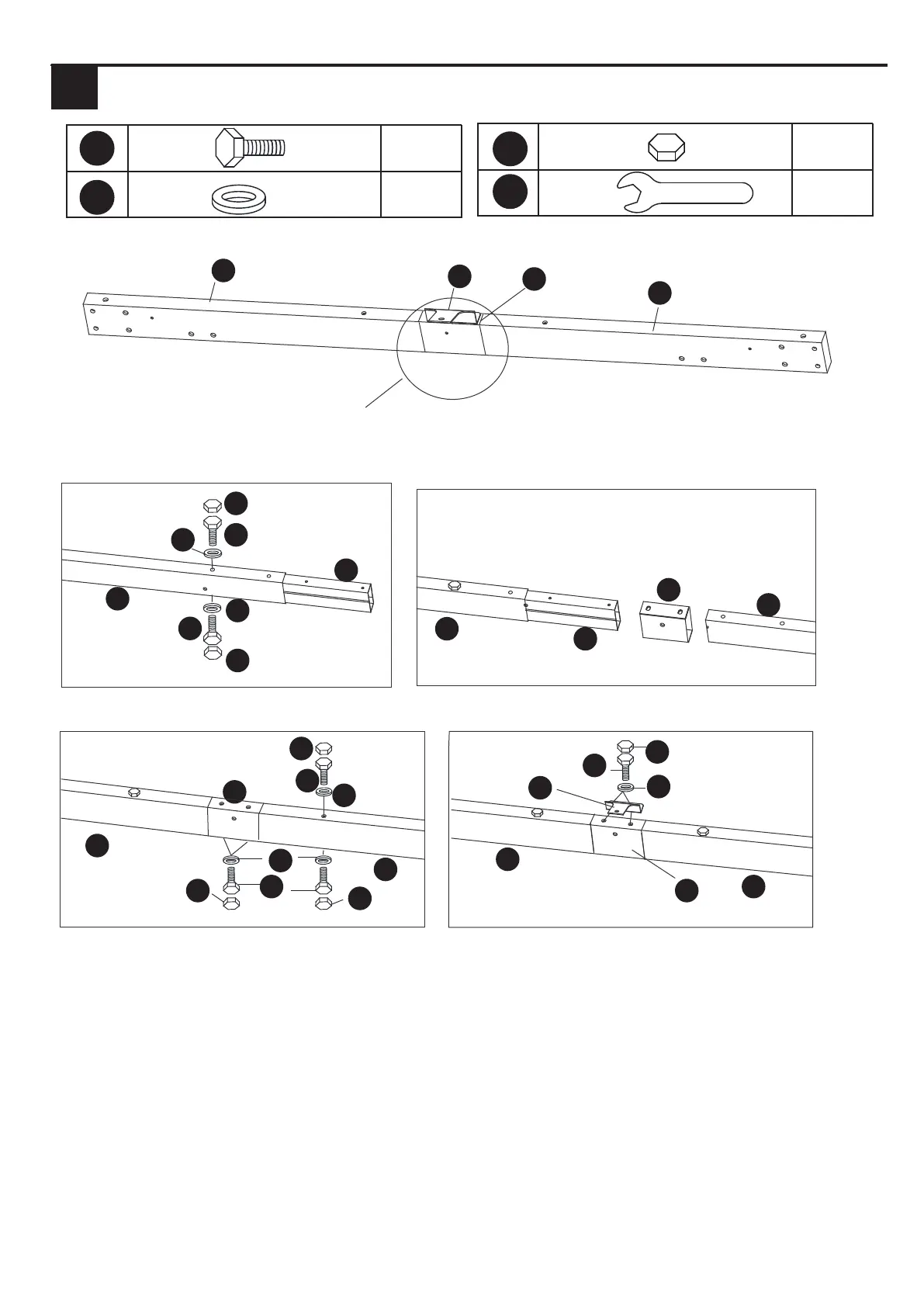
Hardware Used2
INSTALLATION INSTRUCTIONS
2.1 Insert the Lintel connector (F) into the Right Lintel (D2), connect them first to the holes with
bolts (AA) and washers (EE) as shown in the picture, then insert the Cover (G) and Left Lintel (D1)
to the Right Lintel (D2) at the same time, and fix them with bolts (AA) and washers (EE) as shown
in the picture.
2.2 Connect the Connector (F2) to the Cover (G) and Lintels (D1/D2) with Bolt (AA) and washers (EE).
Finally put on the Bolt Cover (GG) over all bolts.
X32
X32
X1
AA
GG
NN
X32
EE
D1
F2
G
D2
D2
F
AA
AA
AA
AA
EE
GG
GG
GG
EE
EE
GG
GG
F
G
G
D2
D2
D2
AA
GG
EE
F2
G
D1
D1
D1
EE
Note: The holes on the Cover (G) are facing inward
1 2 3 4 5 6 7 8
9 10 11 12 13 14 15 16
17 18 19 20 21 22 23 24
25 26 27 28 29 30 31 32
33 34 35 36 37 38 39 40
41 42 43 44 45 46 47 48
49 50 51 52 53 54



 To Next Page