EasyManua.ls Logo

LFE 2000 Series - Page 64

LFE 2000 Series
155 pages
Print Icon
To Next Page IconTo Next Page
To Previous Page IconTo Previous Page
Loading...
958-31
REV.
B
6.12.3
PROCESS
INPUT
CALIBRATION
An
appropriate
precision
current
or
process
t-nput
calibratlon.
vo I tage
calrbration
source
rs required
for
The
display
at
the
left
ls
the
first
to
appear
rn the
calrbratron
sub-1oop.
Connect
a
preci-sion
calibrator
to
rear
case
terminals
H(+)
and
F(-).
Set
the
calibrator
to
the
Lo
calibration
value
corresponding
tothe
L0
VAL
display
selected
j-n
Section
6.11.
Allow
a 2 minute
rnterval
for
the
controller
to
stabillze
and
then
press
the
pARAl,t
(CHECK)
key
to
advance
to
the
next
display.
This
display
appears
next.
in the
calrbratlon
sub-loop.
Reset
the
precision
calibrator
to
the
HI calibration
value
correspondrlg
to
the
HI
VAL
dlsplay
selected
in
Section
5.11.
Allow
a 2
nrrnute
rnterval
for
the
controller
to
stabilize
and then
press
the
PARAM
(CHECK)
key
to advance
to
the
next
dlsplay.
proceed
to Sectlon
6.I2.4.
6.12,4
REMOTE
SETPOINT
]NPUT
CALIBRATION
The
remote
setpoint
input
option
may
2012,2013,2014,2015
and
2017
.
Remote
this
option
is
not
installed, proceed
be
installed
on any
cont.roller
except,
Models
setpornt
input
is
standard
on
Model
2005.
If
directly
to Section
6,12,6
VOLTAGE
OR
CTIRRENT
SOURCE
An
appropriate
precision
current
or voltage
calibration
source
is requrre4
for
rernote
setpolnt
rnput
calibration
unless
the
internal
supply
is
used
to
power
the
rernote
setpornt pot.
Connect
the
remote
setpoint
circuit
as
shown
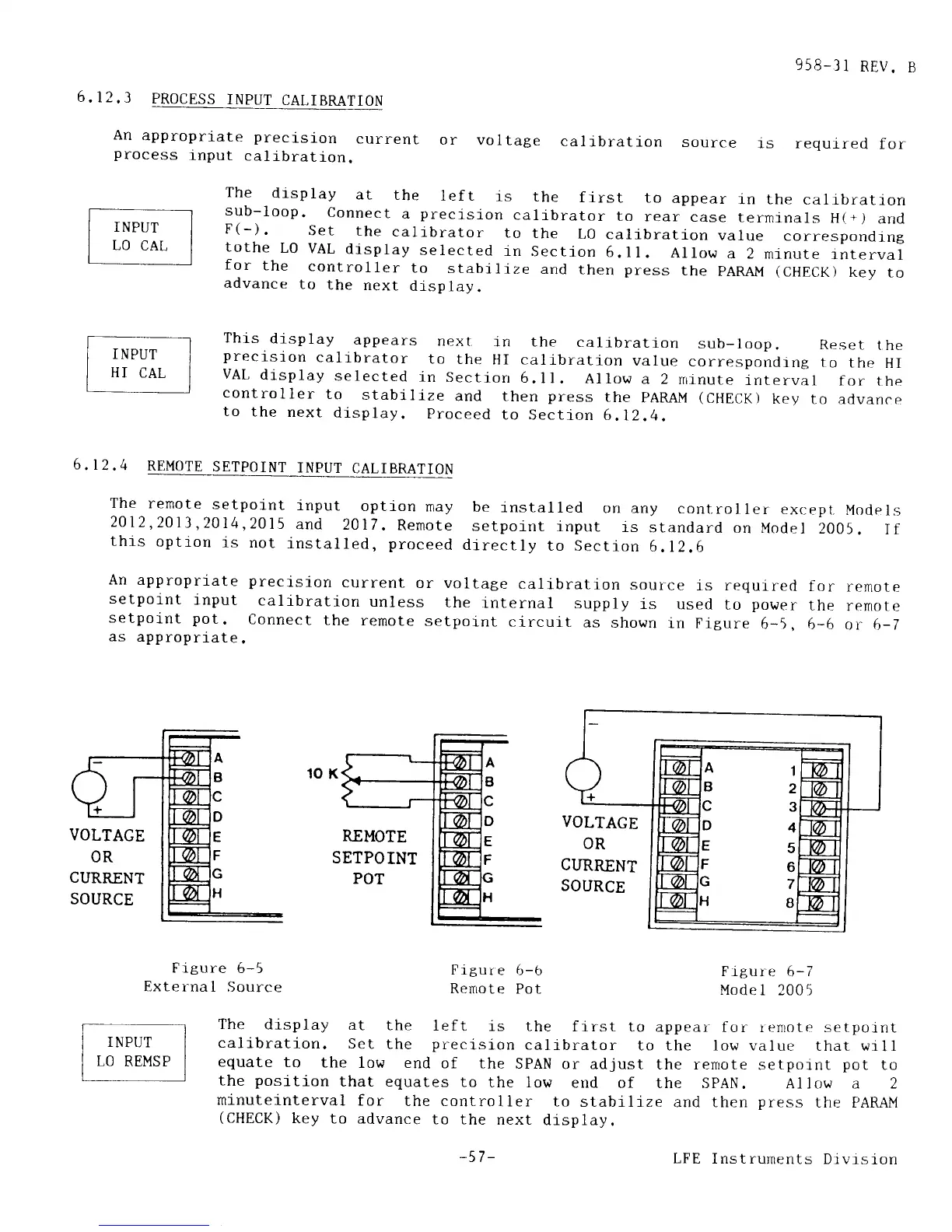
rn Frgure
6-5.
6-6 rtr
6-l
as
approprtate.
VOLTAGE
OR
CIIRRENT
SOURCE
Figure
6-5
Exter-nal
Source
Figur
e 6-b
RenLote
Pot
Figure
6-7
Model
2005
The
display
at
the
left
is the
first
to appear
for renrote setpoint
calibration.
Set
the
preclsion
calj.brator
to the low value
that wtll
equate
to
the
low end
of the
SPAN
or adjust
the renrote
setpotnt
pot
to
the
position
that equates
to
the low
end
of the spAN.
Allow a 2
minuteinterval
for
the controller
to
stabilize
and then
press
the PARAM
(CHECK)
key to advance
to the
next
display.
A1
B2
4
5
6
7
I
-57 -
LFE Instruments
Divrsion