EasyManua.ls Logo

LFE 2000 Series - Page 63

LFE 2000 Series
155 pages
Print Icon
To Next Page IconTo Next Page
To Previous Page IconTo Previous Page
Loading...
958_3I
REV B
All
thermocouple
input
controllers
are
ca
50.000
mVDC
callbration
source
and
a
type
J
ice
bath
simulator
are
required.
Iibrated
1n the
same
nanner.
A
prectsron
thermocouple
in
an
ice
bath
or
a type
J
The
display
at
the
reft
is
the
first
to
appear
in
the
carrbration
sub-loop.
rt
indicates
that
a
precision,
dlstortion-free
50.000
mvDC
calibration
source
nust
be
connected
to
rear
case
terminals
F(-)
and
H(+)'
Allow
a 2
minute
interval
for
the
controller
to
stabil
lze
after
applyine
the
50.000
nV
signal
and
then
press
the
pARALf
(CHECK)
key
to
advance
to
the
next
display.
This
display
appears
next
in
the
calibration
sub-loop.
without
removing
the
AC
supply
power,
remove
the
connections
to
the
calibrator
in
the
prevlous
step
and
connect
the
input
to
a
type
J
therrnocouple
in an
ice
bath
or
its
equivalent'
Allow
a
2
minute
interval
for
the
controller
to
stabr,lize
after
connecting
the
type
J
thermocouple
and
then
press
the
PARAM
(CHECK)
key
to
advance
to
the
next
display.
proced
to
sectron
6.12.4.
6.12.2
RTD
INPUT
CALIBRATION
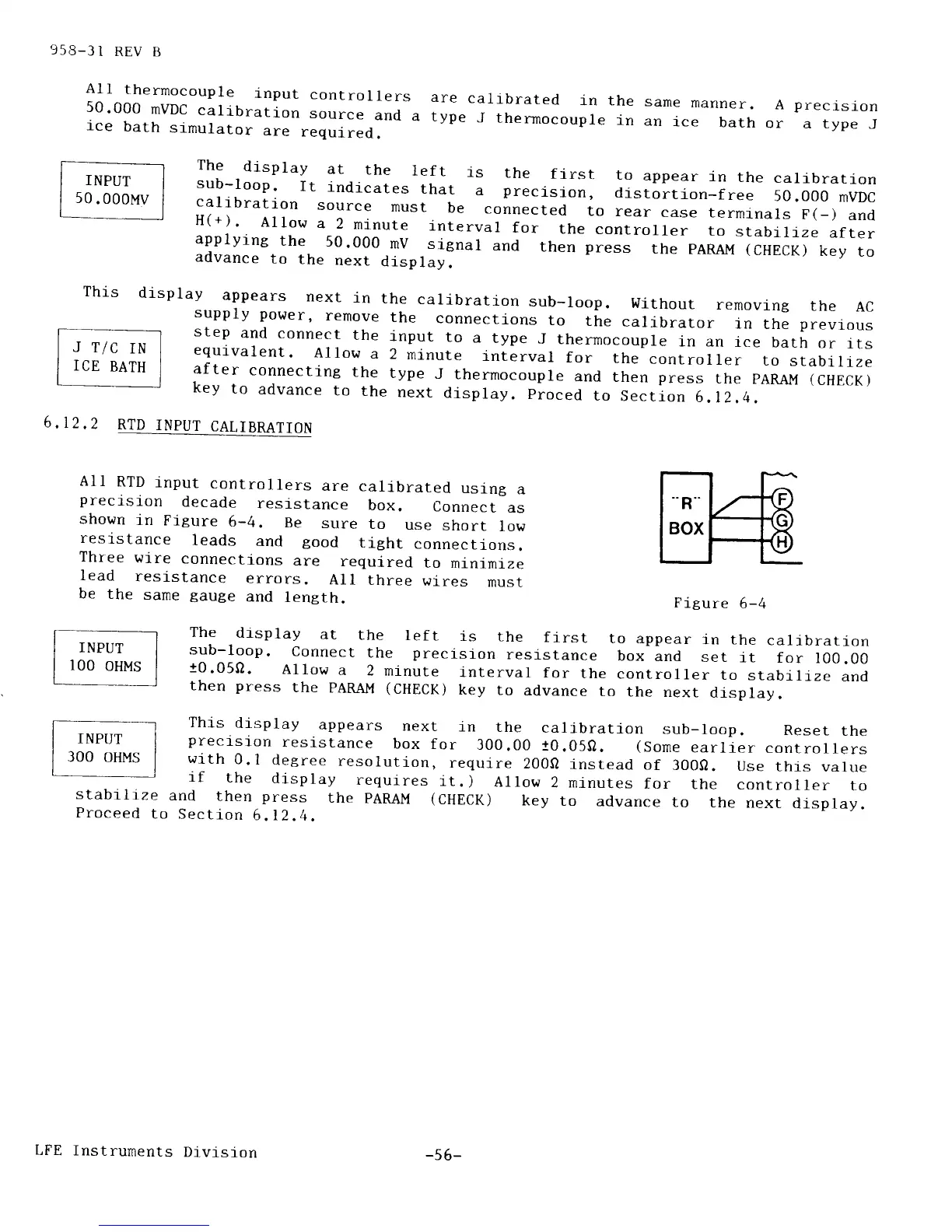
All
RTD
input
controllers
are
calibrated
using
a
precrsi-on
decade
resistance
box.
Connect
as
shown
in
Figure
6-4.
Be
sure
to
use
short
low
reslstance
leads
and
good
tight
connections.
Three
wire
connections
are
required
to
minirnize
lead
resistance
errors.
Al1
three
wires
rnust
be
the
same
gauge
and
length.
stabi
I rze
Proceed
to
Figure
6-4
[:*
-l
The
drsplay
at
the
lef
t
is
the
f
irst
to appear
in the
calibration
I
rNPU'l'
I
sub-loop.
connect
the
precision
resistance
box
and
set
it
for
100.00
|
100
0HMS
I
to.05o.
Allow
a
2
minute
interval
for
the
controller
to
stabilrze
andtl
rnen press
the
pARAl,l
(CHECK)
key
to advance
to
the
next
display.
This
display
appears
next
in
the
calibration
sub-loop.
Reset
the
precrsion
resistance
box
for
300.00
10.059.
(Sorne
earlier
controllers
with
0.1
degree
resolution,
require
2000
instead
of
3000.
use
thrs
value
if
the
display
requires
it.
)
Allow
2 rninutes
for
the
controller
to
and
then
press
the
PARAI,I
(CHECK)
key
to
advance
to
the
next
display.
Section
6.12,4.
INPUT
]OO
OHMS
LFE
Instruments
Division
-s6-