- 13 -
LGE Internal Use Only
Copyright © LG Electronics. Inc. All right reserved.
Only for training and service purposes
3.3. CI+ key writing process.
(Device CN)
3.3.1. Download method
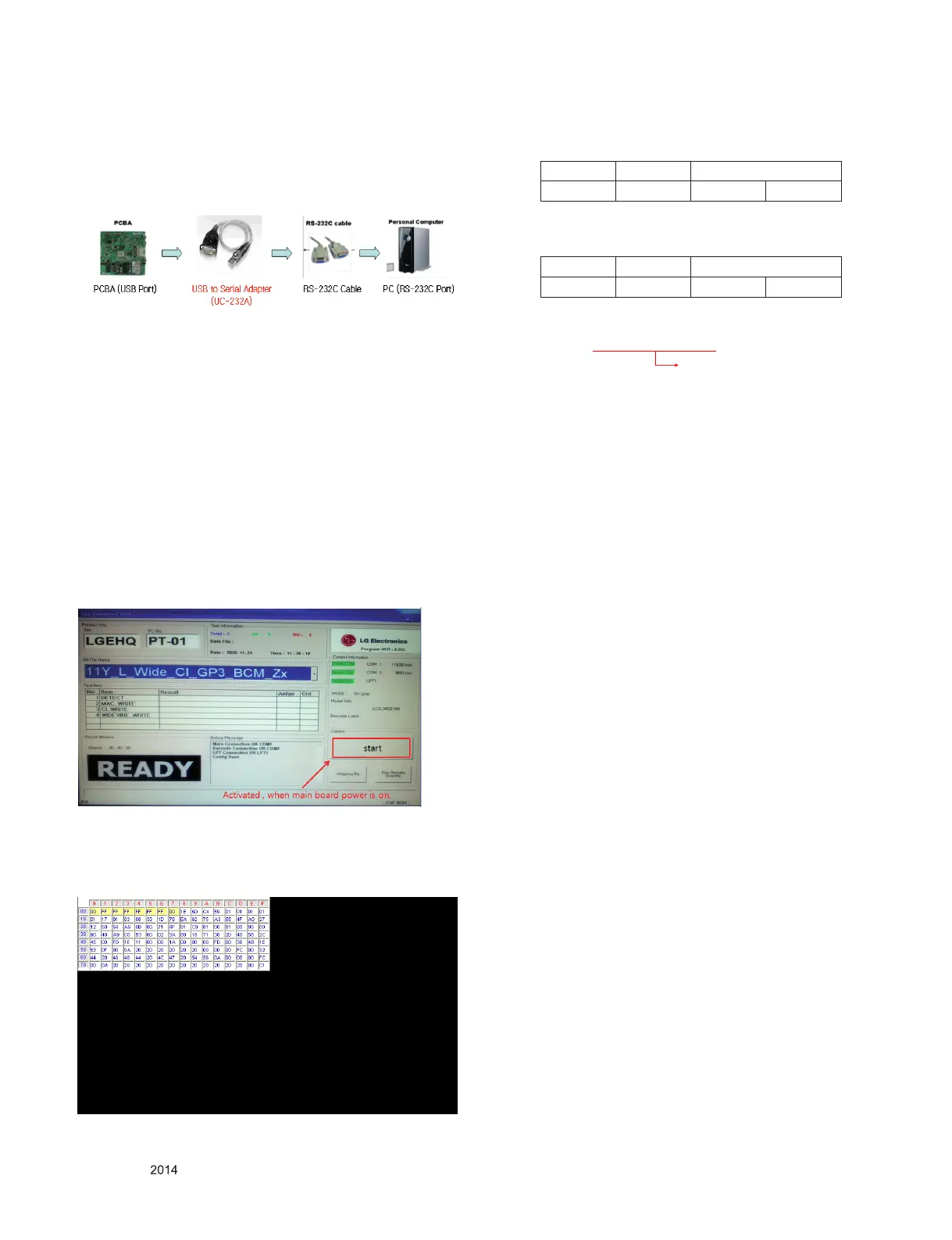
3.3.1.1. Communication Prot Connection
Connection : PCBA (USB Port) → USB to Serial Adapter (UC-
232A) → RS-232C cable → PC(RS-232C port)
→ Caution : LD31Q/LD31A chassis support only UC-232A
driver. ( only use this one. )
3.3.2. CI+ Key Download
1) Set CI+ Key path Directory at Start Mac & CI+ Download
Programme.
2) Set COM 1,2,3,4 / 115200(Baudrate) (1)/(2)
3) Click port connection button(1)
4) Start CI+ Key Download, Push the button(4)
5) Check OK or NG.
6) After completing download, CI + key values are increase by
one automatically. To write CI+ key next SET, click CI+ key
writing button(5) directly.
7) Check whether the key was downloaded or not at ‘In Start’
menu. (Refer to below).
3.3.3. Check the Download to CI+ Key value in LG
set.
1) Check the method of CI+ Key value
a) Check the method on Instart menu
2 ) Check the method of CI+ key value(RS232)
a) Into the main ass’y mode(RS232: aa 00 00)
b) Check the mothed of CI+ key by command
(RS232: ci 00 20)
3) Result value
i 01 OK 1d1852d21c1ed5dcx
CMD 1 CMD 2 Data 0
A A 0 0
CMD 1 CMD 2 Data 0
C I 2 0
CI+ Key Value


 To Next Page