Phone Components
Phone Components
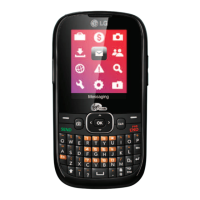
Earpiece
MP3 key
Navigation key
Send key
Left soft key
Microphone
Confirmation key
Message key
End / Power key
Right soft key
Clear key
Your Phone’s Features
❑ Earpiece
❑ Navigation key
Use for quick access to phone
functions.
❑
Left soft key / Right soft
key
Each of these keys perform the
functions indicated by the text
on the display immediately
above them.
❑
MP3 key
Press this key to access the
MP3 player menu.
❑
Send key
You can dial a phone number
and answer incoming calls. Press
this key in standby mode to
quickly access the most recent
incoming, outgoing and missed
calls.
❑
Microphone
Can be muted during a call for
privacy.
❑
Confirmation key
Allows you to select and
confirm menu options.
❑
Message key
Use to retrieve or send text
messages.
❑
End/Power key
Allows you to power the phone
on or off, end calls, or return to
Standby Mode.
❑
Clear key
Allows you to delete the
characters entered or return
you to the previous screen.
Menu Tree
Menu Tree
1. Call History
1.1 Missed Calls
1.2 Dialed Calls
1.3 Received Calls
1.4 Delete Recent Calls
1.5 Call Duration
2. Messages
2.1 New Message
2.2 Inbox
2.3 Drafts
2.4 Outbox
2.5 Sent
2.6 Voice Mail
2.7 Info Messages
2.8 Templates
2.9 Settings
3. Contacts
3.1 Contacts
3.2 New Contact
3.3 Speed Dial List
3.4 Caller Groups
3.5 Copy All Contacts
3.6 Delete All Contacts
3.7 Set Save Location
3.8 Information
4. Internet
4.1 Home
4.2 Bookmarks
4.3 Network Profile
4.4 Cache Settings
4.5 Security Certificates
4.6 Information
5. Rogers Mall
5.1 Get Music & Tones
5.2 Get Games
5.3 Get Graphics
5.4 Get Email/Chat
5.5 Get Celebrity
Voicemail
5.6 Get News & Info
5.7 Search
6. Games & Apps
6.1 Games & Apps
6.2 Bookmarks
6.3 Network Profile
6.4 Information
7. Media
7.1 Camera
7.2 MP3 Player
7.3 Audio
7.4 Graphics
7.5 Videos
8. Tools
8.1 Print via Bluetooth
8.2 Alarm Clock
8.3 Calendar
8.4 Voice Memo
8.5 Calculator
8.6 Notepad
8.7 World Clock
8.8 Unit Converter
8.9 Tip Calculator
9. Settings
9.1 Audio
9.2 Display
9.3 Bluetooth
9.4 Date & Time
9.5 Call
9.6 Security
9.7 Connection
9.8 Flight Mode
9.9 Check Memory
9.0 Reset Default
Getting Started
Getting Started
Installing the SIM Card
When you subscribe to a cellular network,
you are provided with a plug-in SIM card
loaded with your subscription details, such
as your PIN, any optional services available
and many others.
1. If necessary, switch off the phone by
holding down the key until the
power-off image displays.
2. Remove the battery. To do so:
1 Pull and hold the battery lock above
the battery toward the top of the
phone.
2
Lift the battery away, as shown.
Turning Your Phone On and
Off
1. Open the flip.
2. Press the key.
3. If the phone asks for a PIN, enter the
PIN and press the left soft key [OK].
3. Slide the SIM card into the SIM card
socket so that it locks the card into place.
Make sure that the notched corner is
bottom left and the gold contacts of the
card face into the phone.
Note
]
When you need to remove the SIM card, slide
it, as shown, and take it out of the socket.


 To Next Page
 Need help?
 General