EasyManua.ls Logo

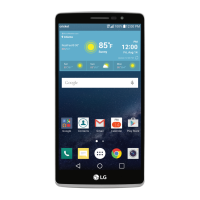
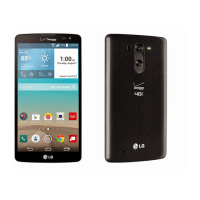
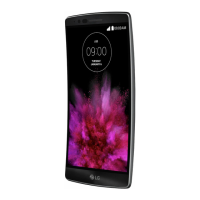
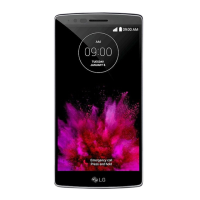
LG G Pro 2 - User Manual

LG G Pro 2
334 pages
Go to English
Print Icon
To Next Page IconTo Next Page
Loading...
www.lg.com
繁體中文
简体中文
ENGLISH
使用手冊
用户手册
User Guide
MFL69190401 (1.0)
LG-D838

Table of Contents

Other manuals for LG G Pro 2

Questions and Answers

  • J
    jillroseAug 18, 2025
    What to do if my LG G Pro 2 cannot be switched on?
    • P
      perezjessicaAug 18, 2025
      If your LG Cell Phone won't switch on, it might be due to these reasons: * The On/Off key was pressed too briefly - press the On/Off key for at least two seconds. * The battery is not charged - charge the battery and check the charging indicator on the display.
  • W
    wchavezAug 20, 2025
    Why is my LG G Pro 2 charging error?
    • M
      Megan PittsAug 20, 2025
      Several factors can cause a charging error: * The battery may not be charged - in this case, charge the battery. * The outside temperature might be too hot or cold - ensure the phone is charging at a normal temperature. * There could be a contact problem - check the charger and its connection to the phone. * There might be no voltage - try plugging the charger into a different socket. * The charger could be defective - replace the charger. * You might be using the wrong charger - use only original LG accessories.
  • A
    Angela BridgesAug 23, 2025
    What to do if my LG G Pro 2 Cell Phone has no network connection or dropped network?
    • D
      David BakerAug 23, 2025
      If your LG Cell Phone has no network connection or keeps dropping the network, it could be due to: * A weak signal or being outside the carrier network - move toward a window or into an open area and check the network operator coverage map. * The operator applied new services - contact your service provider.
  • J
    jessica76Aug 25, 2025
    What to do if my LG G Pro 2 Cell Phone calls are not available?
    • G
      Gregory KingAug 26, 2025
      If calls are not available on your LG Cell Phone, it could be due to: * A dialling error - check for new restrictions. * A new SIM card inserted - check for new restrictions. * The pre-paid charge limit reached - contact your service provider or reset the limit with PIN2.
  • M
    Michelle CainAug 28, 2025
    How to fix LG G Pro 2 Cell Phone SIM card error?
    • D
      David RiveraAug 28, 2025
      If your LG Cell Phone displays a SIM card error, it means there is no SIM card in the phone or it is inserted incorrectly. Make sure that the SIM card is correctly inserted.
  • J
    Jacqueline GoodmanAug 30, 2025
    Why does my LG Cell Phone hang up or freeze?
    • L
      Laura SweeneyAug 31, 2025
      If your LG Cell Phone hangs up or freezes, it may be due to an intermittent software problem. Try to perform a software update via the website.
  • A
    Ashley HortonSep 2, 2025
    What to do if my LG G Pro 2 impossible to receive or send SMS & photos?
    • B
      Barbara FrySep 2, 2025
      If your LG Cell Phone cannot receive or send SMS & photos, it's likely because the memory is full. Delete some messages from your phone.
  • K
    Kathryn StoneSep 4, 2025
    Why is there no sound on my LG G Pro 2?
    • S
      Susan VargasSep 5, 2025
      If there is no sound on your LG Cell Phone, check the settings status in the sound menu to make sure you are not in vibration or silent mode.
  • R
    richardhoSep 6, 2025
    Why is my LG G Pro 2 number not allowed?
    • D
      Darren CharlesSep 7, 2025
      If your LG Cell Phone displays 'number not allowed', the Fixed dialling number function is on. Check the Settings menu and turn the function off.
  • D
    David DeanSep 9, 2025
    What to do if my LG G Pro 2 screen does not turn on when I receive a call?
    • M
      Michael PhillipsSep 9, 2025
      If the screen on your LG Cell Phone does not turn on when you receive a call, it could be a proximity sensor problem. If you use a protection tape or case, make sure it has not covered the area around the proximity sensor. Make sure that the area around the proximity sensor is clean.

Summary

Guidelines for Safe and Efficient Use

Exposure to Radio Frequency Energy

Information on SAR values and safe usage limits.

Product Care and Maintenance

Guidelines for maintaining and cleaning the device.

Efficient Phone Operation and Road Safety

Tips for optimal phone performance and safe driving practices.

Hearing, Glass, and Blasting Area Precautions

Warnings about hearing damage, glass breakage, and blasting zones.

Environmental and Emergency Guidelines

Safety advice for explosive atmospheres, aircraft, children, and emergency calls.

Battery Information and Care

Instructions on battery charging, handling, and disposal.

Smartphone Update and Compliance

Information on updating software and regulatory compliance.

Important Notice

Phone Memory Management

How to check and free up phone memory by uninstalling apps.

Optimizing Battery Life

Tips to extend battery power by managing features and settings.

Open Source Application and OS Installation

Warning and advice before installing third-party operating systems or applications.

Using Unlock Pattern and Security

Steps to set up a screen unlock pattern and related precautions.

Hard Reset (Factory Reset) Procedure

Instructions on how to perform a factory reset if the phone is not functioning correctly.

Opening and Switching Applications

How to manage multiple applications running simultaneously on the phone.

File Transfer and Phone Handling

Methods for transferring files via MTP and proper phone holding techniques.

Getting to Know Your Phone

Phone Overview and Hardware Identification

Diagrams and explanations of the phone's physical buttons and components.

Installing SIM Card and Battery

Step-by-step guide for inserting the SIM card and battery.

Charging Your Phone

Instructions on how to charge the device and important charging warnings.

Using Memory Card

Guide on inserting, removing, and formatting memory cards.

Locking and Unlocking the Screen

Methods to lock, unlock, and activate screen wake-up features.

Stereo Headset with Microphone Usage

Connecting and using the headset for audio and calls.

Your Home Screen

Touch Screen Navigation Tips

Explains basic touch gestures like tap, hold, drag, and pinch-to-zoom.

Home Screen Layout and Components

Description of the home screen's status bar, widgets, and icons.

Extended and Customizing Home Screens

How to add, remove, and arrange items on the home screen.

Application Shortcuts and Notifications

Managing recently used apps and understanding notification alerts.

Notifications Panel and Status Bar Icons

Detailed explanation of the notification panel and status bar icons.

On-Screen Keyboard and Text Entry

Using the virtual keyboard and entering accented characters.

Google Account Setup

Setting Up Your Google Account

Steps to sign into or create a Google account for device synchronization.

Connecting to Networks and Devices

Wi-Fi Connectivity and Setup

How to turn on Wi-Fi and connect to available networks.

Bluetooth Pairing and Usage

Instructions for enabling Bluetooth and pairing with other devices.

Sharing Phones Data Connection

Using USB tethering and Wi-Fi hotspot for data sharing.

Wi-Fi Direct and SmartShare

Connecting devices directly via Wi-Fi Direct and sharing content.

Nearby Device Content Sharing

Enjoying content from nearby devices using DLNA.

PC Connections via USB Cable

Connecting the phone to a PC using a USB cable for data transfer.

Calls

Making and Receiving Calls

Steps for dialing numbers, calling contacts, and answering/rejecting calls.

Call Volume and Management

Adjusting in-call volume and managing multiple calls.

Viewing Call Logs

How to access and view the history of dialled, received, and missed calls.

Call Settings Configuration

Customizing call forwarding and other carrier-specific call features.

Contacts

Searching and Adding Contacts

Finding existing contacts and adding new ones with details.

Managing Favourite Contacts

Classifying frequently called contacts as favorites.

Creating and Managing Contact Groups

Organizing contacts into groups for easier management.

Messaging

Sending SMS and MMS Messages

Instructions for composing and sending text and multimedia messages.

Message Threads and Settings

Understanding message threads and customizing message settings.

Email

Managing Email Accounts

Setting up, changing, and deleting email accounts on the device.

Composing and Sending Emails

Steps for writing and sending email messages with attachments.

Camera

Camera Viewfinder and Modes

Overview of camera interface, flash, lens swap, and shooting modes.

Advanced Camera Settings

Exploring options like resolution, ISO, focus, and effects.

Taking Quick Photos

Basic steps for capturing a photograph using the camera.

Special Camera Modes (Shot & Clear, Dual Camera)

Using advanced modes for object removal and dual lens photography.

Time Catch Shot and Photo Management

Capturing sequential shots and managing taken photos.

Gallery Access and Photo Operations

Viewing photos in the gallery and performing operations like cropping and sharing.

Video Camera

Video Camera Viewfinder and Modes

Interface for video recording, flash, lens swap, and modes.

Advanced Video Settings

Options for audio zoom, video size, brightness, and color tone.

Recording and Managing Videos

Steps for quick video recording and post-recording actions.

Video Playback and Volume Adjustment

Viewing recorded videos and adjusting playback volume.

Dual and Tracking Zoom Recording Modes

Recording videos using front/rear cameras or tracking specific areas.

Function

QuickMemo Feature Usage

Creating memos and capturing screen shots with QuickMemo.

QuickMemo Options and Saved Memos

Using QuickMemo tools and accessing saved memos.

QSlide Multitasking Feature

Running apps in small windows for multitasking.

QuickRemote Universal Remote

Using the phone as a remote control for home devices.

LG SmartWorld Content Access

Accessing games, apps, and content from LG SmartWorld.

Using LG SmartWorld Features

Navigating and utilizing the LG SmartWorld application.

Multimedia

Gallery for Pictures and Videos

Viewing and managing image and video files.

Viewing Pictures and Zooming

Browsing photos and using zoom gestures.

Playing Videos and Options

Watching video files and using playback controls.

Deleting Media and Setting Wallpaper

Removing files and setting images as wallpaper.

Music Player and File Transfer

Using the music player and transferring audio files.

Playing Songs and Controls

Selecting and controlling music playback.

Utilities

Dual Window Split Screen Feature

Using two apps simultaneously in a split screen view.

Guest Mode Setup

Configuring guest mode for privacy or child usage.

Setting Alarms

Creating and customizing alarms with various options.

Calculator and Calendar Usage

Using the built-in calculator and managing calendar events.

Voice Recorder Functionality

Recording audio memos and sending voice clips.

Task Manager for Application Control

Monitoring and closing running applications.

POLARIS Viewer 5 for Documents

Viewing office documents like Word and PDF files.

Google+ Social Service

Connecting with others via Google's social network.

Voice Search and Downloads

Using voice commands for web searches and managing downloads.

The Web

Internet Browsing Basics

Introduction to using the internet browser.

Web Toolbar and Page Navigation

Using the browser toolbar for navigation and managing pages.

Viewing Webpages and Bookmarks

Entering web addresses and saving favorite pages.

Chrome Browser Usage

Using the Chrome browser for searching and browsing.

Settings

Networks, Bluetooth, and Mobile Data

Configuring Wi-Fi, Bluetooth, and mobile data connections.

Call Settings

Managing call forwarding, reject options, and voicemail settings.

Advanced and General Settings

Adjusting screen effects, language, location, and accounts.

Accessibility and Operation Settings

Configuring accessibility features and one-handed operation.

Security, Guest Mode, and Gestures

Setting screen locks, guest mode, and gesture controls.

Phone Software Update

Software Update via Internet

Instructions for updating phone firmware using a PC and internet.

Over-the-Air (OTA) Software Update

Conveniently updating phone software wirelessly.

About This User Guide

User Guide Information and Trademarks

Overview of the manual, LG trademarks, and copyright notices.

DivX HD and Dolby Digital Plus Information

Information on video and audio technologies supported by the device.

Accessories

Available Phone Accessories

List of optional accessories compatible with the phone.

Troubleshooting

Common Phone Errors and Solutions

Troubleshooting tips for SIM card errors, network issues, and codes.

Charging and Network Issues

Resolving charging errors, number not allowed, and message sending problems.

Screen and Freezing Problems

Solutions for screen not turning on, no sound, and phone freezing.

FAQ

Bluetooth, Data, and Google Service FAQs

Answers to common questions about Bluetooth, data sync, and Google services.

Phone Functionality FAQs

FAQs regarding email, ringtone, message time, and navigation.

Wait;Pause, Security, and Unlock Pattern FAQs

Questions about contact saving, phone security, and unlock patterns.

Memory, Language, and VPN FAQs

FAQs covering memory status, language change, and VPN setup.

Screen Timeout, Network, and Home Screen FAQs

FAQs on screen timeout, network usage, and home screen management.

Application Errors, Charger, and Alarm FAQs

Troubleshooting application errors, charger issues, and alarm functionality.

LG G Pro 2 Specifications

General IconGeneral
Display Size5.9 inches
Resolution1080 x 1920 pixels
Pixel Density373 ppi
Display TypeIPS LCD
ProcessorQualcomm Snapdragon 800
CPUQuad-core 2.26 GHz Krait 400
GPUAdreno 330
RAM3 GB
Internal Storage16 GB / 32 GB
Expandable StoragemicroSD, up to 64 GB
Rear Camera13 MP
Front Camera2.1 MP
Battery Capacity3200 mAh
Battery TypeLi-Ion
Operating SystemAndroid 4.4.2 (KitKat), upgradable to 5.0.1 (Lollipop)
Dimensions157.9 x 81.9 x 8.3 mm
Weight172 g
SIMMicro-SIM
NetworkGSM / HSPA / LTE
ColorsTitan, White, Red

Related product manuals