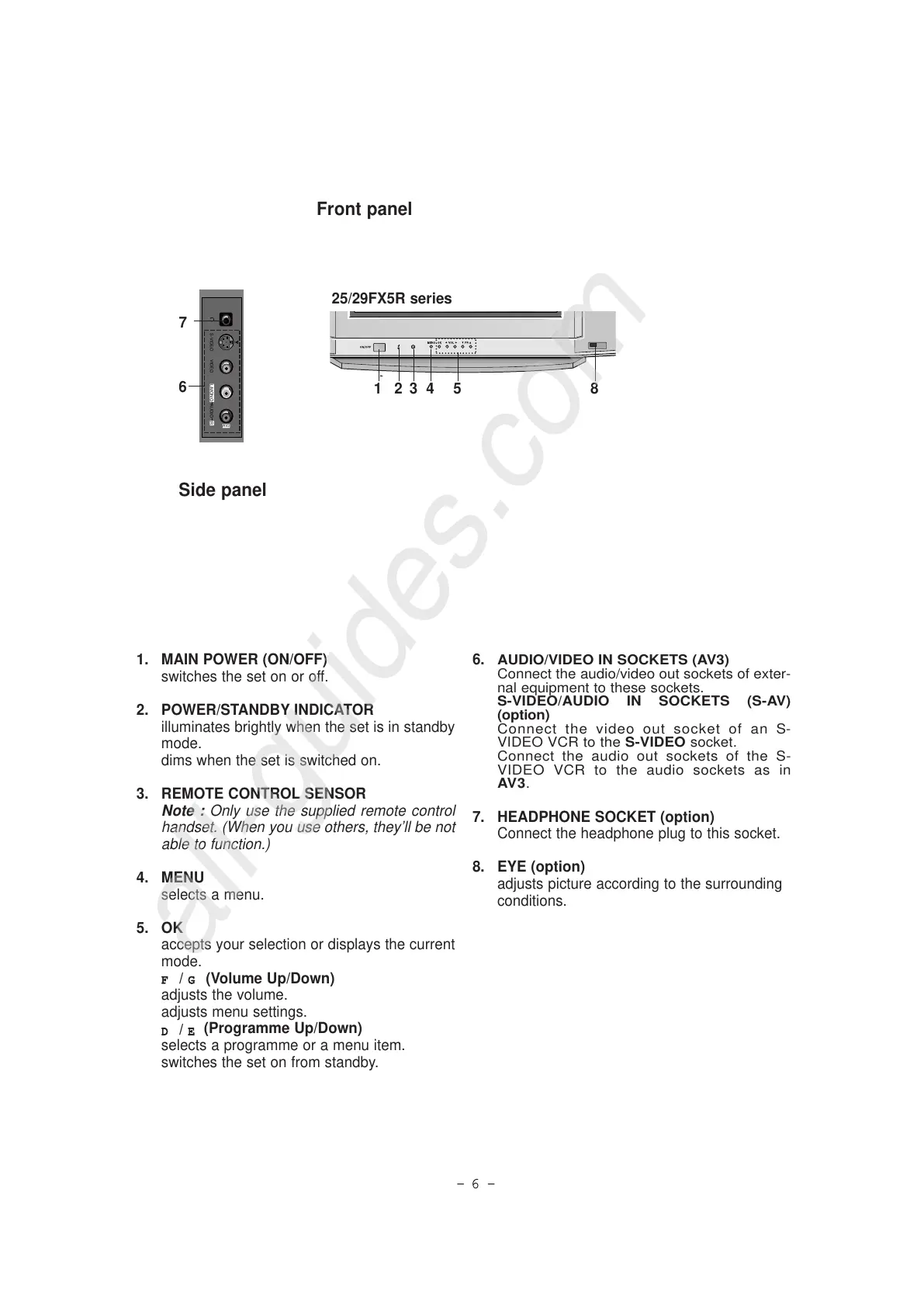
1. MAIN POWER (ON/OFF)
switches the set on or off.
2. POWER/STANDBY INDICATOR
illuminates brightly when the set is in standby
mode.
dims when the set is switched on.
3. REMOTE CONTROL SENSOR
Note : Only use the supplied remote control
handset. (When you use others, they’ll be not
able to function.)
4. MENU
selects a menu.
5. OK
accepts your selection or displays the current
mode.
FF / GG (Volume Up/Down)
adjusts the volume.
adjusts menu settings.
DD
/
EE
(Programme Up/Down)
selects a programme or a menu item.
switches the set on from standby.
6.
AUDIO/VIDEO IN SOCKETS (AV3)
Connect the audio/video out sockets of exter-
nal equipment to these sockets.
S-VIDEO/AUDIO IN SOCKETS (S-AV)
(option)
Connect the video out socket of an S-
VIDEO VCR to the S-VIDEO socket.
Connect the audio out sockets of the S-
VIDEO VCR to the audio sockets as in
AV3.
7. HEADPHONE SOCKET (option)
Connect the headphone plug to this socket.
8. EYE (option)
adjusts picture according to the surrounding
conditions.
Front panel
Side panel



 To Next Page