109
TO USE A USB DEVICE
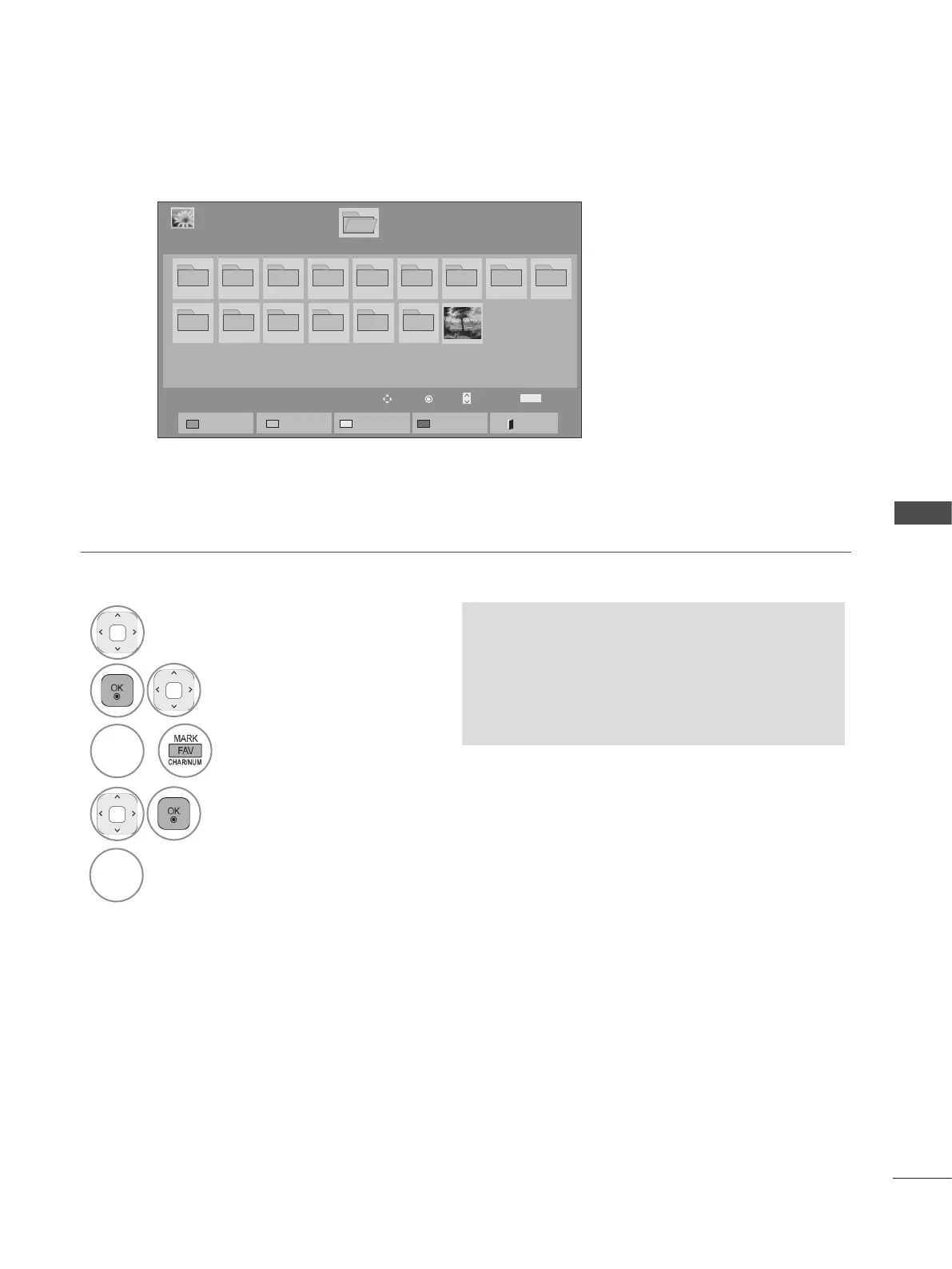
■ When selected photo files are displayed
• When one or more photos are marked, you
can view each marked photo or a slide show
of the marked photos. If no photos are
marked, you can view every individual photo
in the folder or a slide show of all photos in
the folder.
Page 1/1
Photo List
Drive1
1. EMF
Ental FHD HD MV Photo TS
10_1_Top 100
2009_5_3_TOP...
20090711 20090810
200942_Top100
20091010
001
Basic Test Kit
Page 1/1
USB1 External
Mark
MARK
Mark Page Change
Move
P
Exit Mark Mode
Unmark All
Mark All
View Marked
Exit
Mark Mode
1
Select the target folder or drive.
2
Select the desired photos.
3
or
BLUE
Convert to Mark Mode.
4
Mark desired photo file.
5
Marked photo file is displayed.
RED



 To Next Page