41
WATCHING TV / PROGRAMME CONTROL
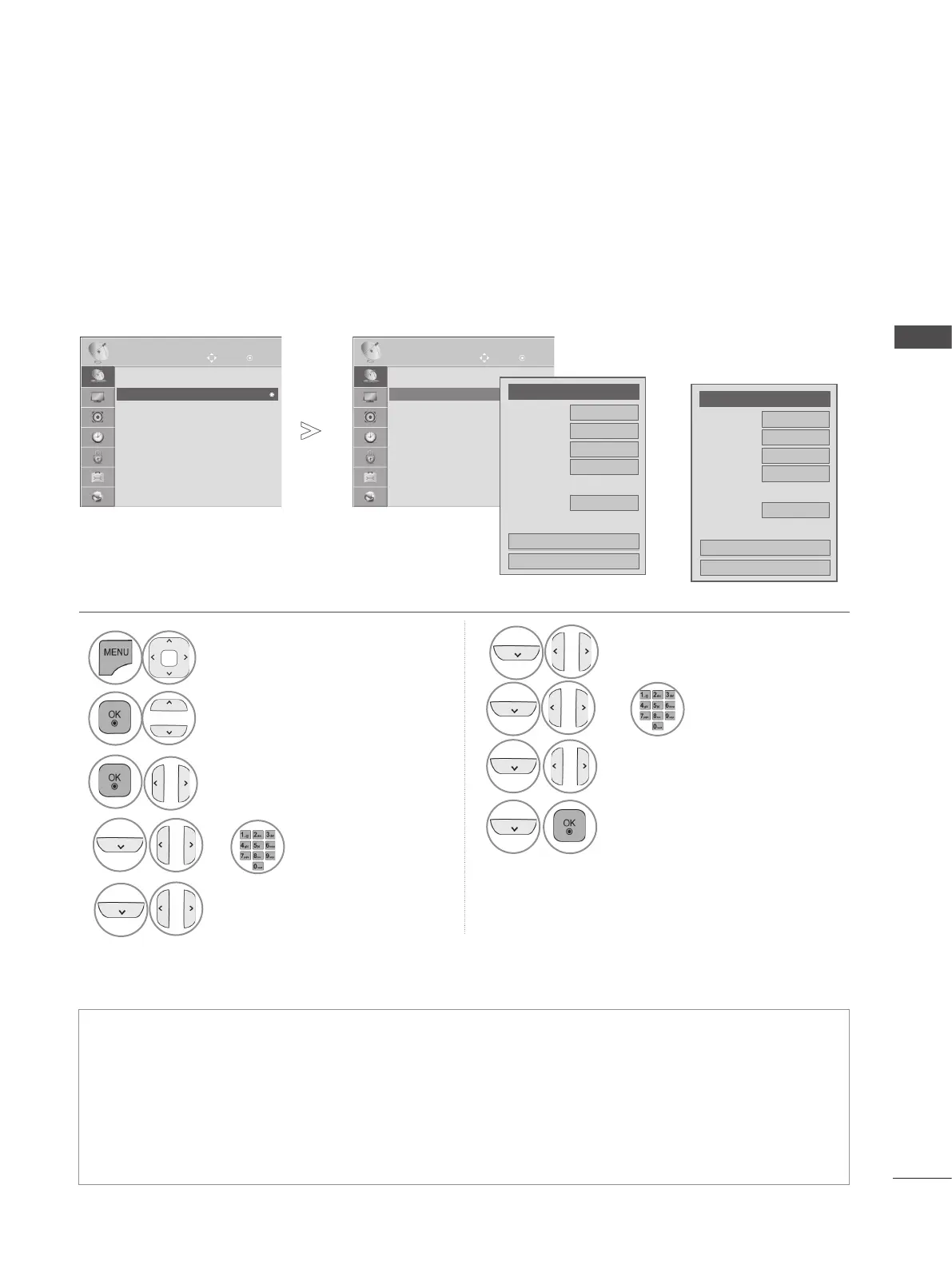
MANUAL PROGRAMME TUNING
(IN ANALOGUE MODE)
Manual Tuning lets you manually tune and arrange the stations in whatever order you desire.
• Press the MENU/EXIT button to return to normal TV viewing.
• Press the BACK button to move to the previous menu screen.
• Use NUMBER
buttons to input a 4-digit password in Lock System ‘On’.
• L : SECAM L/L’ (France)
BG : PAL B/G, SECAM B/G (Europe / East Europe / Asia / New Zealand / M.East / Africa /
Australia)
I : PAL I/II (U.K. / Ireland / Hong Kong / South Africa)
DK : PAL D/K, SECAM D/K (East Europe / China / Africa / CIS)
• To store another channel, repeat steps 4 to 9.
1
Select SETUP.
2
Select Manual Tuning.
3
Select TV or Cable TV.
4
or
Select the desired
programme
number on.
5
Select a TV system.
6
Select V/UHF or Cable.
or
7
Select the desired
channel number.
8
Commence searching.
9
Select Store.
●
Storage
◄ Cable
TV
►
3
●
System
BG
●
Band
V/UHF
●
Channel
0
◄ ►
●
Search
●
Name
C 02
Close
Store
OK
Move
● Auto Tuning
● Manual Tuning
● Programme Edit
● Booster : Off
● CI Information
SETUP
● Manual Tuning
●
Storage
◄
TV
►
3
●
System
BG
●
Band
V/UHF
●
Channel
0
◄ ►
●
Search
●
Name
C 02
Close
Store
OK
Move
● Auto Tuning
● Manual Tuning
● Programme Edit
● Booster : Off
● CI Information
SETUP
● Manual Tuning
or
►
►



 To Next Page