EasyManua.ls Logo

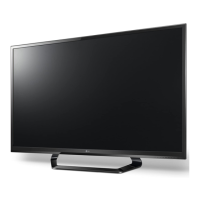
LG 42LS3450 - User Manual

LG 42LS3450
129 pages
Print Icon
To Next Page IconTo Next Page
Loading...
.LG
Life's
Good
LED LCD
TV
I LCD
TV
Please
read
this
manual
carefully
before
operating
your
set
and
retain
it
for
future
reference.
LED LCD
TV
MODELS
32LS3400
22LS3500
22LS3510
47LS4500
42LS3400
26LS3500
26LS3510
55LS4500
32LS3410
32LS3500
32LS3510
32LS3450
42LS3450
P/NO:
MFL67468111
{1208-REV08)
Printed
in
Mexico
LCD
TV
MODELS
32CS460
32CS560
32CS461
37CS560
42CS530
42CS560
www.lg.com

Questions and Answers

  • D
    David HansenSep 3, 2025
    How to improve poor reception on my LG 42LS3450?
    • K
      Kelli PinedaSep 3, 2025
      If your LG LCD TV has poor reception on some channels, try switching to other channels as there may be an issue with the broadcast. Also, try adjusting the antenna's direction to improve the station signal. Check for any local interference from electrical appliances or power tools.
  • J
    john03Sep 2, 2025
    Why is my LG 42LS3450 LCD TV showing black and white or poor color quality?
    • J
      John DickersonSep 2, 2025
      If you see an image in black and white or the color quality is poor on your LG LCD TV, adjust the color settings in the menu. Ensure there's enough distance between the TV and other electronic devices. You may also want to try changing channels, as the broadcast itself could be the issue.
  • G
    Gary JonesAug 31, 2025
    Why is my LG LCD TV showing no image and no sound?
    • K
      Karen WallsAug 31, 2025
      If your LG LCD TV shows no image and produces no sound, make sure the TV is turned on. Check that the power cord is properly connected to a working wall outlet. To test the outlet, try plugging in other devices.
  • B
    Brandon HernandezAug 29, 2025
    What to do if my LG 42LS3450 LCD TV says 'No Signal'?
    • V
      vmcdowellAug 29, 2025
      If your LG LCD TV displays 'No Signal', verify that the signal cable is properly connected between the TV and other devices. Also, check the selected input source by pressing the INPUT button.
  • J
    Johnathan SpencerAug 28, 2025
    Why does my LG 42LS3450 LCD TV keep turning off by itself?
    • S
      Stephanie BrownAug 28, 2025
      If your LG LCD TV suddenly turns off, check the power control settings to ensure the power supply isn't interrupted. Also, verify if the Auto sleep feature is enabled in the Time settings. Note that the TV will automatically turn off after 15 minutes of inactivity if there is no signal.
  • C
    Cameron WhitakerAug 26, 2025
    How to fix an LG 42LS3450 remote that is not working?
    • W
      williamberryAug 27, 2025
      If you're unable to control your LG LCD TV with the remote, start by checking the remote control sensor on the TV and try again. Make sure there are no obstructions between the remote and the TV. Also, ensure the batteries in the remote are working and correctly installed.
  • N
    nholmesAug 25, 2025
    How to brighten the screen on my LG 42LS3450?
    • L
      Louis LucasAug 26, 2025
      If the image on your LG LCD TV appears extremely dark, adjust the brightness and contrast settings in the menu.
  • A
    Alexander ParkerAug 23, 2025
    How to restore sound on LG LCD TV?
    • C
      Christina CollinsAug 23, 2025
      If you're not getting any sound from your LG LCD TV while images are displaying, try pressing the VOL + or - button. Ensure the sound isn't muted by pressing MUTE. Try switching to different channels as the problem might be with the broadcast. Finally, check if the TV Speaker feature is activated in the menu options.

Summary

IMPORTANT SAFETY INSTRUCTIONS

INSTALLATION PROCEDURE

ASSEMBLING AND PREPARING

Covers unpacking, lifting, setting up, mounting, and tidying cables.

Lifting and moving the TV

Guidelines for safely lifting and transporting the television set.

Setting up the TV

Instructions for placing the TV on a stand or wall.

Mounting on a table

Steps for setting up the TV on a table and securing it.

Mounting on a wall

Guidance on attaching the TV to a wall using a mount.

Tidying cables

Methods for organizing and managing TV cables for a neat setup.

REMOTE CONTROL

WATCHING TV

Managing channels

Covers channel setup, tuning, and management.

Checking current program info

Displays information about the currently watched program.

Using additional options

Adjusts aspect ratio, AV modes, and uses the quick menu.

Connecting to the AC;DC adapter

Connects the TV to the power source for operation.

Turning the TV on for the first time

Guides through the initial setup process after powering on.

Using the quick menu

Provides quick access to frequently used menus and settings.

ENTERTAINMENT

Connecting USB storage devices

Connects USB devices for multimedia features like browsing files.

Browsing files

Accesses photo or music lists and browses files from a USB device.

Viewing Photos

Allows viewing of image files saved on a USB storage device.

Listening to music

Enables playing music files from a USB storage device.

CUSTOMIZING TV SETTINGS

The Main Menus

Overview of the main menu categories for TV settings.

CHANNEL Settings

Covers setup and editing of TV channels.

PICTURE Settings

Adjusts image size, quality, and picture effects.

AUDIO Settings

Adjusts sound quality, effects, and volume levels.

TIME Settings

Sets time, date, and daylight-saving time features.

OPTION Settings

Customizes general settings like language and captioning.

LOCK Settings

Locks or unlocks channels and programs based on ratings.

MAKING CONNECTIONS

Connecting to an antenna or cable

Guides connecting an antenna or cable box to watch TV.

Connection Overview

Illustrates connecting various external devices to the TV.

Connecting to a HD receiver, DVD, or VCR player

Guides connecting A/V sources like HD receivers, DVD, or VCRs.

Connecting to a PC

Connects a PC to the TV using HDMI for best image quality.

Connecting to an Audio System

Connects external audio devices using optical audio cable.

Connecting to a USB

Connects USB storage devices for multimedia playback.

SIMPLINK Connection

Controls AV devices connected via HDMI-CEC for simplified operation.

MAINTENANCE

Cleaning Your TV

Provides instructions for cleaning the TV screen, frame, and cabinet.

Preventing “Image burn” or “Burn-in” on your TV screen

Advises on avoiding permanent image disfigurement on the screen.

TROUBLESHOOTING

SPECIFICATIONS

IR CODES

CHILD SAFETY

LG 42LS3450 Specifications

General IconGeneral
3DNo
Operating relative humidity (H-H)20 - 80 %
Display diagonal42 \
Native aspect ratio16:9
LED backlighting typeEdge-LED
Supported video modes1080p
Supported graphics resolutions1920 x 1080 (HD 1080)
Tuner typeAnalog & digital
Analog signal format systemNTSC
Digital signal format systemATSC
RMS rated power10 W
Number of speakers2
PC in (D-Sub)-
USB 2.0 ports quantity1
Ethernet LAN (RJ-45) ports0
Number of OSD languages32
Product colorBlack
AC input voltage100 - 240 V
AC input frequency50 - 60 Hz
Power consumption (standby)0.3 W
Cables includedAC
Operating temperature (T-T)5 - 40 °C
Weight and Dimensions IconWeight and Dimensions
Depth (with stand)212 mm
Height (with stand)635 mm
Weight (with stand)11800 g
Depth (without stand)86 mm
Width (without stand)972 mm
Height (without stand)571 mm
Weight (without stand)10700 g

Related product manuals