EasyManua.ls Logo

LG 42PC1D - Page 24

LG 42PC1D
128 pages
Print Icon
To Next Page IconTo Next Page
To Previous Page IconTo Previous Page
Loading...
CONNECTIONS & SETUP
23
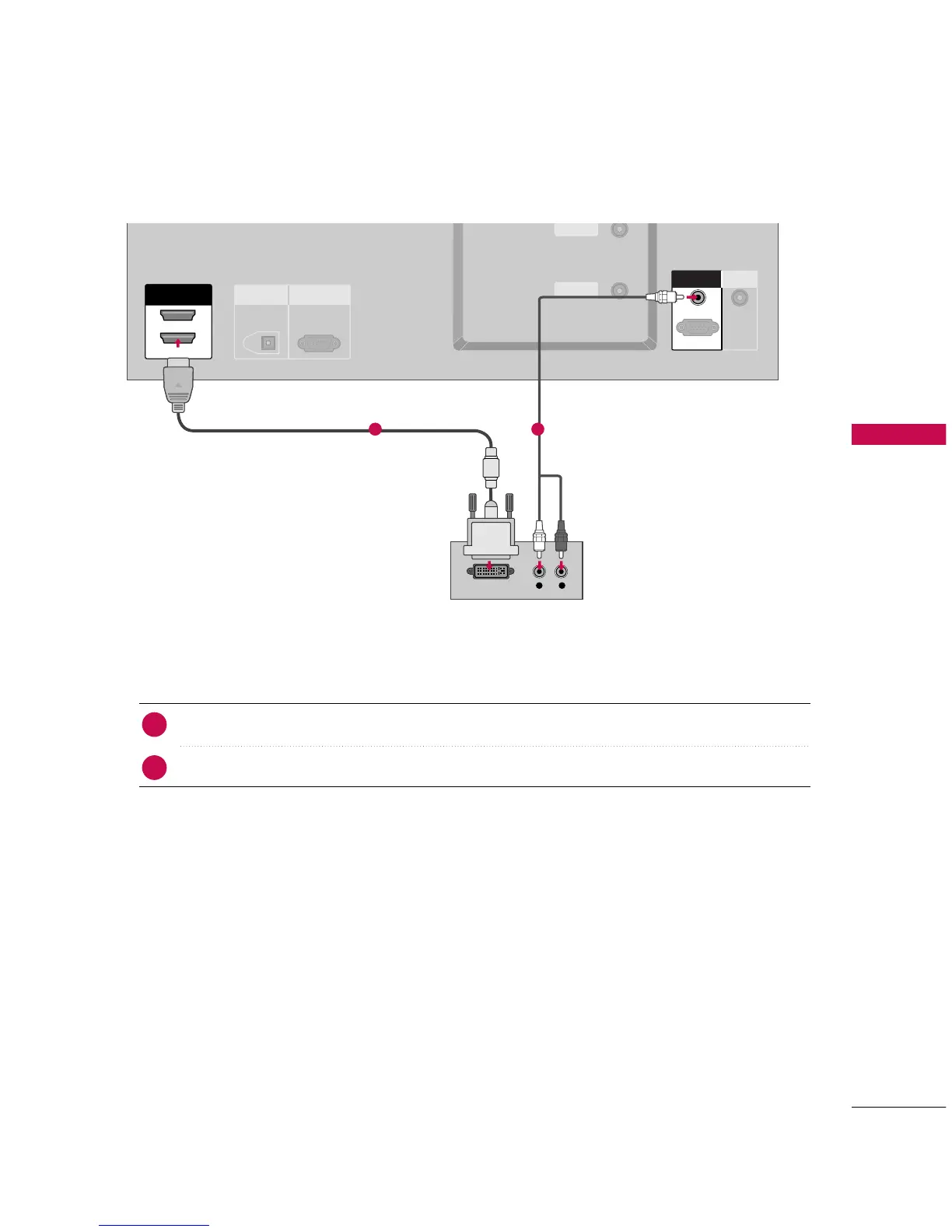
When connecting HDMI to DVI cable
ANTENNA
IN
CABLE
IN
VIDEO
AUDIO
COMPONENT IN
ANTENNA
IN
CABLE
IN
HDMI IN
2
1(DVI)
L R
DIGITAL AUDIO
OUT
OPTICAL
RS-232C IN
(CONTROL
&
SERVICE)
ANTENNA
IN
CABLE
IN
HDMI INHDMI IN
2
1(DVI)
DVI-DTV OUTPUT
ANTENNA
IN
CABLE
IN
REMOTE
CONTROL IN
RGB INRGB IN
AUDIO (RGB/DVI)
RGB (PC
/
DTV)
RGB IN
AUDIO (RGB/DVI)
RGB (PC
/
DTV)
Connect the DVI output of the digital set-top box to the
HHDDMMII IINN 11((DDVVII))
jack on the set.
Connect the audio output of the digital set-top box to the
AAUUDDIIOO
((
RRGGBB//DDVVII
))
jack on the set.
1. How to connect
Turn on the digital set-top box.
(
Refer to the owner’s manual for the digital set-top box.
)
Select
HHDDMMII11//DDVVII
input source with using the
IINNPPUUTT
button on the remote control.
2. How to use
2
1
1 2


Other manuals for LG 42PC1D

Related product manuals