TV GUIDE ON SCREEN
TM
SYSTEM
43
Screen Components
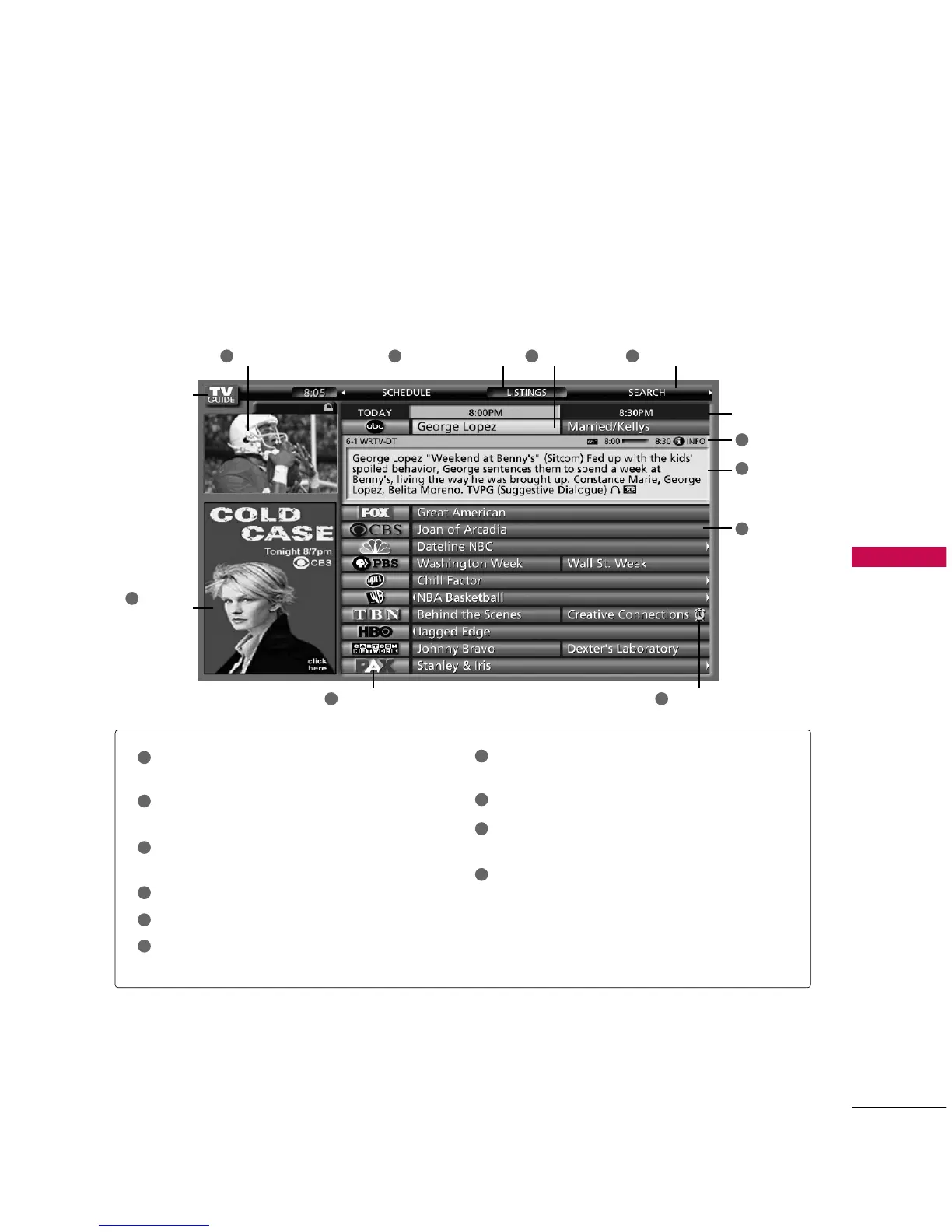
The screens displayed in the TV Guide On Screen system share many of the same components, as shown in
the following figure:
Video Window - Displays TV video while The TV
Guide On Screen system is displayed.
Service Bar - Provides access to the 3 main
Guide Services.
Current Service Label - Indented to indicate cur-
rent Service displayed.
Tile - Displays show title.
Highlight - Indicates an active tile.
INFO Box - Provides information for a highlighted
item.
INFO Button - Indicates you can cycle through
the various Info Box sizes.
Channel Logo - Identifies network.
Remind Icons - Indicates a show is set as a
Reminder.
Panel Ad - Location where show- or product-spe-
cific information appears (and also where Panel
Menu appears).
Video Window Current Service Label Highlight Service bar
Time slot
Tile
INFO button
INFO box
Remind iconChannel Logo
Panel Ad
and Panel
Menu Entry
TV Guide
Logo
1
7
6
4
8
1
2
3
4
7
8
9
10
5
6
10
9
23 5



 To Next Page