EasyManua.ls Logo

LG 42PC1D - Video Adjustment

LG 42PC1D
128 pages
Print Icon
To Next Page IconTo Next Page
To Previous Page IconTo Previous Page
Loading...
TV MENU
/
VIDEO ADJUSTMENT
71
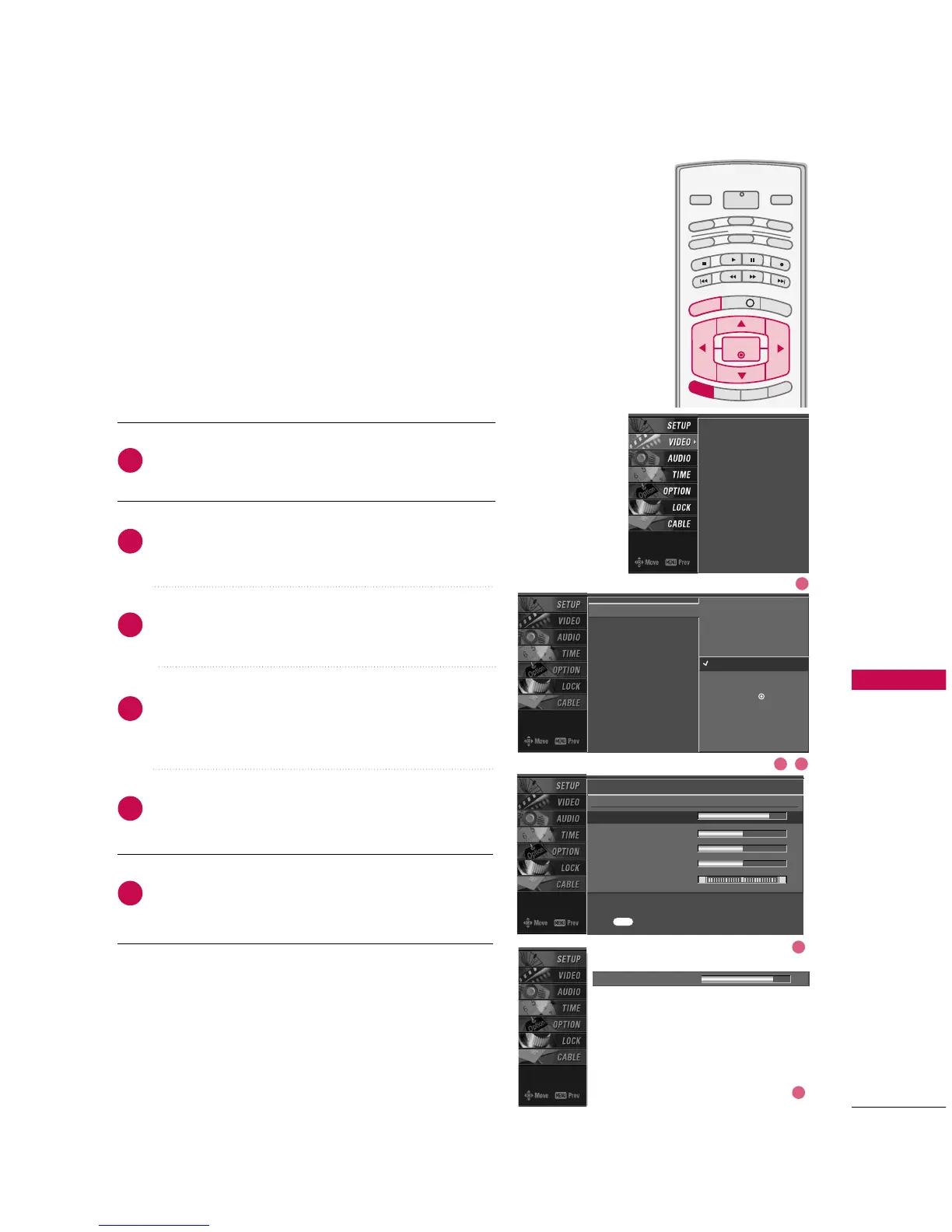
MANUAL PICTURE CONTROL
(
EZ Picture-
UUsseerr
option
)
Press the
MMEENNUU
button and then use
DD
or
EE
button
to select the
VVIIDDEEOO
menu.
Press the
GG
button and then use
DD
or
EE
button to
select
EEZZ PPiiccttuurree
.
Press the
GG
button and then use
DD
or
EE
button to
select
UUsseerr 11
or
UUsseerr 22
.
Press the
GG
button and then use
DD
or
EE
button to
select the desired picture option
((
CCoonnttrraasstt
,
BBrriigghhttnneessss
,
CCoolloorr
,
SShhaarrppnneessss
, or
TTiinntt
))
.
Press the
GG
button and then use
FF
or
GG
button to
make appropriate adjustments.
Press
EEXXIITT
button to return to TV viewing or press
MMEENNUU
button to return to the previous menu.
INFO i
TV GUIDE
ENTERENTER
SAP
CC
RATIO
POWER
DAY -
DAY+
VCR
TV
DVD
AUDIO
CABLE
STB
MODE
TV INPUT
INPUT
MENUMENU
EXIT
Adjust the picture appearance to suit your preference and
viewing situations.
EZ Picture
Color Temperature
XD
Advanced
Video Reset
Daylight
Normal
Night Time
User 1
G
User 2
Selection (
G
or ) leads you
to the detailed setting
screen.
Contrast 85
FF
G
EE
User1
Contrast 85
G
Brightness 50
Color 50
Sharpness 50
Tint 0
R G
Press to confirm.
MENU
EZ Picture
Color Temperature
XD
Advanced
Video Reset
2
3
4
5
6
1
1
2 3
4
5

Other manuals for LG 42PC1D

Related product manuals