- 17 -
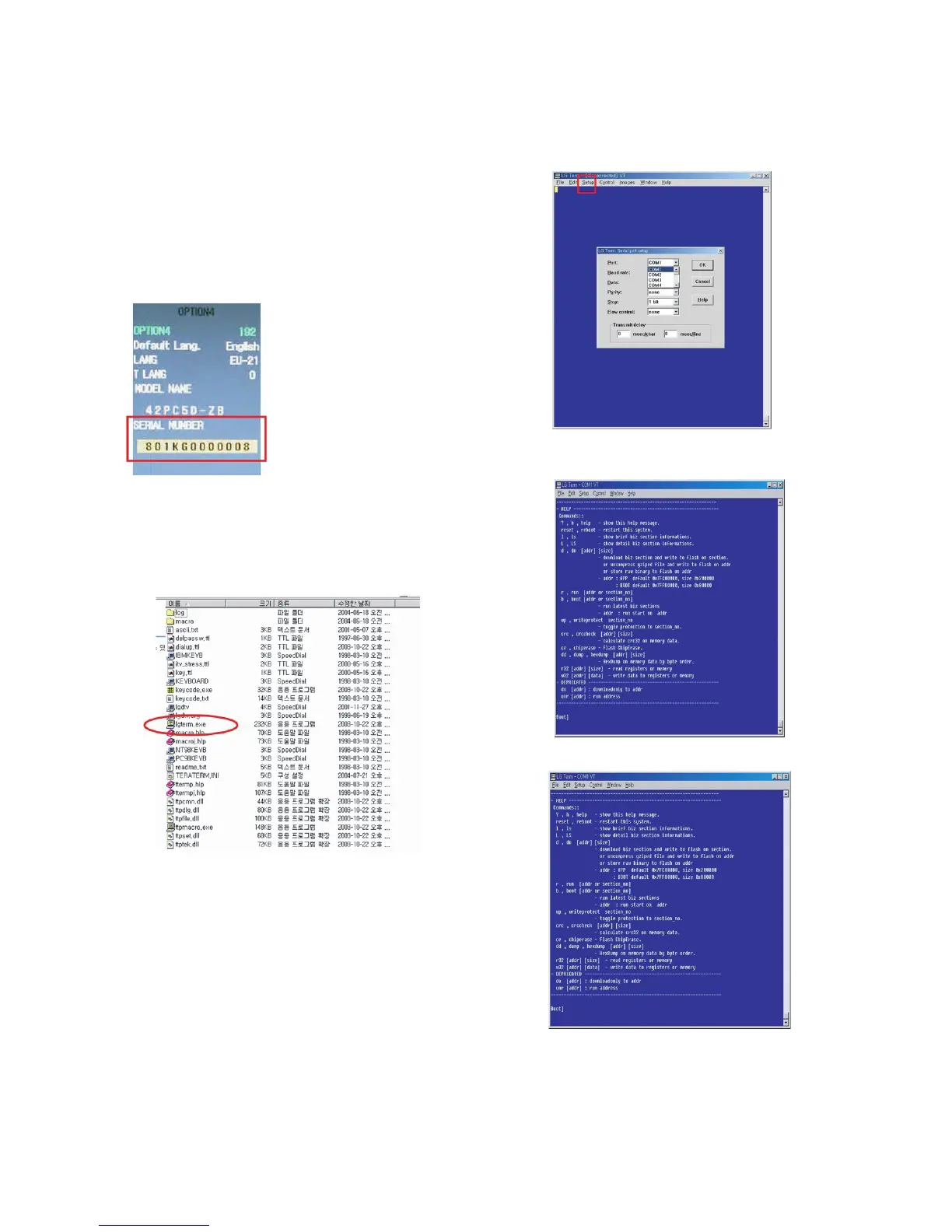
18-2. Insert the ‘SERIAL NUMBER’ &
‘MODEL NAME’
1) Check the original serial number.
(Check the Label on the Back Cover)
2) After change the Main Ass’y, Press the ‘ADJ button on the
Adjustment Remote control.
1. Choose the ‘OPTION4’
2. Insert the ‘MODEL NAME’ by navigation key.
3. Insert the original serial number on the ‘SERIAL
NUMBER’ MENU by navigation key.
* After All Setting, Turn Off TV SET-> On
19. ST DOWN LOAD
19-1. ST ROM DOWN LOAD
(1) Installation the ‘LG Term’
1) Extract to folder lgterm.zip.
(2) Download biz file using LG Term
1) Prepare the ‘ *.biz ‘ that you want to download on ST.
2) Connect TV set and PC by using RS232 cable, Turn on
the TV.
3) SVC MENU Setting.
case 1. Press the ‘Turbo Sound’ button on the
Adjustment Remote Control.
case 2. Press the ‘ADJ’ button.
1) Press the ‘System Control 2’ menu
2) Enter the ‘GProbe’ on the ‘RS-232 Host’
3) Enter ‘115200bps’ on the ‘Baud Rate’
4) Enter the ‘STi 5100’ on the ‘Download’
* If you don’t have a Adjustment Remote Control.
‘Menu’ button on the Remote Control + ‘Menu’ button on
the Local Key during 7~8sec.
4) Execute ‘lgterm.exe’.
1. Select ‘Serial port’ on ‘Setup’ Menu.
2. Port’ should be connected with the TV SET by RS232.
5) TV SET DC Power OFF => ON.
1. Check the message like the Picture.
6) Insert ‘dn’ and Enter.



 To Next Page