EasyManua.ls Logo

LG 43LT340C9UB - User Manual

LG 43LT340C9UB
52 pages
Print Icon
To Next Page IconTo Next Page
Loading...
www.lg.com
LED TV
ENGLISH Easy Setup Guide
Please read this manual carefully before operating your set and retain it for future reference.
ESPAÑOL Guía Rápida de Configuración
Lea atentamente este manual antes de poner en marcha el equipo y consérvelo para futuras
consultas.
FRANÇAIS Guide de configuration rapide
Avant d’utiliser l’appareil, veuillez lire attentivement ce manuel et le conserver pour pouvoir
vous y reporter ultérieurement.
Depending upon model / Según el modelo / Selon le modèle
Printed in Korea
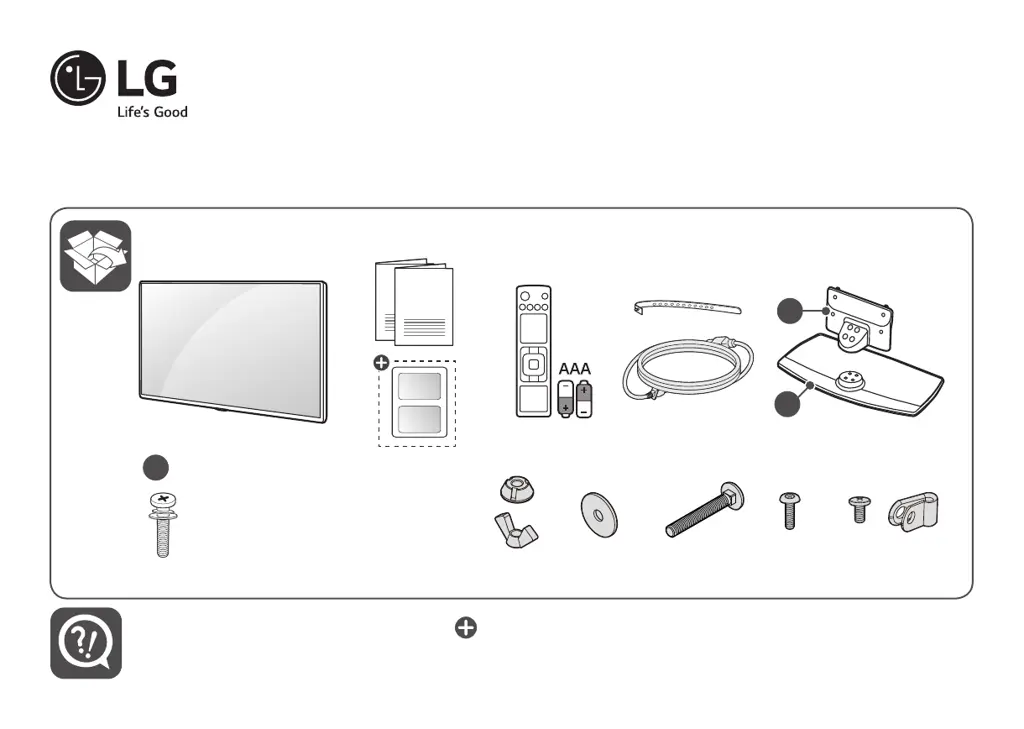
a
b
c
X 6
(M4 x L20)
32/40LT560H*
32/40LT570H*
X 8
(M4 x L20)
43/49LT560H*
43/49LT570H*
X 2 X 2 X 2
X 2
12 14 16 20
32LT560HBUA
40LT560H0UA
43LT560H0UA
49LT560H0UA
32LT560H9UA
43LT560H9UA
32LT570HBUA
40LT570H0UA
43LT570H0UA
49LT570H0UA
32LT570H9UA
43LT570H9UA

Other manuals for LG 43LT340C9UB

Questions and Answers

  • N
    Natalie WilliamsAug 8, 2025
    How to fix LG LED TV remote control not working?
    • P
      pricescottAug 9, 2025
      If you're having trouble controlling your LG LED TV with the remote, try these steps: * Ensure nothing is blocking the receiver on the TV, such as tape. * Make sure there are no obstacles between the remote and the TV. * Replace the remote batteries with fresh ones.
  • S
    Steven BallardAug 12, 2025
    What to do if my LG 43LT340C9UB LED TV turns off suddenly?
    • C
      Calvin WardAug 13, 2025
      If your LG LED TV turns off suddenly, it could be due to a few reasons. First, the power supply might be interrupted, so check the power control settings. Second, the auto-off function might be activated in the time-related settings. Finally, if there's no signal while the TV is on, it will turn off automatically after 15 minutes of inactivity.
  • M
    Michelle HansenAug 17, 2025
    What to do if my LG 43LT340C9UB has no picture and sound?
    • C
      Cheryl AndersonAug 17, 2025
      If your LG LED TV shows no image and produces no sound, first, ensure the TV is turned on. Next, check that the power cord is securely connected to a working wall outlet. You can verify the outlet's functionality by plugging in another device.
  • C
    Chelsea McdonaldAug 21, 2025
    Why does my LG 43LT340C9UB LED TV keep turning off by itself?
    • J
      Jose LeonAug 21, 2025
      If your LG LED TV is turning off suddenly, there are a few things you can check. The power supply may be interrupted, so check the power control settings. Also, verify if the auto-off function is enabled in the time-related settings. Finally, if the TV is on but not receiving a signal, it will automatically turn off after 15 minutes of inactivity.
  • S
    Scott JohnsonAug 26, 2025
    What to do if LG LED TV HDMI no signal from PC?
    • S
      Susan ClarkeAug 27, 2025
      If your LG LED TV isn't detecting a signal when connected to your PC via HDMI, try the following: Turn the TV off and then back on using the remote control. Reconnect the HDMI cable. Restart your PC while the TV is powered on.
  • B
    Brenda TurnerAug 29, 2025
    How to prevent image sticking on LG LED TV?
    • S
      Sandra Strickland PhDAug 29, 2025
      To prevent image sticking on your LG LED TV, avoid displaying a fixed image on the screen for extended periods.
  • J
    Jessica DownsSep 3, 2025
    What to do if my LG 43LT340C9UB LED TV says no signal when connected to PC via HDMI?
    • V
      Vicki ParkSep 3, 2025
      If your LG LED TV displays 'no signal' when connected to a PC via HDMI, try turning the TV off and then on again using the remote control. If that doesn't work, reconnect the HDMI cable. As a further step, restart your PC while the TV is on.

LG 43LT340C9UB Specifications

General IconGeneral
Screen Size43 inches
Resolution1920 x 1080
Display TypeLED
Smart TVNo
HDMI Ports2
USB Port1
Refresh Rate60Hz
Energy Efficiency ClassA
Audio Output10W

Related product manuals