ENGLISH
48
Picture ID
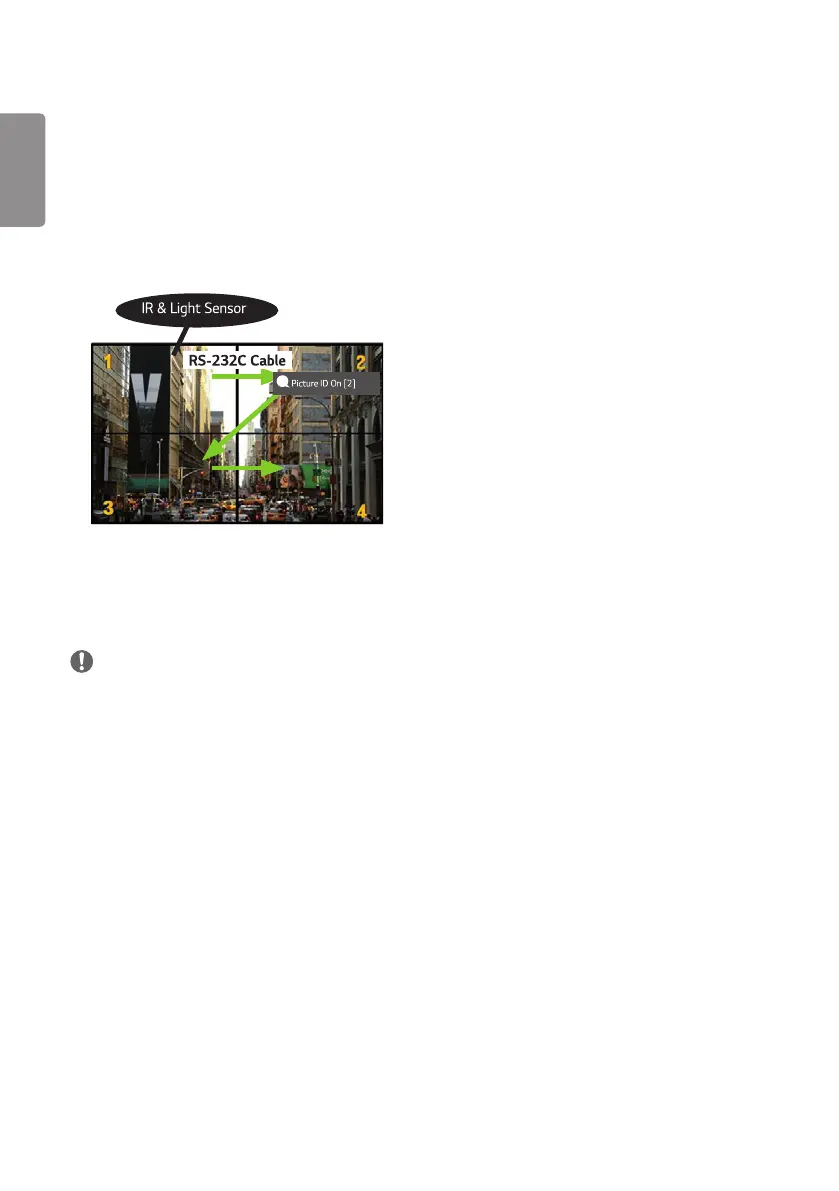
[Picture ID] is used to change the settings of a specific set (display) using a single IR receiver for multi-vision.
Communication is possible between a monitor with an IR receiver and other monitors using RS-232C cables. Each
monitor is identified by a Set ID. Setting [Picture ID] allows you to only use the remote control with monitors with a
[Set ID] that matches the [Picture ID].
1 Assign [Set ID] to the installed monitors as shown below:
AUDIO
(RGB/DVI)
REMOTE
CONTROL IN
RS-232C OUT
RS-232C IN
RS-232C OUT
RS-232C IN
RS-232C OUT
RS-232C IN
2
Press the red [Picture ID] [On] button on the remote control.
3
Make sure that the Picture ID you set is identical to the [Set ID] of the monitory you wish to control.
• A set with a [Set ID] that is different from the [Picture ID] cannot be controlled by IR signals.
NOTE
• If [Picture ID] has been set to 2, only the upper right monitor, which has a [Set ID] of 2, can be controlled by IR signals.
• If you press the green [Picture ID] [Off] button on your remote control, the [Picture ID] for all monitors are turned
off. If you then press any button on the remote control, all monitors can be controlled by IR signals regardless of their
[Set ID]'s.


 To Next Page
 Loading...