Need help?
Do you have a question about the LG 43UT7000PUA and is the answer not in the manual?
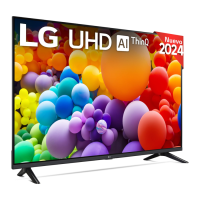
This document is an owner's manual for an LG LED TV, providing essential information for safe operation, installation, and troubleshooting. It also includes details on external control device setup and regulatory compliance.
The LG LED TV is designed for home entertainment, offering a visual display for various media. It can be controlled using a remote control or the physical buttons on the TV itself. The TV supports multiple input sources, including antenna, cable, and various external devices like Blu-ray players, gaming consoles, and PCs. It features an "Auto Configure" function to adjust picture position and minimize image shaking, particularly useful in RGB (PC) mode. The TV also includes an "Energy Saving" feature to reduce power consumption, which can be adjusted through the PICTURE menu. For advanced users, the TV supports external control via RS-232C, allowing integration with A/V control systems. This enables remote adjustment of various settings such as power, volume, aspect ratio, screen mute, contrast, brightness, color, tint, sharpness, treble, bass, balance, OSD display, remote control lock, ISM method (for Plasma TVs), color temperature, equalizer, energy saving, and channel tuning.
Basic Operation: The TV can be turned on and off, and its basic functions can be operated using a single button on the TV. This button allows for power on/off, menu control, and menu selection. All running applications will close when the TV is powered off. When accessing menu control, you can adjust settings, and when accessing menu selection, you can use specific functions.
External Device Connectivity: The TV supports a wide range of external devices, including Blu-ray players, HD receivers, DVD players, VCRs, audio systems, USB storage devices, PCs, and gaming devices. For optimal connection, HDMI cables and USB devices should have bezels within specified dimensions. An extension cable supporting USB 2.0 can be used if a USB cable or flash drive does not fit directly into the TV's USB port. The TV also supports an IR Blaster (depending on the country and model) to control set-top boxes, Blu-ray/DVD players, soundbars, and game consoles using universal control settings. An IR blaster connection is required for "Room to Room Share" and "Hands-free Voice Control."
Picture and Sound Adjustments: Users can adjust various picture settings such as aspect ratio, contrast, brightness, color, tint, and sharpness through the PICTURE menu. Sound settings like treble, bass, and balance can be adjusted in the AUDIO menu. The TV also offers an equalizer function to fine-tune audio output. For models supporting 3D, there are options to change 3D mode, including 3D On/Off, 3D to 2D, and 2D to 3D, with various pattern options and depth effects.
Channel Management: The TV allows for channel tuning for both analog and digital antenna/cable sources. It supports physical, major, and minor channel numbers for digital broadcasts. There is also a function to add or delete (skip) channels, which saves the channel status.
Remote Control and OSD: The TV can be controlled remotely, and the On-Screen Display (OSD) can be turned on or off. There's a remote control lock mode to disable front panel controls and the remote control, useful for preventing unintended changes.
Energy Efficiency: The TV is designed to be energy efficient, qualifying for ENERGY STAR in its factory default setting. Users can further adjust energy saving options through the PICTURE menu.
Cleaning: To clean the TV, unplug the power cord and gently wipe the screen and frame with a soft, dry cloth. Avoid spraying water or other liquids directly onto the TV. Do not use chemicals such as glass cleaner, air freshener, insecticide, lubricants, wax, abrasive, thinner, benzene, or alcohol, as these can damage the product or its panel. If using a cleaner, spray it onto a dry cloth first, then wipe the screen. Be careful not to allow any liquid or foreign objects to enter the gaps around the panel.
Handling and Installation: When moving or lifting the TV, it is recommended to keep it in its original box or packing material. Always disconnect the power cord and all cables before moving. The screen should face away from you to prevent damage. Hold the top and bottom of the TV frame firmly, avoiding the transparent part, speaker, or speaker grille. For larger TVs, at least two people are recommended for moving. Avoid jolts or excessive vibration during transport, and keep the TV upright. Do not place the product on the floor with its front facing down without padding. When attaching the stand or wall mount, place the screen face down on a cushioned surface to protect it from scratches.
Safety Precautions: The manual emphasizes several safety instructions, including reading and retaining the instructions, heeding all warnings, and following all instructions. It warns against using the apparatus near water, blocking ventilation openings, or installing it near heat sources. It also advises protecting the power cord from physical abuse and using only manufacturer-specified attachments and accessories. In case of lightning storms or long periods of disuse, unplug the apparatus. All servicing should be referred to qualified personnel. Batteries for accessories should be stored safely, not short-circuited, disassembled, or exposed to excessive heat or fire.
Troubleshooting: The manual provides a troubleshooting section for common issues such as the remote control not working, no image or sound, sudden TV shutdowns, and abnormal display. It offers solutions like checking for obstacles, replacing batteries, verifying power connections, and adjusting power control settings. It also explains phenomena like small flickers when turning on (normal), tiny black/colored dots on the panel (not a malfunction), variations in brightness/color depending on viewing position (characteristic of the panel), temporary distortion from prolonged screen touching, and image sticking from fixed images (avoid displaying still images for extended periods). Generated sounds like cracking noise (plastic thermal contraction) and electrical circuit humming/panel buzzing (high-speed switching circuit) are explained as normal operating characteristics.
 General
| Screen Size | 43 inches |
|---|---|
| Display Type | LED |
| Smart TV | Yes |
| Operating System | webOS |
| HDMI Ports | 3 |
| USB Ports | 2 |
| Audio Output | 20W |
| Refresh Rate | 60Hz |
| Processor | Quad Core Processor |
| Bluetooth | Yes |
| Wi-Fi | Yes |
| Resolution | 4K UHD (3840 x 2160) |
| HDR Support | Yes (HDR10, HLG) |


 To Next Page