EasyManua.ls Logo

LG 43UJ6300 - User Manual

LG 43UJ6300
41 pages
Print Icon
To Next Page IconTo Next Page
Loading...
P/No: MFL70264102 (1706-REV00)
www.lg.com
ENGLISH Easy Setup Guide
Please read this manual carefully before operating your set and retain it for future reference.
ESPAÑOL Guía Rápida de Conguración
Lea atentamente este manual antes de poner en marcha el equipo y consérvelo para futuras consultas.
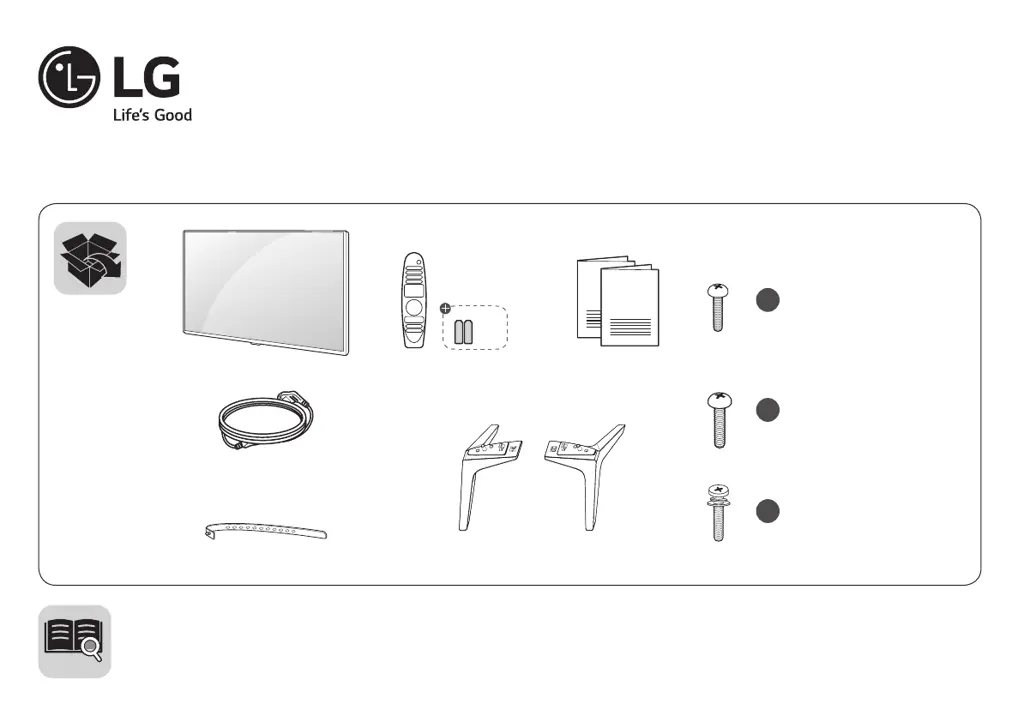
AA
a
X 4
(M4 X L16)
49UJ6320
b
X 4
(M5 X L20)
55UJ6320
c
X 6
(M4 X L20)
60/65UJ6320
49UJ6320
55UJ6320
60UJ6320
65UJ6320
LED TV

Other manuals for LG 43UJ6300

Questions and Answers

  • R
    Richard RamirezJul 27, 2025
    What to do if there is no video but normal audio on my LG 43UJ6300 LED TV?
    • V
      Victoria McdanielJul 27, 2025
      If you have normal audio but no video on your LG LED TV, several components could be at fault. First, ensure all cables between the boards (Main B/D, Power B/D, LVDS Cable, Speaker Cable, IR B/D Cable) are properly inserted. If the connections are secure, check the backlight. Also, verify the Power Board voltage is at 13V. If these steps don't resolve the issue, consider replacing the T-con/Main Board or module, repairing the Power Board or its parts, or replacing the Inverter.
  • S
    Steven WilsonAug 10, 2025
    How to troubleshoot no video but normal audio on LG 43UJ6300 LED TV?
    • D
      danielwhiteAug 11, 2025
      To troubleshoot the 'no video but normal audio' issue on your LG LED TV, you can start by checking the connections of all cables between boards such as the Main B/D, Power B/D, LVDS Cable, Speaker Cable, and IR B/D Cable to make sure they are properly inserted. You may also need to check the backlight. Also, verify the Power Board voltage is at 13V. If the problem persists, the T-con/Main Board or module may need replacement, the Power Board or its parts may need repair, or the Inverter may need replacement.

Summary

Easy Setup Guide

Safety and Reference

TV Operation and Installation

Button Operations and Menu Adjustments

Learn to operate TV functions, basic controls, and adjust settings via menus.

Table Mounting and Wall Securing

Steps for table mounting and securing the TV to a wall for stability.

Mounting on a Wall

Connections

Connecting to Antenna or Cable

Guide for connecting an antenna or cable box to watch TV.

Other Connections

Remote Control

Troubleshooting

Specifications

Regulatory Information

External Control Device Setup

Key Codes

List of hexadecimal codes for various TV functions for external control.

USB to Serial Converter Connection

Instructions for connecting a USB to Serial converter for external control.

RS-232 C Connection

Details on connecting via RS-232C cable for external control and service.

Phone Jack Type Connection

Information on connecting via a phone jack to RS-232 cable.

RS-232 C Configurations

Wiring and configuration details for RS-232C serial communication.

Communication Parameters

Technical parameters for communication, including baud rate and parity.

Command Reference List

List of commands for controlling TV functions via external devices.

Transmission; Receiving Protocol

Protocol details for sending and receiving commands for external control.

Smart TV Quick Setup Guide

Network Settings

Steps to connect the TV to a network via Wi-Fi or Ethernet.

Troubleshooting Network Problems

Solutions for common network connection issues with the TV.

SmartShare PC Software Setup

Instructions for installing and setting up SmartShare PC software.

SmartShare Smartphone Connection

Guide to share content from a smartphone to the TV using SmartShare.

Updating the TV Firmware

Procedure to check and update the TV's software firmware.

Wi-Fi Direct Setting

Instructions for connecting devices directly to the TV using Wi-Fi Direct.

Miracast Setting

Guide to wirelessly send video and sound from a portable device to the TV.

WiDi (Wireless Display) Setting

Instructions for connecting a laptop to the TV wirelessly using WiDi.

LG 43UJ6300 Specifications

General IconGeneral
Screen Typeled
Wall Mount200mm x 200mm
Featurestrue color accuracy, ips technology, channel plus, ultra surround
Tunerdigital
Screen Size43 inches
Refresh Rate60hz
Closed Captioningyes
Motion Enhancementtrumotion 120
HDRyes
Built-In Speakersyes
Surround Sounddts, ultra surround
Speakers Output20 watts
HDMI ARC Portsyes
USB Ports2
Ethernetyes
RF Antennayes
Networkbuilt-in wi-fi, ethernet
Digital Optical Audio Outputs1
Component Video Inputs1
Composite Video Inputs1
DVI0
SmartTVwebos
Remote Controlstandard
3Dno
Power Consumption92 kilowatt hours
Depth with Stand7.4 inches
Height with Stand24.2 inches
Width with Stand38.5 inches
Net Weight with Stand18.5 pounds
Depth without Stand3.2 inches
Height without Stand22.6 inches
Net Weight without Stand18.3 pounds

Related product manuals