ENG
ENG
ENG
DEU
DEU
FRA
FRA
ITA
ITA
DEU FRA ITA
Easy Setup Guide
Please read this Easy Setup Guide carefully before operating your product. Keep it for future reference and
record the model number and serial number of the product. See the label attached on the product and quote
this information to your dealer if you require service.
FRANÇAIS ITALIANODEUTSCHENGLISH
P/NO : MBM63556001(1202-REV02) / Printed in Korea
www.lg.com
Assurez-vous que les accessoires suivants sont inclus avec votre moniteur.
Les accessoires fournis peuvent avoir un aspect légèrement différent de ceux représentés ci-dessous.
Assicurarsi che i seguenti componenti siano in dotazione con il prodotto.
Gli accessori inclusi potrebbero differire leggermente dalle immagini illustrate di seguito.
Stellen Sie sicher, dass die folgenden Zubehörteile im Lieferumfang des Produkts enthalten sind.
Die mitgelieferten Zubehörteile können von den nachstehenden Abbildungen abweichen.
Make sure the following items are included with your product.he included accessories may look slightly
different from the fi gures shown below.
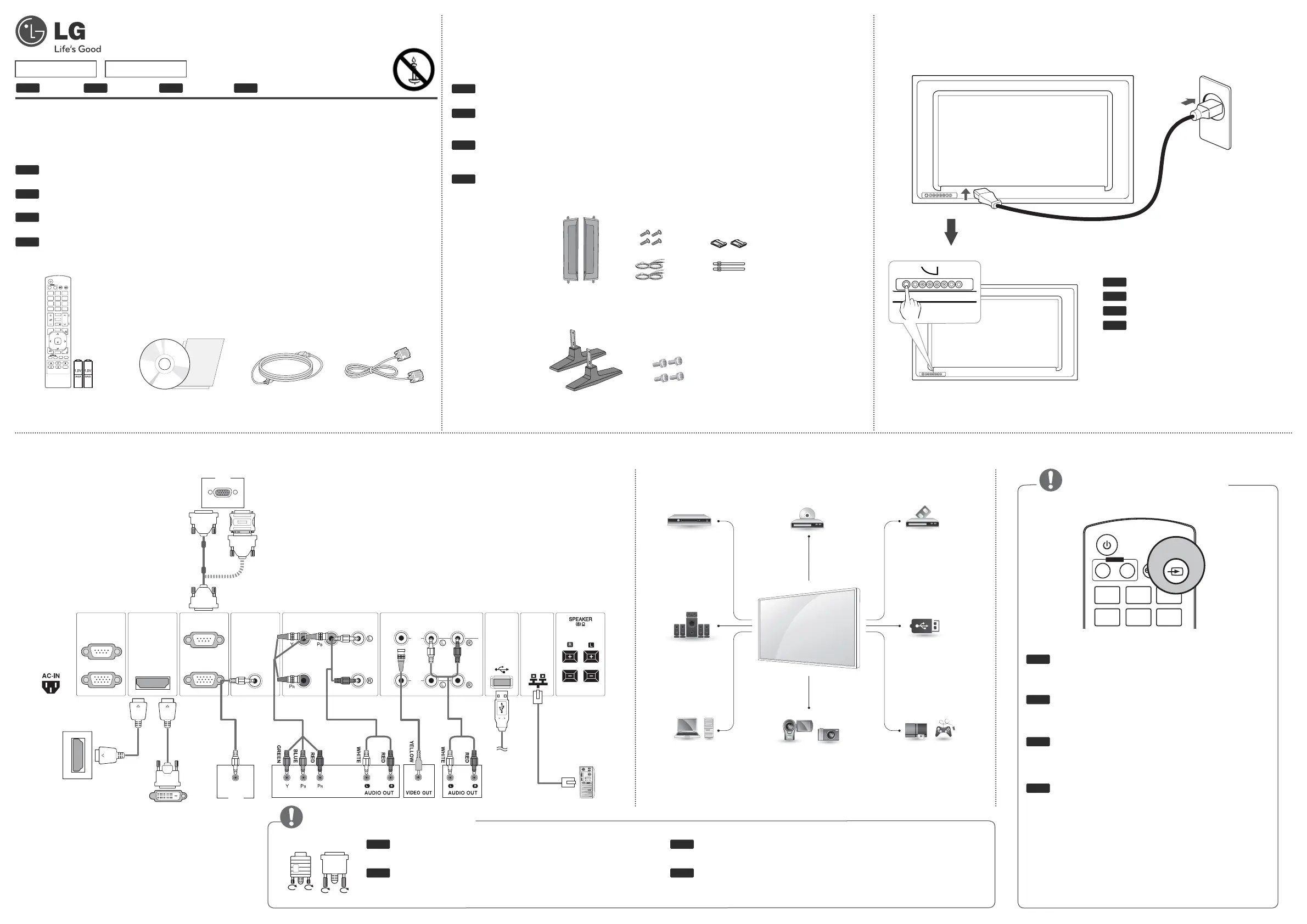
Accessories/ Zubehör/ Accessoires fournis/ Accessori
Connecting external devices/ Verbinden externer Geräte/ Raccordement d'appareils externes/ Collegamento di dispositivi esterni
Connecting the power/ Anschluss an die Stromversorgung/ Raccordement
à l'alimentation/ Collegamento del cavo di alimentazione
Note/ Hinweis/ Remarque/ Nota
AV ➙ Composantes ➙ RGB ➙ HDMI/DVI
Sélectionnez un signal d’entrée.
AV ➙ Component ➙ RGB ➙ HDMI/DVI
Selezionare un segnale di ingresso.
AV ➙ Komponente ➙ RGB ➙ HDMI/DVI
Wählen Sie ein Eingangssignal aus.
Select an input signal.
AV ➙ Component ➙ RGB ➙ HDMI/DVI
Power turn On/ Off
Gerät ein-/ ausschalten
Marche/ Arrêt
Pulsante di accensione/
spegnimento
Connect the signal input cable and tighten it by turn-
ing the screws clockwise.
Schließen Sie das Eingangskabel an, und sichern Sie es,
indem Sie die Schrauben im Uhrzeigersinn festziehen.
Raccordez le câble d'entrée de signal et serrez-le en tournant
les vis dans le sens des aiguilles d'une montre.
Collegare il cavo di ingresso del segnale e fissarlo
ruotando le viti in senso orario.
Note/ Hinweis/ Remarque/ Nota
RGB DVI
ENG
DEU
FRA
ITA
ENG
DEU
FRA
ITA
47VX30MF 47VX30MS
Remote Control/
Batteries
Power Cord
CD (Owner's Manual)/
Card
D-Sub Signal Cable
INPUT
ENERGY
SAVING
ON
OFF
. , !
ABC
DEF
MONITOR
POWER
INPUT
P
A
G
E
INPUT
ENERGY
SAVING
MARK
ARC
ON
OFF
. , !
ABC
DEF
GHI
JKL
MNO
PQRS
TUV
1/a/A
- * #
WXYZ
CLEAR
MONITOR
PSM
AUTO
MUTE
BRIGHT
NESS
MENU
POWER
OK
S.MENU
ID
BACK
TILE
ON
OFF
EXIT
DEU
FRA
ITA
ENG
Without prior notice, optional accessories are subject to change to improve the performance of the prod-
uct, and new accessories may be added. Optional accessories are not included for all models.
Optionale Zubehörteile zur Produktverbesserungen können ohne vorherige Ankündigung geändert und
neue Zubehörteile hinzugefügt werden. Optionales Zubehör ist nicht bei allen Modellen im Lieferumfang
enthalten.
Les accessoires en option peuvent être modifi és et de nouveaux accessoires peuvent être ajoutés sans
préavis, dans le but d'améliorer les performances du produit. Les accessoires en option ne sont pas inclus
avec tous les modèles.
Gli accessori opzionali possono subire modifi che senza preavviso e possono essere aggiunti nuovi ac-
cessori per migliorare le prestazioni del prodotto. Gli accessori opzionali non sono inclusi in tutti i modelli.
Optional Accessories (Only 47VX30MS model)/ Optionales Zubehör (nur
Modell 47VX30MS)/ Accessoires en option (Modèle 47VX30MS uniquement)/
Accessori opzionali (solo per il modello 47VX30MS)
Speaker kit
Stand kit
Cable holder/
Cable Tie
Screws/ Cable
Screws
Speaker
Stand
RS-232C
(CONTROL)
IN
OUT
HDMI / DVI RGB IN
RGB OUT
AUDIO
(RGB/DVI)
LANUSB
COMPONENT IN
VIDEO AUDIO
AV IN / OUT
VIDEO
IN
OUT
AUDIO
PC
PC
HDMI
DVI
AV(CVBS)
Component
HDMI
DVI
AV(CVBS)
Component
HDMI
DVI
AV(CVBS)
Component
AV(CVBS)
Component
HDMI
AV(CVBS)
Component
Memory storage
HD Receiver
PC
Speaker
USB
DVD
Camcorder/Camera
VCR
Gaming device
HDMI
DVI
RGB
LAN


 To Next Page
 Loading...



