[Video wall installation setting]
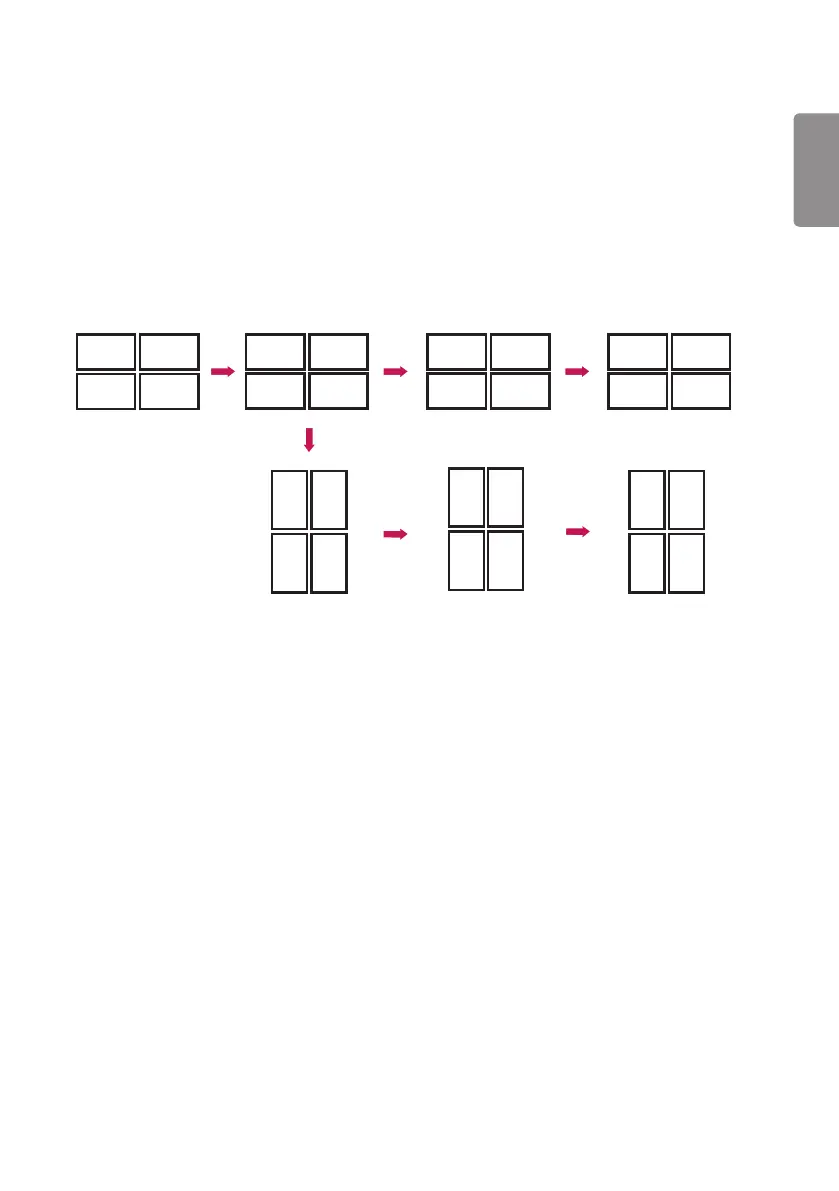
You can implement a landscape and portrait video wall using Pivot mode, Scan Inversion, and Content Rotation.
Example) Tile mode 2 x 2
* Landscape video wall
- Set Scan Inversion and Pivot Mode to On for the displays in row 2.
* Portrait video wall
- Set Scan Inversion to On and set Content Rotation to 90 for the displays in column 1.
- Set Content Rotation to 270 for the displays in column 2.
Original
2
2
2
2
2
2
2
2
2
2
2
2
22
2
2
222
Row 2 Scan Inversion Row 2 Pivot Mode Tile Mode
Rotating displays
(90 degrees)
Contents Rotation Column 1: 90,
Column 2: 270
<Landscape>
Tile Mode
<Portrait>
ENGLISH
15



 To Next Page