EasyManua.ls Logo

LG 55SL80 - Page 9

LG 55SL80
63 pages
Print Icon
To Next Page IconTo Next Page
To Previous Page IconTo Previous Page
Loading...
PREPARATION
11
Image shown may differ from your TV.
42/47SL90
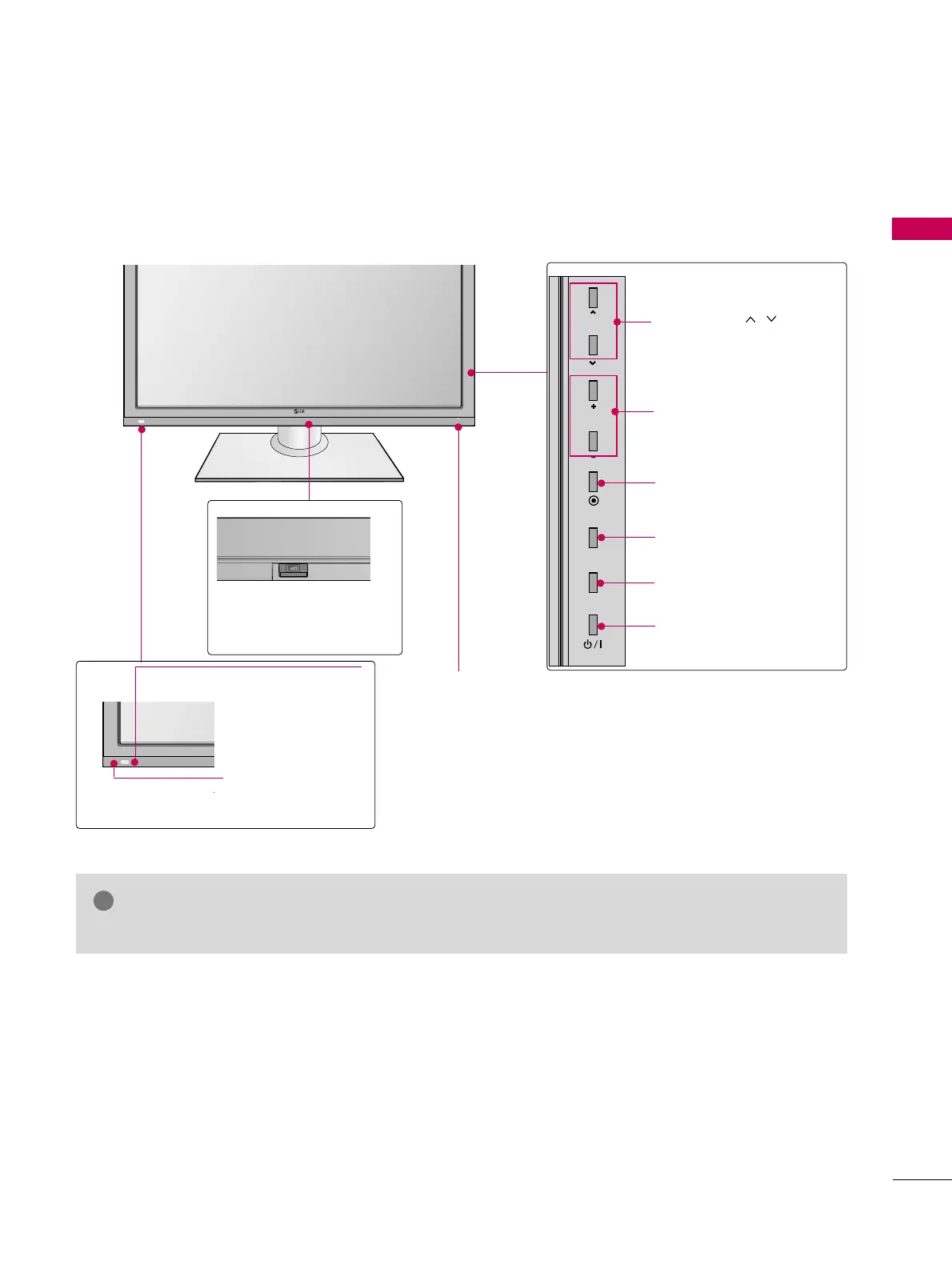
Main power switch
(For 42/47SL90)
OFF ON
Power/Standby Indicator
Illuminates red in standby mode.
Illuminates blue when the TV is switched on (Can be
adjusted using the
PPoowweerr IInnddiiccaattoorr
in the OPTION
menu.
GG
pp..8844
).
GG
Do not step on the glass stand or subject it to any impact.It may break, causing possible
injury from fragments of glass, or the TV may fall.
GG
Do not drag the TV. The floor or the product may be damaged.
NOTE

INPUT
MENU
ENTER
CH
VOL
CHANNEL ( , )
Buttons
VOLUME (+, -)
Buttons
ENTER Button
MENU Button
INPUT Button
POWER Button
Sensor de Control Remoto
Sensor Inteligente
Ajusta la imagen
según las condi-
ciones del entorno.

Related product manuals