EasyManua.ls Logo

LG 75US340C2UD - Page 33

LG 75US340C2UD
52 pages
Print Icon
To Next Page IconTo Next Page
To Previous Page IconTo Previous Page
Loading...
25
ENGLISH
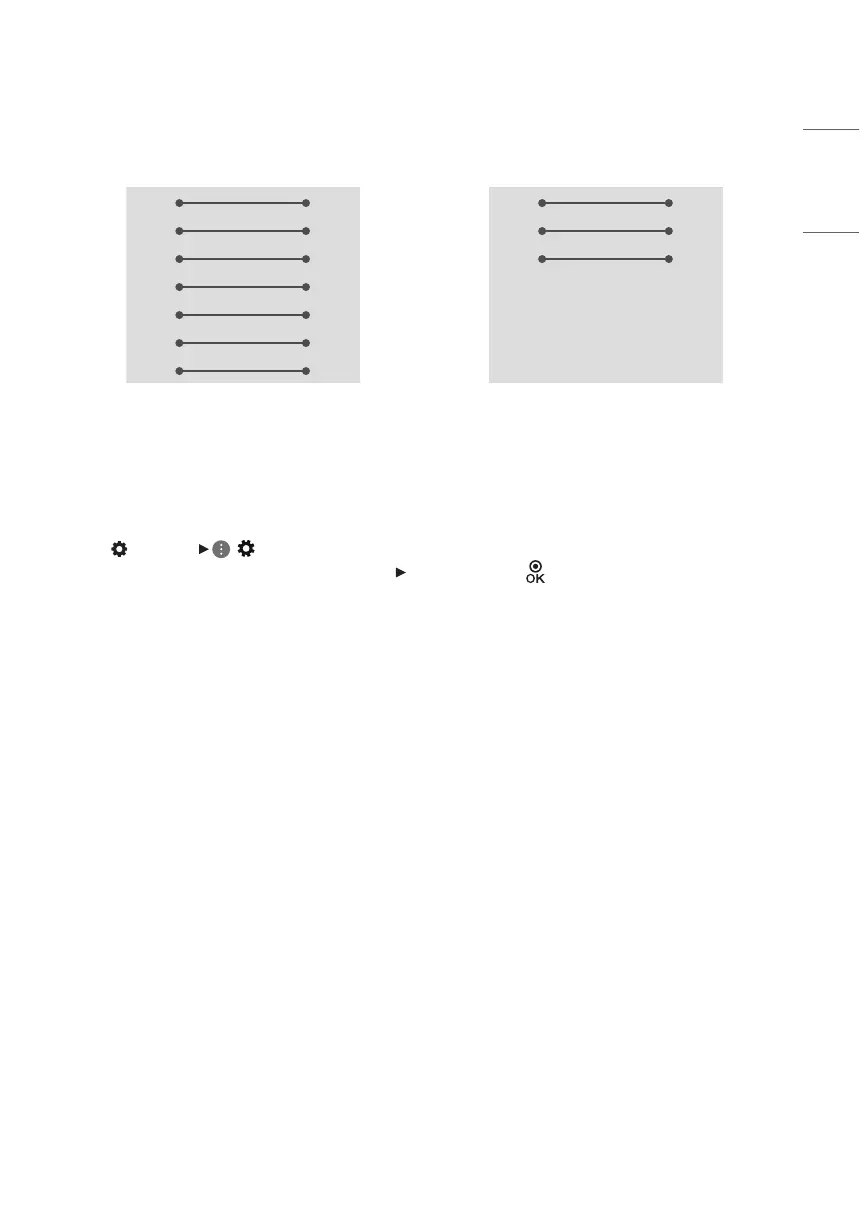
RS-232C configurations
7-Wire Configurations
(Standard RS-232C cable)
3-Wire Configurations
(Not standard)
PC TV
RXD 2 3 TXD
TXD 3 2 RXD
GND 5 5 GND
DTR 4 6 DSR
DSR 6 4 DTR
RTS 7 8 CTS
CTS 8 7 RTS
D-Sub 9 D-Sub 9
PC TV
RXD 2 3 TXD
TXD 3 2 RXD
GND 5 5 GND
DTR 4 6 DSR
DSR 6 4 DTR
RTS 7 8 CTS
CTS 8 7 RTS
D-Sub 9 D-Sub 9
Set ID
For Set ID number, see “Real data mapping (Hexadecimal: Decimal)”.
1 Press (Settings) ( ) to access the main menus.
2 Press the Navigation buttons to scroll to ([General] [Set ID]) and press .
3 Scroll left or right to select a [Set ID] number. The adjustment range is 1-99.

Other manuals for LG 75US340C2UD

Related product manuals