Operating16
Operating
3
Selecting a file or folder
1. Press PRESET·FOLDER W/S repeatedly until a
desired folder appears.
2. Press
N
to play it. The first file of folder will be
played.
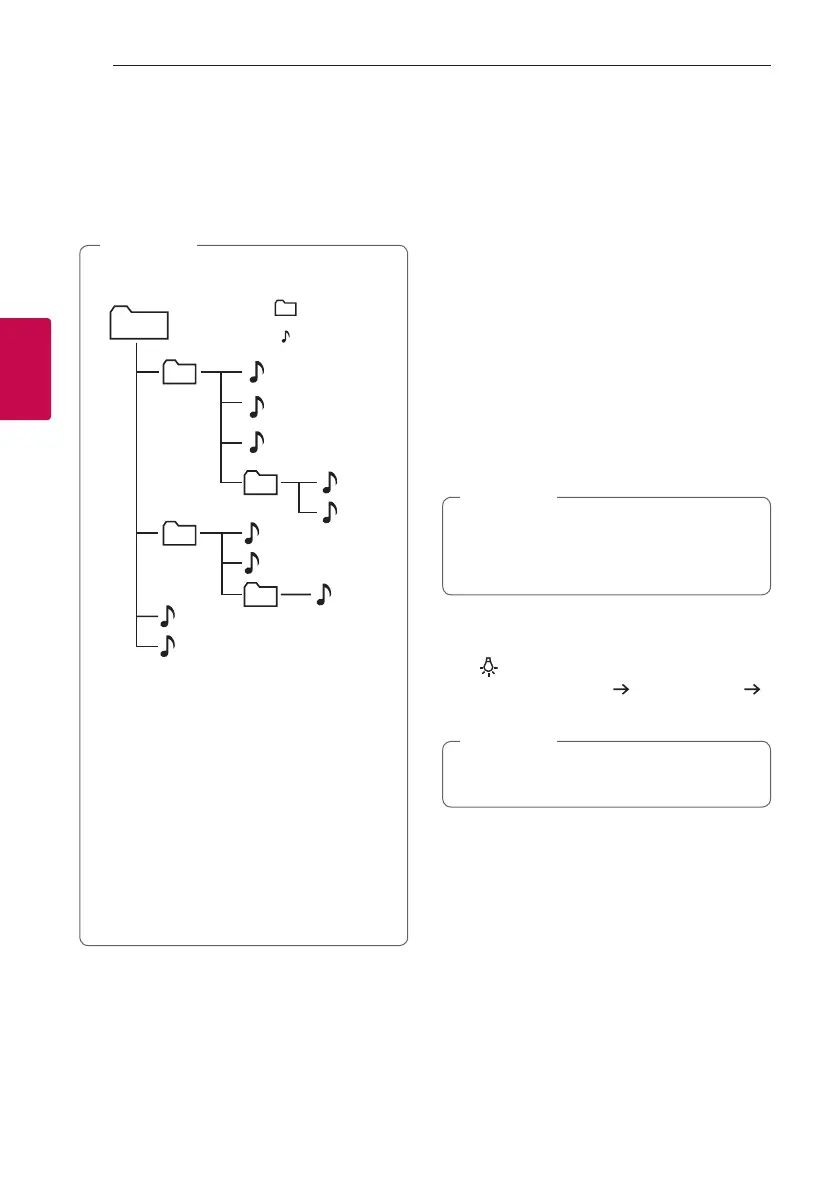
y Folders and les on the USB are recognized
as below.
A
: File
: Folder
*ROOT
B
C
D
E
F
G
H
I
J
a
c
b
d
y If there is no le in a folder, the folder will not
appear.
y File will be played from le $A to le $J
one by one.
y Files will be played in order recorded and it
may be different depending on the record
circumstances.
y This unit can display le or folder names that
contain numbers or English characters only.
y *ROOT : The rst screen you can see when a
this unit recognize the USB is “ROOT”.
,
Note
Other operations
Turn off the sound temporarily
Press [ (Mute) to mute your unit.
You can mute your unit, for example, to answer the
telephone, “MUTE” is displayed in the display window.
To cancel it, press [ (Mute) again on the remote
control or change the volume level.
Sleep Timer Setting
Press SLEEP on the remote control repeatedly to
select delay time between 10 and 180 minutes.
After the delay time, the unit will be turned off.
To cancel the sleep function, press SLEEP on the
remote control repeatedly until “OFF” appears.
You can check the remaining time before the
unit is turned off. Press SLEEP on the remote
control to check or change the remaining time.
,
Note
Mood light
Press repeatedly to adjust mood light or turn off.
Turn on (1 level brightness)
2 level brightness
Turn off
You can adjust mood light even if this unit is
turned off.
,
Note


 To Next Page