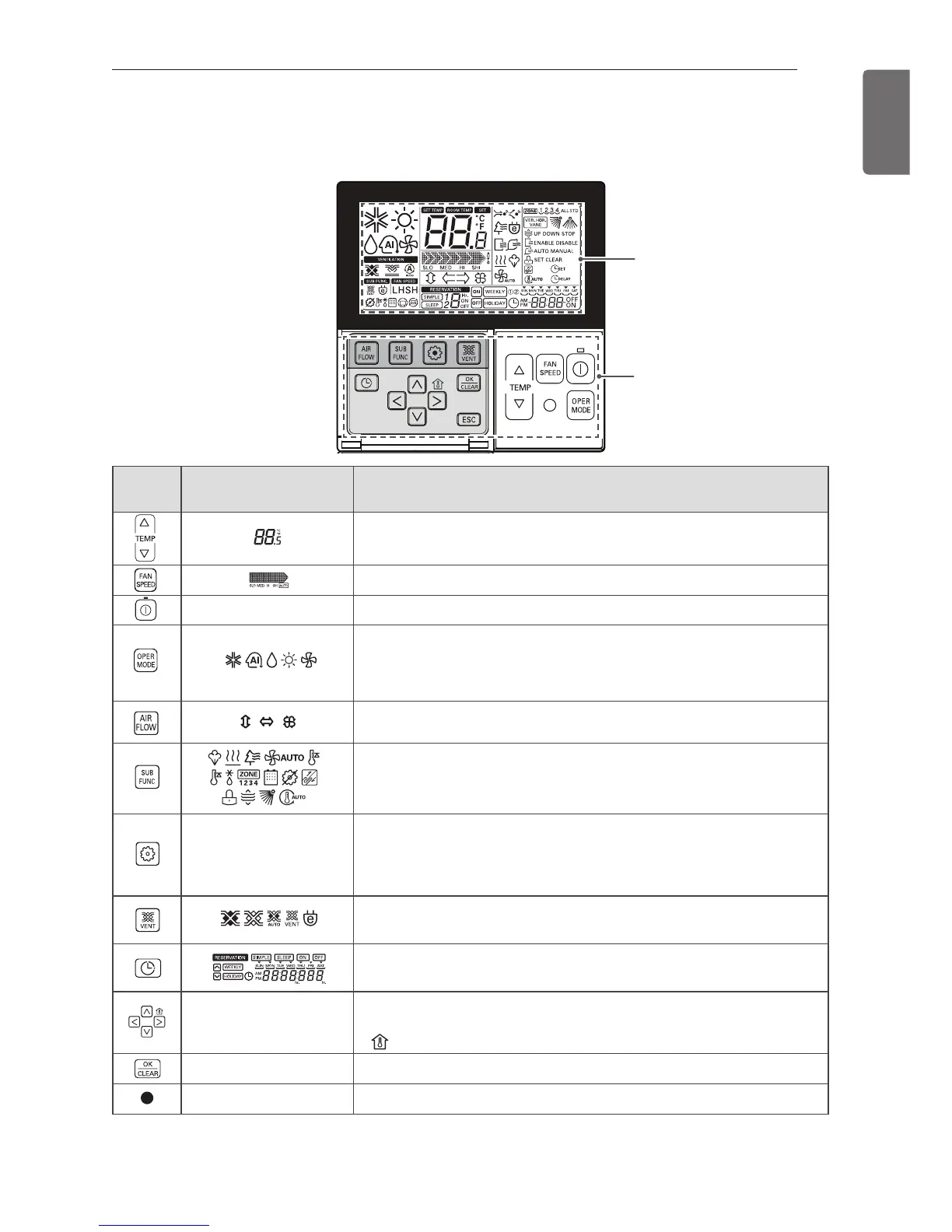
*Some functions may not be operated and displayed depending on the product type.
*It will display strange value to the room temperature if wired remote controller is not connected.
Model : PQRCVSL0 (black color), PQRCVSL0QW (white color)
For more details refer to the wired remote control accessory manual.
Control
panel
Display screen Description
Temperature adjustment button: Adjusts the room tempera-
ture when cooling and heating.
Indoor fan speed button: Adjusts the fan speed.
- On/Off button: Turns the power on/off.
Operation mode selection button*: Selects the operation
mode.
Cooling Operation/ Auto Operation/ Dehumidifying Operation/
Heating Operation/ Fan Operation
Air flow direction selection button*: Adjusts the air flow
direction vertically or horizontally.
Subfunctions button*: Sets additional functions including
plasma purification, dehumidifying, electric heating and the
child lock.
-
Function setting button
- Enters custom setting mode.
- Enters remote control setting mode (press for longer than 3
seconds).
Air circulation button*: Circulates indoor air without cooling or
heating.
Reservation functions button: Selects the reservation mode.
Simple/ Sleep/ On/ Off/ Weekly/ Holiday reservation
-
Navigation and functions button: Adjusts the time and sets the
special functions.
- : Displays the room temperature.
- OK/ Clear button: Setting or cancels functions.
- Wireless remote controller receiver




 To Next Page