EasyManua.ls Logo

LG AN-WF500 - User Manual

LG AN-WF500
19 pages
Print Icon
To Next Page IconTo Next Page
Loading...
OW NER'S M AN UAL
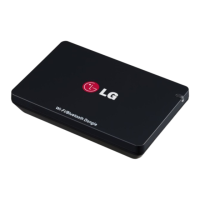
Wi-Fi/Bluetooth Dongle
Please read this manual carefully
before operating your set and
retain it for future reference.
AN-WF500
webos-forums.ru

Questions and Answers

  • C
    Cynthia MartinJul 28, 2025
    Why is my LG Transceiver wireless connection so slow?
    • C
      Christopher WardJul 28, 2025
      If your LG Transceiver's wireless connection is slow, check for other wireless devices near the TV. As a solution, you can also set the wireless router band to 5 GHz before using it.
  • B
    Brian WalterAug 10, 2025
    What to do if my LG Transceiver is not connecting to the network?
    • S
      Sarah VangAug 10, 2025
      If your LG Transceiver isn't connecting to the network, make sure the LED indicator on the Wi-Fi/Bluetooth Dongle is on and that the router is working properly.

Summary

Preparation

Product Handling

Guidelines for safe handling, cleaning, and preventing damage to the product.

Installation Instructions

Advice on product placement, environmental conditions, and avoiding interference.

Unpacking

Installing the Wi-Fi;Bluetooth Dongle

LG AN-WF500 Specifications

General IconGeneral
Full HDNo
Product colorBlack
Wi-Fi standards802.11a, 802.11b, 802.11g
Video formats supported-
Weight and Dimensions IconWeight and Dimensions
Weight- g

Related product manuals