OPERATING INSTRUCTIONS
11
ENGLISH
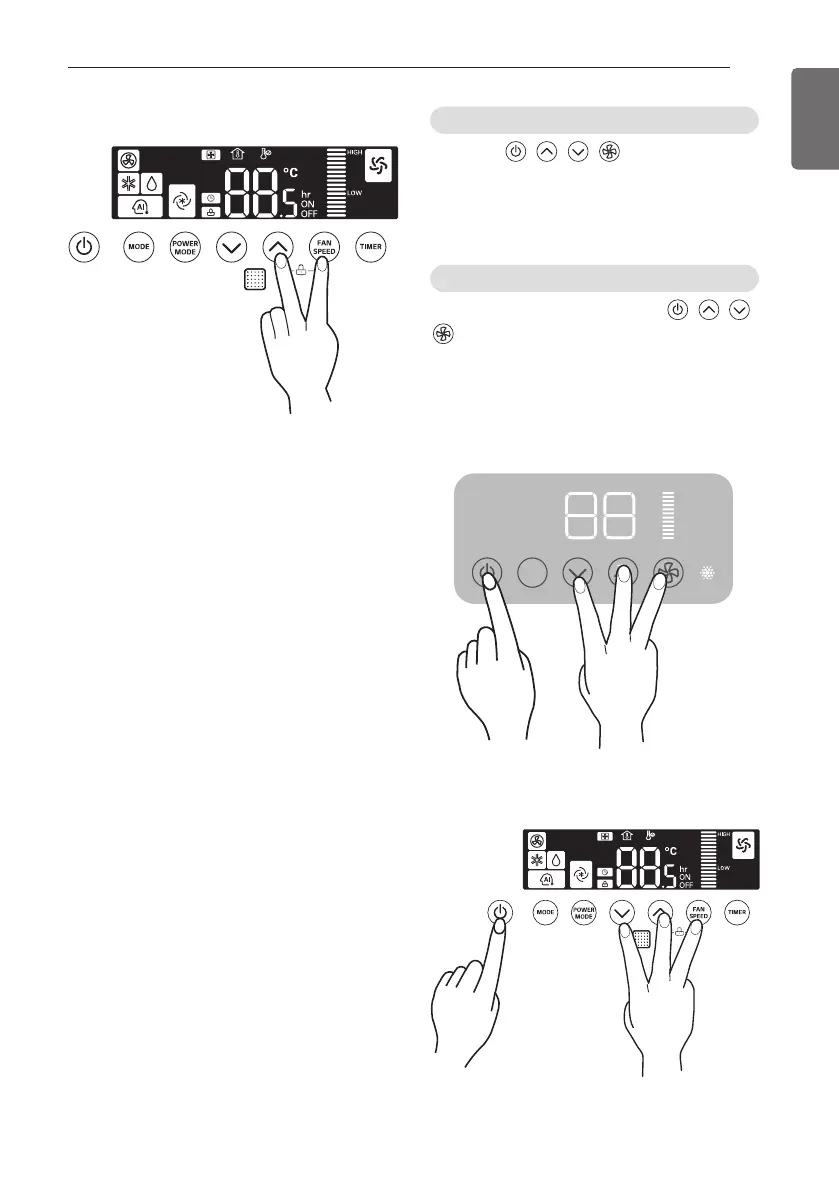
Press the , , , (4 buttons)
simultaneously for 3 seconds.
The unit will respond with beep and Re-
operation function will be removed.
After function release, Press the , , ,
(4 buttons) simultaneously for 3 seconds.
The unit will respond with beep and Re-
operation function will be set.
<PT3>
For Releasing Re-operation function
For Setting Re-operation function
MODE
<PF2>
Auto Re-operation Function
When power is supplied again after unit
operation has been stopped because of
interruption of power supply due to outage or
other causes, auto re-operation will be
performed by remembering previous setting.
- The following functions are auto re-operated.
: Operation mode, fan speed, desired
temperature, airflow direction(up/down,
left/right)
- When power is supplied, outdoor unit
operation will be started within 3 minutes.
1 Auto Re-operation function can be
established/released by manipulating
indoor unit button.
* When initial state, auto Re-operation
function will be set up as standard.
<PF2>



 To Next Page