Operation 7
Charging the portable battery
Charge the portable battery completely before using it for the rst time.
Before connecting the USB cable, check the voltage/current of the adapter.
If you use unsuitable device, it may cause malfuction of portable battery
or charger.
>
Caution
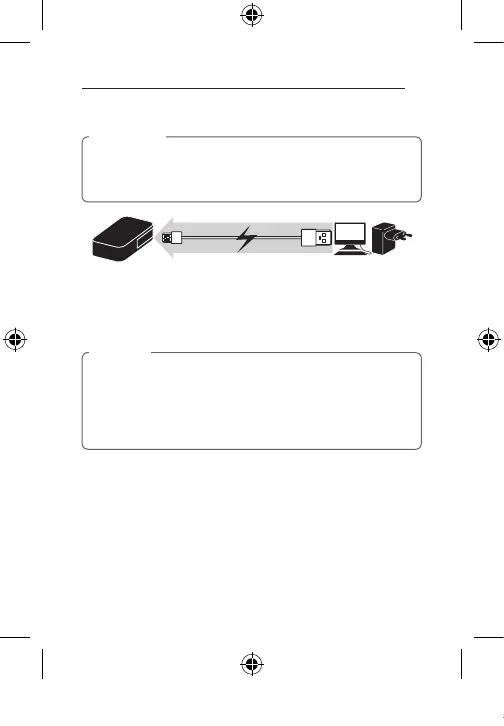
1. Connect the Micro USB port (Input) of the portable battery and the
charger adapter or PC USB port by using the USB cable.
-
The LED is blinking, it is charging normally.
2. When charging of the portable battery is done, the LED indicator will be
turned off. Then, remove the USB cable.
•LED lights display charging conditions and capacity indications. For more
details, refer to LED conditions on page 6.
•When you press LED button while in charging battery, the portable
battery mode change to discharging mode for portable device and stop
the charging during 20 seconds. After 20 seconds, the portable battery
will be charged normally.
,
Note
BP410_BP405_BP302_ENG_TAY35387870.indd 7 2014-04-30 �� 9:55:58



 To Next Page