41
SMART FUNCTIONS
ENGLISH
• For reasons not attributable to LGE’s negligence,
the service may not operate due to external
factors such as, but not limited to, Wi-Fi
unavailability, Wi-Fi disconnection, local app
store policy, or app unavailability.
• The feature may be subject to change without
prior notice and may have a different form
depending on where you are located.
Using Audible Diagnosis to
Diagnose Issues
Follow the instructions below to use the audible
diagnosis method.
• Launch the
LG ThinQ
application and select the
Smart Diagnosis
feature in the menu. Follow
the instructions for audible diagnosis provided
in the
LG ThinQ
application.
1
Press the
POWER
button to turn on the
appliance.
• Do not press any other buttons.
2
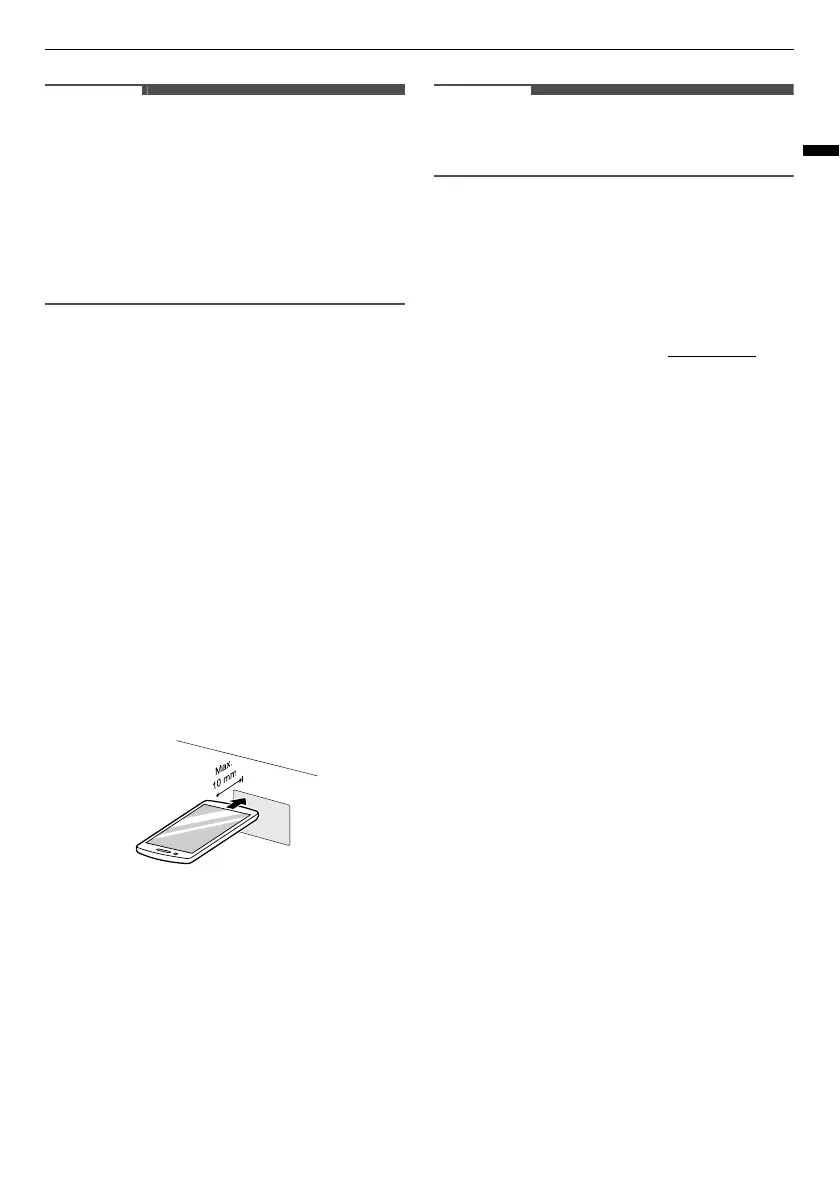
Place the mouthpiece of your smartphone in
front of the display located on the control
panel.
3
Press and hold the
Download Cycle
button for
3 seconds or longer while holding the
smartphone mouthpiece to the logo until the
data transfer is complete.
• Keep the smartphone in place until the data
transfer has finished. Time remaining for
data transfer is displayed.
4
After the data transfer is complete, the
diagnosis will be displayed in the application.
• For best results, do not move the smartphone
while the tones are being transmitted.
Customer Care and Service
Contact an LG Electronics customer information
centre.
• To find an LG Electronics authorised service
personnel, visit our website at www.lg.com
and
follow the instructions found there.
• Self-repair is not recommended as it could
further damage the device and void the
guarantee.



 To Next Page