
 To Next Page
T
Terry MaciasJul 31, 2025
How to fix an LG Home Theater System with no power?
- TTammy PattersonJul 31, 2025
If your LG Home Theater System has no power, ensure the power cord is securely plugged into the wall outlet.

How to fix an LG Home Theater System with no power?
If your LG Home Theater System has no power, ensure the power cord is securely plugged into the wall outlet.
What to do if my LG DH3120S Home Theater System has little or no sound?
If your LG Home Theater System has little or no sound, select the correct input mode on the unit so you can hear the sound. Check that the audio cables are correctly connected to the terminals. If the issue persists, try replacing the audio cable.
What to do if the LG Home Theater System remote control doesn’t work?
If the remote control for your LG Home Theater System isn't working, make sure it's pointed directly at the unit and is within 23 feet (7m). Remove any obstacles between the remote and the unit. Also, check the batteries and replace them if they are flat.
How to fix an LG DH3120S that won't play DVDs or CDs?
If your LG Home Theater System won't play a DVD or CD, first ensure that a disc is inserted. Verify that the disc is playable by checking the disc type, color system, and regional code. Make sure the disc is placed with the label or printed side facing upwards. If applicable, enter your password or change the rating level.
Essential safety precautions and warnings to prevent hazards.
Instructions for attaching and positioning speakers for optimal sound.
Guidance on connecting the unit to a TV using various video methods.
Guide to customizing language, picture, and sound settings.
Settings for sound modes, DRC, Vocal, and 5.1 speaker configuration.
A table listing common issues and their corresponding correction steps.
Details of the product guarantee, coverage, and requirements.
 General
| Disc types supported | CD-R, CD-RW, DVD, DVD+R, DVD+R DL, DVD+RW, DVD-R, DVD-RW |
|---|---|
| Playback disc formats | CD audio |
| Number of optical discs | 1 discs |
| Optical disc player type | DVD player |
| Display | FLD |
| Built-in HDD | No |
| ID3 Tag display | Yes |
| Subwoofer depth | 320 mm |
| Subwoofer width | 156 mm |
| Subwoofer height | 325 mm |
| TV tuner integrated | - |
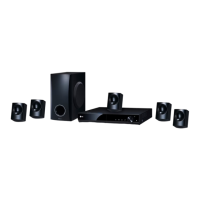
| Center speaker depth | 114 mm |
| Center speaker width | 99 mm |
| Center speaker height | 87 mm |
| Apple docking compatibility | Not supported |
| Video formats supported | DIVX, MPEG2 |
| Analog signal format system | NTSC, PAL |
| Audio decoders | Dolby Digital |
| RMS rated power | 300 W |
| Audio output channels | 5.1 channels |
| Audio formats supported | LPCM, MP3, WMA |
| Preset stations quantity | 50 |
| Front speakers RMS power | 90 W |
| Center speaker RMS power | 45 W |
| Center speaker impedance | 4 Ω |
| Product color | Black |
| USB version | 2.0 |
| USB ports quantity | 1 |
 Weight and Dimensions
| Main unit dimensions (WxDxH) | 360 x 310 x 58.5 mm |
|---|---|
| Satellite speaker dimensions (WxDxH) | 99 x 87 x 114 mm |