25INSTALLATION
ENGLISH
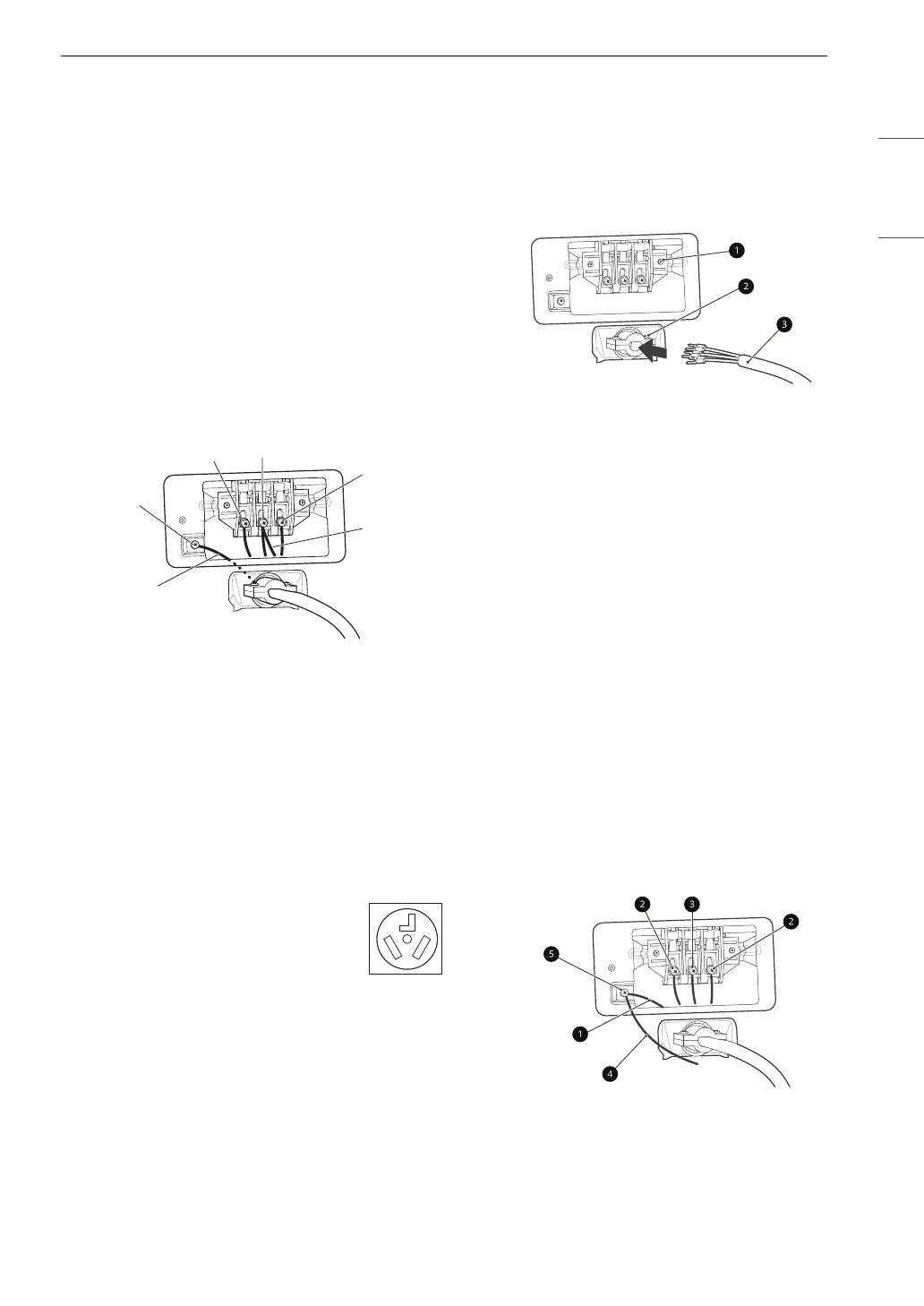
6 Attach the two hot leads (black and red) of the
power cord to the outer terminal block
screws.
7 Attach the neutral (white) wire to the center
screw of the terminal block.
8 Attach the power cord ground wire to the
green ground screw.
9 Tighten all screws securely.
10 Reinstall the terminal block access cover.
a White Wire moved from Ground Screw
b Hot Leads of Power Cord (Black and Red)
c Neutral Wire (White)
d Power Cord Ground Wire
e Ground Screw
Three-Wire Power Cord
1 Remove the terminal block access cover on
the upper back of the appliance.
2 Install the UL-listed strain relief into the
power cord through-hole.
3 Thread a 30-amp, 240 volt, 3-wire, UL-listed
power cord with #10 AWG-minimum copper
conductor through the strain relief.
a Terminal Block
b UL-Listed Strain Relief
c UL-Listed 3-Wire Power Cord
4 Attach the two hot leads (black and red) of the
power cord to the outer terminal block
screws.
5 Attach the neutral (white) wire to the center
terminal block screw.
6 Connect the external ground (if required by
local codes) to the green ground screw.
7 Tighten all screws securely.
8 Reinstall the terminal block access cover.
a White Wire from Dryer Harness
b Hot Leads of Power Cord (Black and Red)
c Neutral Wire (White)
d External Ground Wire (if required by local
codes)
• A 3-wire connection is NOT
permitted on new construction after
January 1, 1996.
• A UL-listed strain relief is required.
• Use a 30-amp, 240-volt, 3-wire, UL-listed
power cord with #10 AWG-minimum copper
conductor and closed loop or forked terminals
with upturned ends.



 To Next Page
 Loading...