49
ENGLISH
Tag On Cycle Set
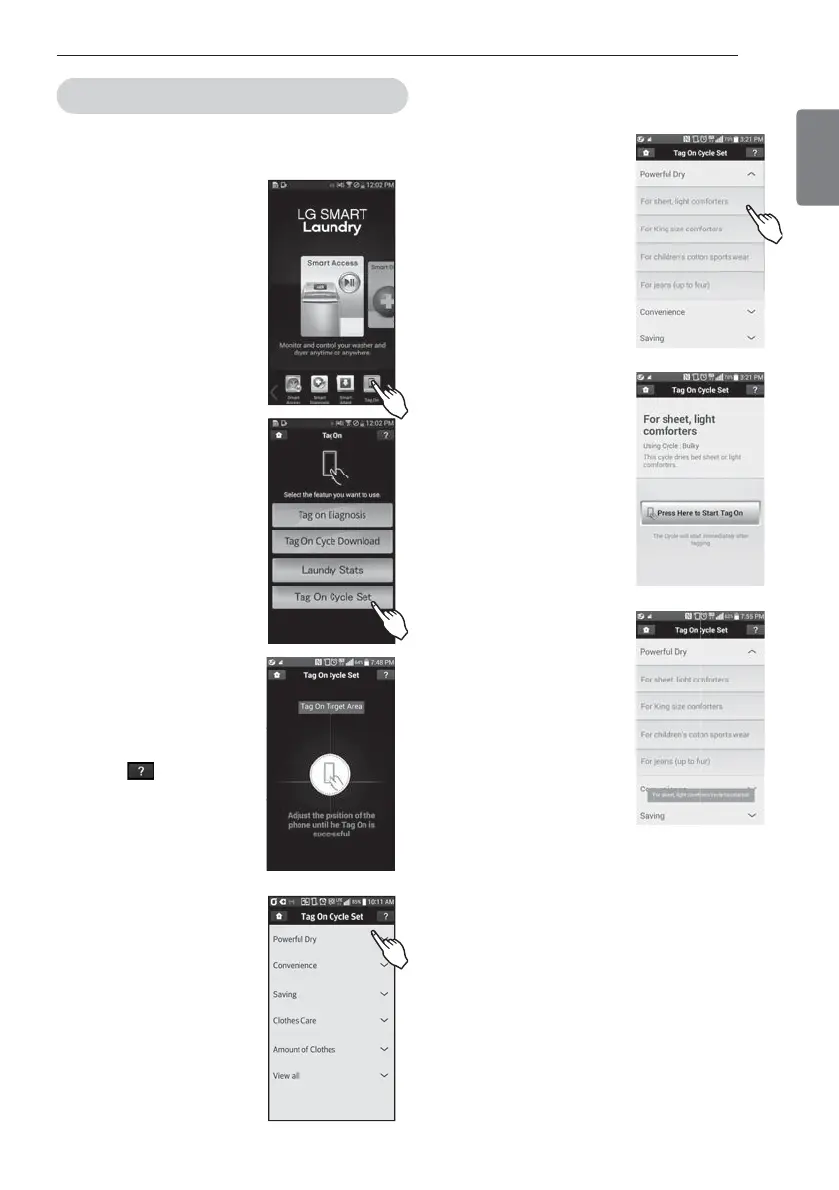
Tag On Cycle Set allows you to automatically adjust the
cycle and settings based on your needs.
4FMFDU5BH0OCZVTJOHUIF
UPQJDPOTPSUIFCPUUPN
JDPOT
4FMFDU5BH0O$ZDMF4FU
5PVDIUIF5BH0OMPHP
- When a Tag On screen
appears(shown at right), tap
your smart phone on the Tag
On icon on the right side of
the dryer’s control panel.
- If the phone isn’t recognized,
touch [
] on the upper
right of the Tag On screen on
your LG Smart Laundry&DW
application to see the
detailed guide. (This might
happen due to the different
NFC antenna positions for
each phone.)
4FMFDUBMBVOESZDBUFHPSZ
CBTFEPOUIFJTTVFZPVXBOU
UIFNBDIJOFUPGPDVTPO
"GUFSTFMFDUJOHUIF
DBUFHPSZBMJTUPGTQFDJGJD
DZDMFTXJMMBQQFBS4FMFDU
UIFDZDMFCBTFEPOZPVS
needs.
8IFOUIF5BH0OTDSFFO
BQQFBSTTIPXOBUSJHIU
tap your smart phone to
UIF5BH0OMPHPPOUIF
SJHIUTJEFPGUIFXBTIFSTPS
ESZFSTDPOUSPMQBOFM
"GUFSUBHHJOHUIFNBDIJOF
XJUIZPVSQIPOFUIFDZDMF
XJMMBVUPNBUJDBMMZTUBSU
7FSJGZUIFDPSSFDUDZDMFBOE
TFUUJOHTXFSFTFMFDUFE
Images are for reference only. The actual LG Smart
Laundry&DW application may be different.
HOW TO USE


 To Next Page