ExtERnal COntROl DEVICE SEtUP
RS-232C Setup
Connect the RS-232C (serial port) input jack to
an external control device (such as a computer or
an A/V control system) to control the product’s
functions externally.
Connect the serial port of the control device to the
USB jack on the product back panel.
NOTE
RS-232C on this TV is intended to be used
with third party RS-232C control hardware
and software. The instructions below
are provided to help with programming
software or to test functionality using telenet
software. RS-232C connection cables are not
supplied with the product.
It is not able to control the multiple TVs
connected to the one external control
box(Such as A/V control system) individually.
Basically, this function works when TV is
power on.
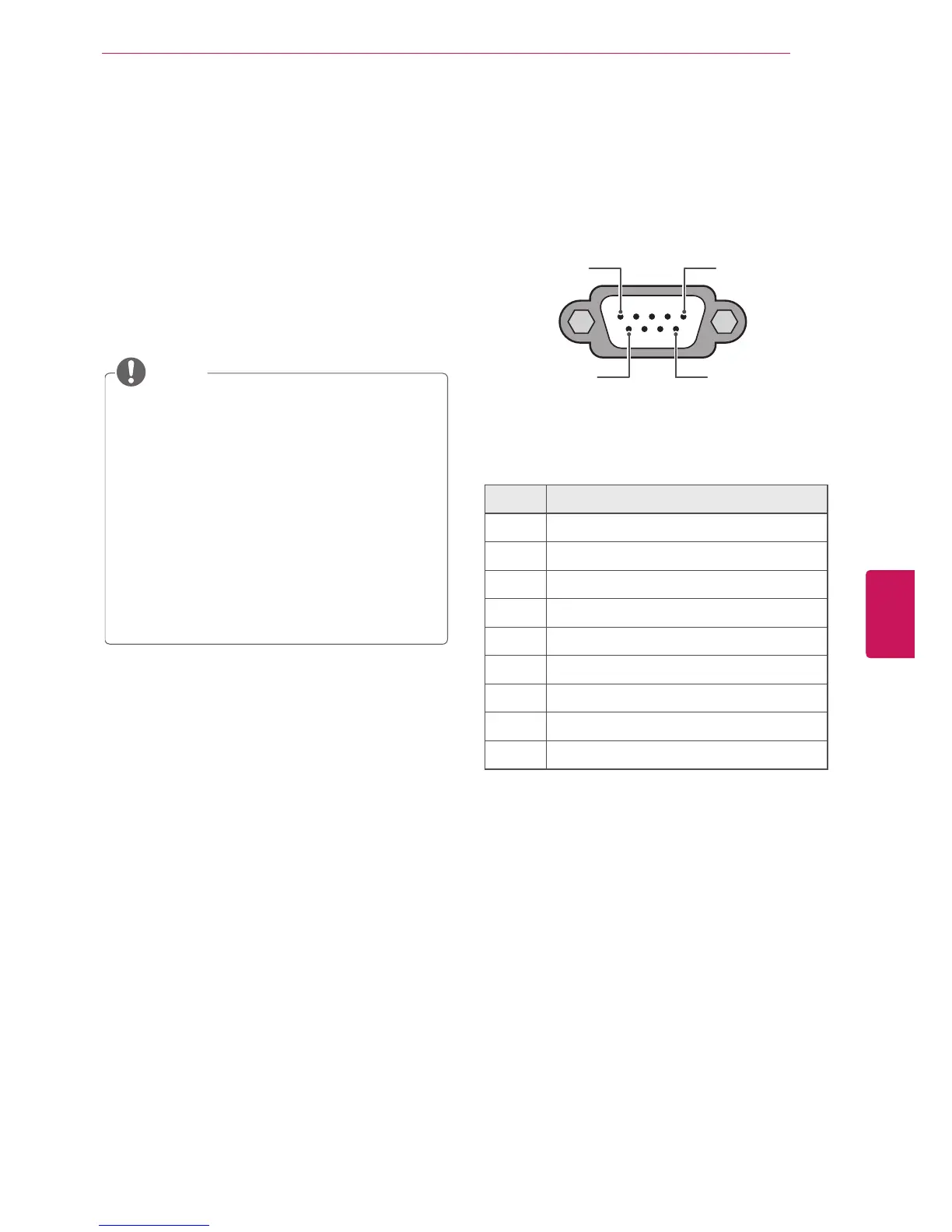
Type of connector;
RS232C to USB cable
1 5
6 9
RS-232C IN
(CONTROL & SERVICE)
No. Pin name
1 No connection
2 RXD (Receive data)
3 TXD (Transmit data)
4 DTR (DTE side ready)
5 GND
6 DSR (DCE side ready)
7 RTS (Ready to send)
8 CTS (Clear to send)
9 No Connection
5
Eng
EnglISH
EXTERNAL CONTROL DEVICE SETUP


 To Next Page