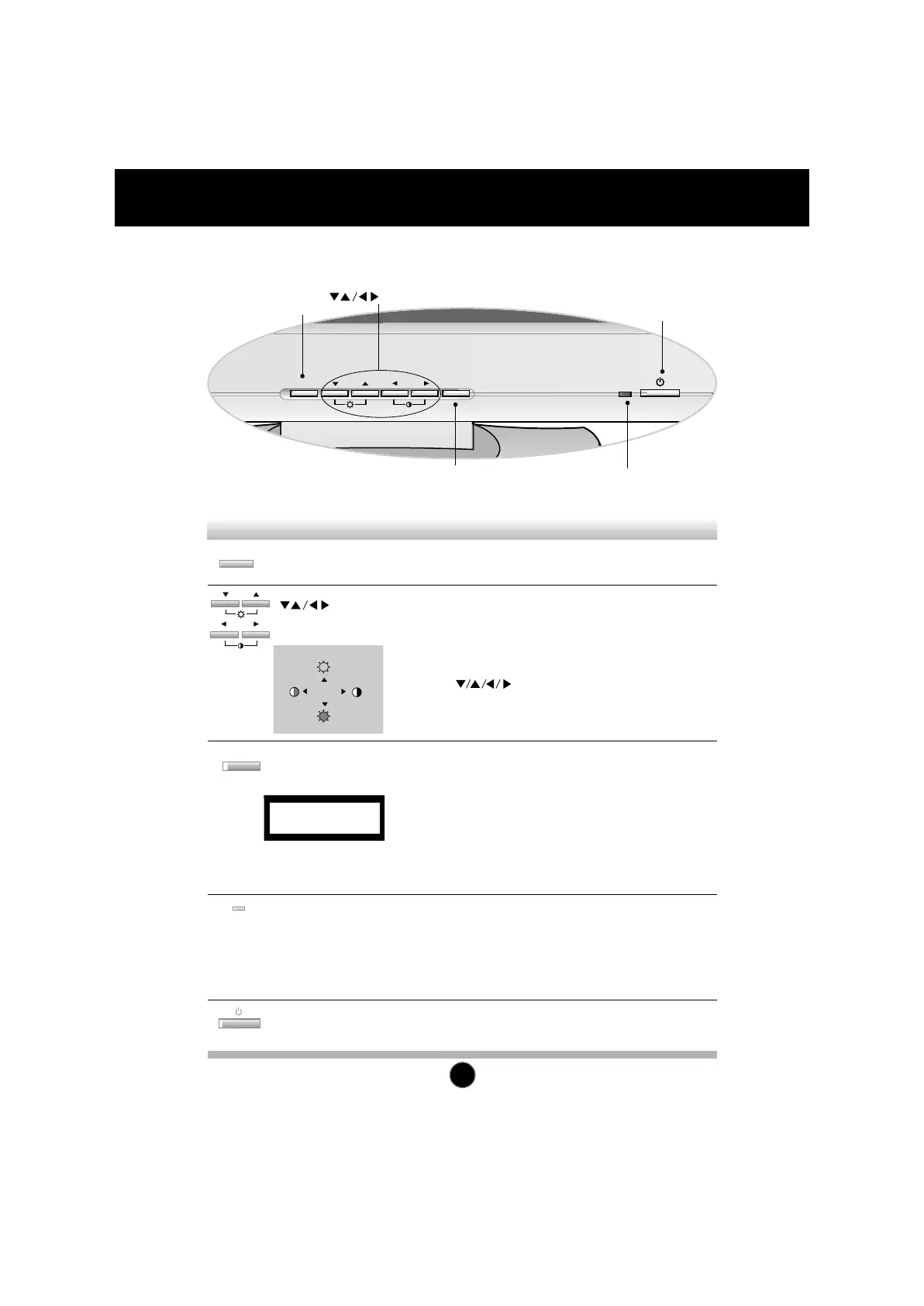
Use this button to enter and from the on
screen display (OSD).
Use these buttons to choose or adjust items in
the on screen display.
<Shortcut Keys>
• Brightness and Contrast can be adjusted directly without
entering the On Screen Display (OSD) system. Touch
the buttons to adjust the settings and then
the OSD button to save all changes. The Brightness
and Contrast functions are also available in the On
Screen Display (OSD) menu.
OSD Button
Buttons
This indicator lights up green when the
monitor operates normally. If the monitor is in
DPM (Energy Saving) mode (stand-by/
suspend/power off), this indicator color
changes to amber.
Power (DPMS)
Indicator
Use this button to turn the monitor on or off.Power Button
Use this button to enter a selection in the on
screen display.
* AUTO adjustment function
Touch the AUTO/SET button before using OSD menu.
This button is for the automatic adjustment of the screen
position, clock and phase.
Note: Some signal from some graphics boards may not function
properly. If the results are unsatisfactory, adjust your monitor’s
Position, Clock and Phase manually.
AUTO/SET
Button
Control Function
OSD Button
AUTO/SET Button
Power Button
Power (DPMS) Indicator
Buttons


 To Next Page
 Loading...