EasyManua.ls Logo

LG G350 - User Manual

LG G350
130 pages
Print Icon
To Next Page IconTo Next Page
Loading...
Všeobecné dotazy
<Informační centrum pro zákazníky společnosti LG>
810 555 810
* Před voláním se ujistěte, že máte správné číslo.
Všeobecné otázky
<Stredisko informácií pre zákazníkov spoločnosti LG>
0850 111 154
* Pred telefonátom sa uistite, že je telefónne číslo správne.
www.lg.com
LG-G350
USER GUIDE
ČESKY
SLOVENSKY
ENGLISH
MFL69322701 (1.0)

Table of Contents

Questions and Answers

  • D
    danny12Jul 31, 2025
    Why my LG G350 cannot be switched on?
    • R
      Ryan EspinozaJul 31, 2025
      If your LG Cell Phone won't switch on, it might be because the On/Off key was not pressed long enough. Ensure you press and hold the On/Off key for at least two seconds. Alternatively, the battery may be completely discharged, so charge the battery and check the charging indicator on the display.
  • R
    reynoldschristinaAug 3, 2025
    What to do if my LG G350 has charging error?
    • T
      Timothy MasonAug 4, 2025
      If your LG Cell Phone is experiencing charging errors, try the following: ensure the battery is charged, verify the phone is charging at a normal temperature, check the charger and its connection to the phone for any contact issues, plug the charger into a different socket to rule out voltage problems, replace the charger if it is defective, and only use original LG accessories to ensure compatibility.
  • T
    Toni FisherAug 8, 2025
    What to do if my LG G350 Cell Phone shows SIM card error?
    • D
      debbie66Aug 8, 2025
      If your LG Cell Phone displays a SIM card error, it could be due to the SIM card not being inserted correctly or not being present in the phone. Make sure that the SIM card is correctly inserted.
  • J
    Jamie RamosAug 12, 2025
    Why my LG Cell Phone battery is not charging?
    • A
      Ashley MendezAug 13, 2025
      If your LG Cell Phone isn't charging, ensure the battery isn't fully discharged by attempting to charge it. The surrounding temperature could be too hot or cold, so try charging at a normal temperature. Check the charger and its connection to the phone for any contact issues. Try plugging the charger into a different socket to rule out voltage problems. If none of these steps work, the charger may be defective and need replacement. Ensure you are using only original LG accessories, as the wrong charger can cause issues.
  • D
    drussellAug 17, 2025
    What to do if my LG G350 has no network connection?
    • N
      Nicole WilsonAug 17, 2025
      If your LG Cell Phone displays a 'No network connection' message or the network drops frequently, the signal may be weak, or you might be outside of your carrier's coverage area. Try moving closer to a window or going to an open area to improve signal strength. You can also check the network operator coverage map to confirm you are within the service area. It's also possible that your operator has applied new services. If your SIM card is older than 6-12 months, consider changing it at your network provider's nearest branch. You may also want to contact your service provider.
  • B
    bavilaAug 21, 2025
    How to fix no sound on LG Cell Phone?
    • I
      iescobarAug 21, 2025
      If your LG Cell Phone is not producing any sound, check the settings in the sound menu to ensure that you are not in vibration or silent mode.
  • M
    Michelle MillerAug 26, 2025
    What to do if calls are not available on LG G350 Cell Phone?
    • R
      Robert BoyerAug 26, 2025
      If your LG Cell Phone displays a 'Calls not available' message, it could be due to several reasons: a dialing error, a new network not being authorized, a new SIM card being inserted, or a pre-paid charge limit being reached. Check for new restrictions, and if you have a pre-paid plan, contact your service provider or reset the limit with PIN2.

Summary

Initial Phone Setup

Turning On the Phone

Instructions on how to turn the phone on by pressing the End/Power Key.

Charging the Phone

Guidance on charging the phone and maximizing battery life.

Installing SIM Card and Battery

Steps to install the SIM card and battery into the phone.

Wheres Mom Service

Safe and Efficient Use Guidelines

RF Exposure and Safety

Device compliance with international RF exposure guidelines and SAR values.

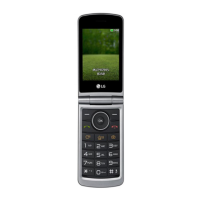
LG G350 Specifications

General IconGeneral
Display typeTFT
Display diagonal3 \
Display resolution240 x 320 pixels
RAM capacity8 MB
Internal memory32 MB
Flash card supportYes
Compatible memory cardsMicroSD (TransFlash)
Image formats supportedBMP, JPG
Rear camera resolution (numeric)1.3 MP
WAP2.0
Data networkGSM
Wi-Fi standards802.11b, 802.11g, Wi-Fi 4 (802.11n)
SIM card capabilitySingle SIM
2G bands (primary SIM)850, 900, 1800, 1900 MHz
Bluetooth version2.1+EDR
Headphone connectivity3.5 mm
Headphone outputs1
Multimedia Messaging Service (MMS)Multimedia Messaging Service (MMS) is a standard way to send messages that include multimedia content to and from a mobile phone over a cellular network
Ringer typeMP3
Talk time (2G)6 h
Battery capacity950 mAh
Standby time (2G)200 h
Subscription typeNo subscription
TypeFeature phone
Product colorTitanium
Form factorClamshell
Personal info management (PIM)Alarm clock, Calculator, Calendar
Head SAR category (EU)-
Specific absorption rate (SAR) value (EU)- W/kg
Weight and Dimensions IconWeight and Dimensions
Depth19.5 mm
Width58 mm
Height108 mm
Weight125 g

Related product manuals