
 To Next Page


C
Charles HudsonSep 8, 2025
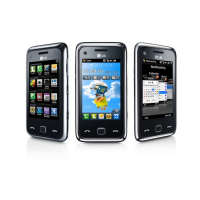
Why are calls not available on my LG GM730?
- CCharles HuntSep 8, 2025
If calls are not available on your LG Cell Phone, check for network issues.

Why are calls not available on my LG GM730?
If calls are not available on your LG Cell Phone, check for network issues.
What to do if my LG Cell Phone cannot be switched on?
If your LG Cell Phone won't switch on, it might be due to several reasons. First, ensure you press the On/Off key for at least two seconds. If that doesn't work, the battery might be empty, so keep the charger attached for a longer time. Also, check if the battery contacts are dirty and clean them if necessary.
What to do if my LG GM730 has no network?
If your LG Cell Phone displays 'No network', it could be due to a weak signal or being outside the GSM network area. Try moving towards a window or into an open area. You can also check the service provider coverage map to confirm if you are in a covered region.
What to do if there is no SIM card in LG Cell Phone?
If your LG Cell Phone indicates that there is no SIM card or it is inserted incorrectly, make sure the SIM card is correctly inserted.
What to do if my LG GM730 Cell Phone shows a charging error?
If you are experiencing a charging error with your LG Cell Phone, check the power supply and its connection to the phone. Also, inspect the battery contacts and clean them if necessary, as the cause might be a contact problem.
What to do if the fixed dial number function is on my LG Cell Phone?
If the Fixed dial number function is on, check the settings on your LG Cell Phone.
How to tell if my LG GM730 charger is defective?
If the charger for your LG Cell Phone does not warm up, replace it.
Why function cannot be set on LG GM730 Cell Phone?
If a function cannot be set on your LG Cell Phone, contact your Service Provider. This issue may arise because the function is not supported by the service provider or requires registration.
Why is the signal weak on my LG GM730?
If the signal on your LG Cell Phone is weak, try moving towards a window or into an open area. You might also want to check the service provider connection coverage map.
How to fix fixed dial number not permitted on LG Cell Phone?
If your LG Cell Phone displays 'Fixed dial number not permitted', the fixed dial number function is likely turned on. Check your phone's settings to adjust this.
Information on SAR and exposure to radio waves.
Instructions for maintaining the phone and avoiding damage.
Best practices for charging, maintaining, and replacing the battery.
Identifies key external buttons, sensors, and ports.
Explains the function of volume, power, and camera keys.
Steps for safely removing the battery cover and battery.
Procedures for inserting the USIM card and battery correctly.
Instructions on how to charge the phone and LED indicators.
Crucial safety advice related to battery replacement and charging.
Guide to inserting a MicroSD card into the phone's slot.
Steps to perform a soft reset using the reset key.
Instructions for a hard reset to restore default settings.
Best practices and recalibration steps for touch screen interaction.
How to launch apps and navigate content by scrolling.
Selecting joystick modes and using it for navigation and selection.
How to choose between different home screen types.
Personalizing the LG Smart Home Screen interface.
Explanation of icons for signal strength, battery, and connectivity.
How to access and manage running applications via multitasking.
Personalize profiles, sounds, backlight, and wallpaper.
Access system info, manage storage, and clear device data.
Configure network connections, GPS, Wi-Fi, and Bluetooth.
Introduction to input methods like Keyboard, Recognizers, XT9, Transcriber.
How to use the on-screen keyboard and adjust key size.
Using Letter Recognizer and Block Recognizer for text input.
Using the XT9 keypad for efficient text input with prediction.
Utilizing Transcriber for handwriting input and gestures.
A quick guide to search functions like Find, Snap to result, and Goto.
Procedures for finding files and items using the search function.
Steps for dialing numbers, calling contacts, and ending calls.
Using speaker, mute, hold, and keypad during a call.
Controlling call volume and setting up speed dial numbers.
Functions available during an active call for managing audio and call state.
How to assign contacts to speed dial numbers and use them.
Methods to find contacts using the keypad or contact list.
Steps to add new contacts, including pictures and numbers.
Accessing details like service numbers, memory info, and business cards.
Composing, sending, and managing SMS and MMS messages.
Steps to configure POP3 or IMAP4 email accounts.
Step-by-step guide to capturing photos using the camera.
Steps to start and stop recording videos.
Steps to turn on Bluetooth and pair with other devices.
Procedures for sending and receiving files wirelessly using Bluetooth.
Steps to enable Wi-Fi and connect to access points.
Adding new networks and changing existing network settings.
Setting up IP address, subnet mask, and DNS servers for Wi-Fi connection.
Solutions for SIM errors, network connection issues, and code mismatches.
Solutions for charging errors, phone losing network, and number restrictions.
 General
| Announced | 2009, February |
|---|---|
| Released | 2009, June |
| Technology | GSM / HSPA |
| 2G bands | GSM 850 / 900 / 1800 / 1900 |
| 3G bands | HSDPA 900 / 2100 |
| Speed | HSPA 7.2/2 Mbps |
| GPRS | Class 12 |
| EDGE | Class 12 |
| Dimensions | 109.8 x 56.5 x 11.9 mm (4.32 x 2.22 x 0.47 in) |
| SIM | Mini-SIM |
| Type | TFT resistive touchscreen, 256K colors |
| OS | Microsoft Windows Mobile 6.1 Professional |
| CPU | Qualcomm MSM7201A 528 MHz |
| Video | Yes |
| Loudspeaker | Yes |
| 3.5mm jack | Yes |
| WLAN | Wi-Fi 802.11b/g |
| Bluetooth | 2.0, A2DP |
| GPS | Yes, with A-GPS |
| USB | microUSB 2.0 |
| Sensors | Accelerometer |
| Size | 3.0 inches |
| Resolution | 240 x 400 pixels |
| Radio | Stereo FM radio |
| Colors | Black |