41
MAINTENANCE
ENGLISH
Air Filter
Replacing the Air Filter
This feature is only available on some models.
• Replace the air filter:
- Approximately every 12 months.
- When the air filter indicator lights up.
• To purchase the air filter:
- Visit your local dealer or distributor or contact
the LG Electronics Customer Information
Centre. For further assistance, visit our
website at lg.com
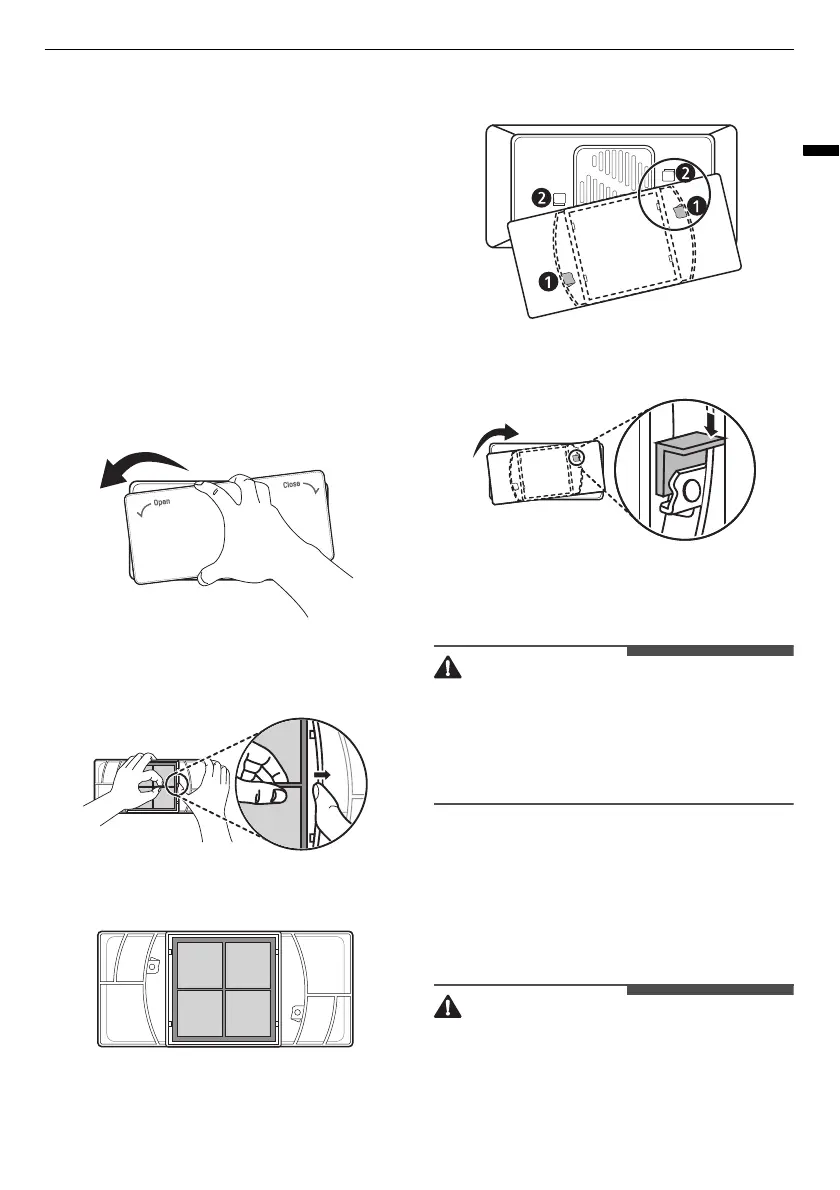
1
Rotate the filter cover counterclockwise to
release the tabs, and remove the cover.
2
Remove the filter from the inside of the cover
by pressing the side of the filter in and pulling
the centre out.
3
Place the new filter inside of the cover with the
side that says
FRONT
facing outward.
4
Align tabs
a
on the filter cover with hooks
b
on the fridge wall.
5
Rotate the air filter cover clockwise until the
hooks engage and the cover locks in place.
6
Press and hold the
Pure N Fresh
/
Replace Air
Filter
/
Air Filter
button on the control panel
for 3 seconds to reset the filter.
• If you wash the filter with water, the filter
performance may also deteriorate.
• Caution should be taken not to change the
direction of the filter to be inserted into the filter
cover.
Water Filter
Before Replacing the Water
Filter
• Do not allow children to have access to small
parts during the installation of this product.


 To Next Page