46 Operation
Operation
4
Listening to music while slide
show
You can display photo les while listening to
music les.
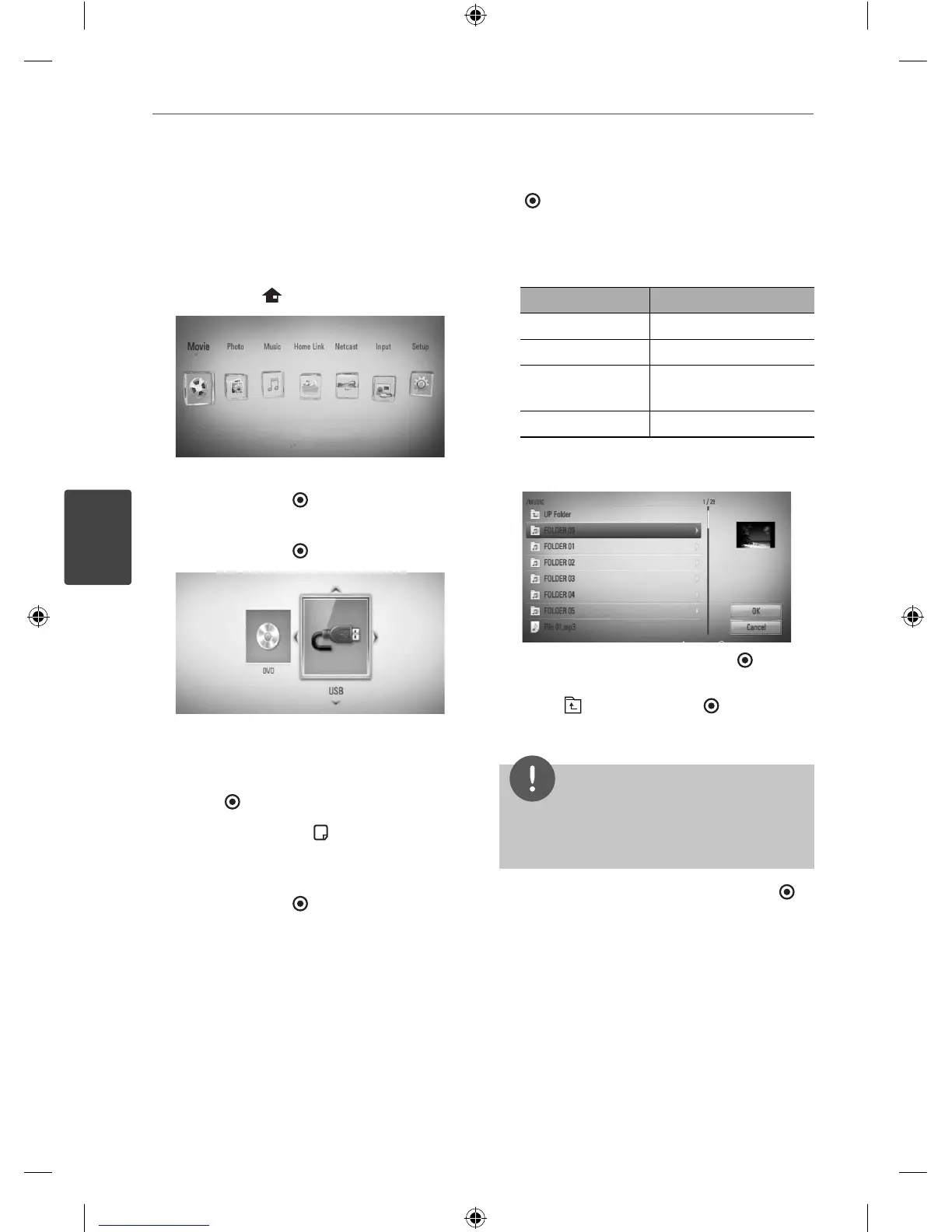
1. Press HOME (
).
2. Select [Photo] or [Home Link] using
I
/
i
,
and press ENTER (
).
3. Select the [Disc] or [USB] option using
I
/
i
,
and press ENTER ( ).
Selecting a server or a share folder is
needed for [Home Link] menu.
4. Select a le using
U
/
u
/
I
/
i
, and press
ENTER ( ) to view the photo.
5. Press INFO/DISPLAY (
) to display the
option menu.
6. Use
U
/
u
to select [Music Select] option,
and press ENTER ( ) to display the [Music
Select] menu.
7. Use
U
/
u
to select a device, and press ENTER
( ).
Device that you can select are di er
depending on the location of the photo le
you are displaying in full screen.
Photo location Available Device
Disc Disc, USB
USB Disc, USB
Share Folder on
your PC (CIFS)
CIFS
DLNA server DLNA server
8. Use
U
/
u
to select a le or a folder you wish
to play.
Select a folder and press ENTER ( ) to
display the lower directory.
Select
and press ENTER ( ) to display
the upper directory.
NOTE
When selecting music from [Home Link], folder
selection is not available. Only le selection is
available on the [Home link].
9. Use
i
to select [OK], and press ENTER ( )
to complete music selection.
HB45E-D0.GBRLL ENG 0017.indd 46HB45E-D0.GBRLL ENG 0017.indd 46 2010-03-04 ¿ÀÀü 9:54:492010-03-04 ¿ÀÀü 9:54:49



 To Next Page