61Operation
4
Operation
NOTE
The YouTube
TM
menu can display 5 videos in the
videos list. Press green (G) or yellow (Y) buttons
to display previous/next 5 videos.
If you select the [Most Viewed] or [Top Rated]
option in the YouTube
TM
menu, the period
options appear at the bottom of the screen. Use
U
/
u
/
I
/
i
to select a period option and press
ENTER
(
) to display the videos list within the selected
period.
The videos list searched from the player may
di er with the list searched from a web browser
on PC.
The playback of YouTube videos may be paused,
stopped or bu ering occurring often depending
on your broadband speed.
We recommend a minimum connection speed
of 1.5 Mbps. For the best playback condition, a
connection speed of 4.0 Mbps is required.
Sometimes your broadband speed varies based
on your ISP’s network conditions.
Contact your ISP if you have problems
maintaining a fast connection that is reliable, or
if you want to increase your connection speed.
Many ISPs o er a variety of broadband speed
options.
•
•
•
•
Using the virtual keyboard
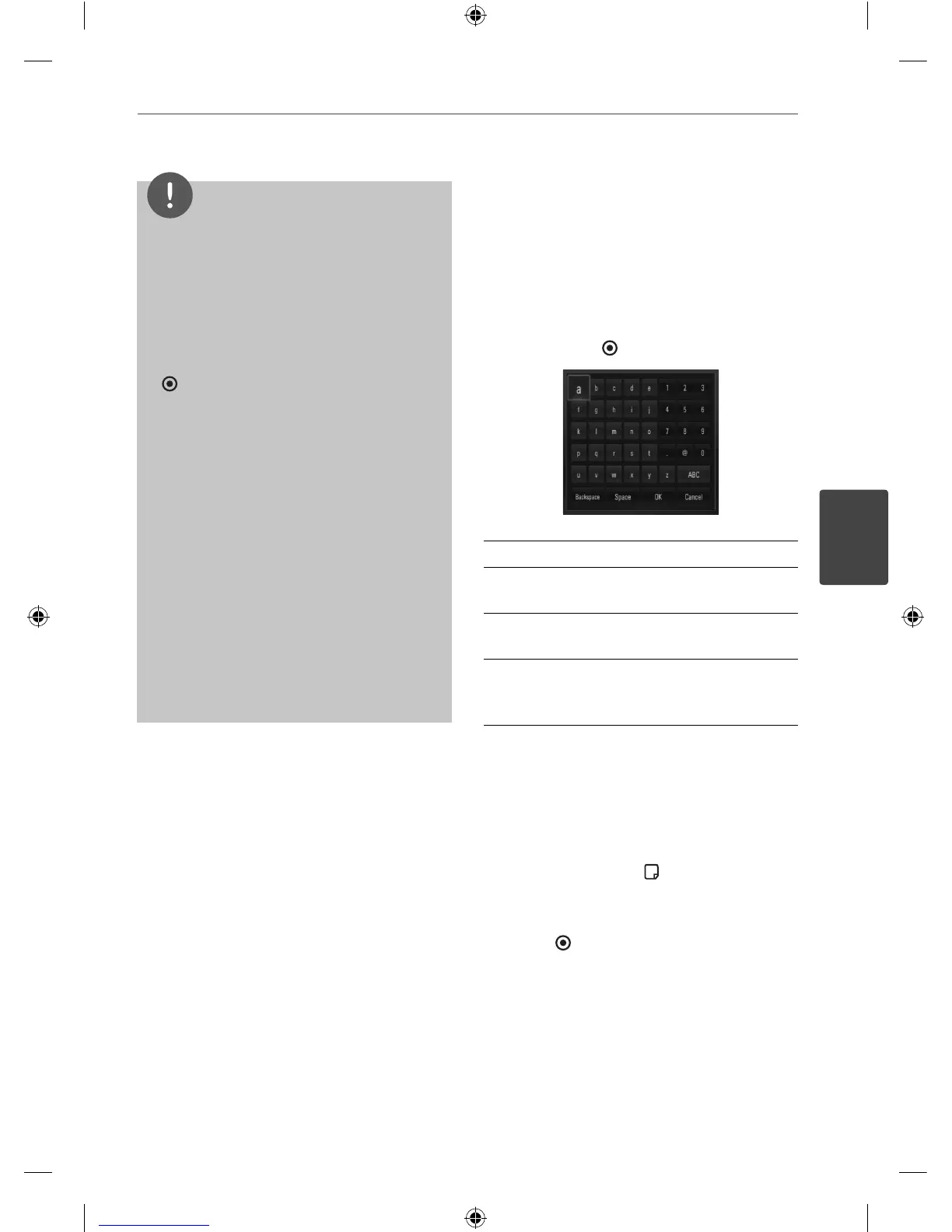
On the virtual keyboard, there are two input
mode for the entering a character. Press the
yellow (Y) coloured button to toggle display
between keyboard mode and keypad mode.
Keyboard Mode
Use
U
/
u
/
I
/
i
to select a letter on the screen,
and press ENTER ( ) to con rm your selection.
[Cancel] – Return to the previous screen.
[Space] – Inserts a space at the cursor
position.
[Backspace] – Deletes the previous character
at the cursor position.
[ABC / abc / #+-=&] – Changes the virtual
keyboard settings to capital letters, small
letters or symbols.
Press CLEAR to clear all entered characters.
To enter a letter with an accent mark:
1. Select a letter using
U
/
u
/
I
/
i
on the virtual
key board.
2. Press INFO/DISPLAY (
) to display the
extended character set.
3. Use
I
/
i
to select a character then press
ENTER (
).
Available languages to enter on the keyboard
mode are as follows: English, Spanish, Italian,
French, German, Dutch, Portuguese, Swedish,
Polish and Czech.
HB45E-D0.GBRLL ENG 0017.indd 61HB45E-D0.GBRLL ENG 0017.indd 61 2010-03-04 ¿ÀÀü 9:54:522010-03-04 ¿ÀÀü 9:54:52



 To Next Page