Getting Started
Getting St ar ted
Installing the SIM card
and battery
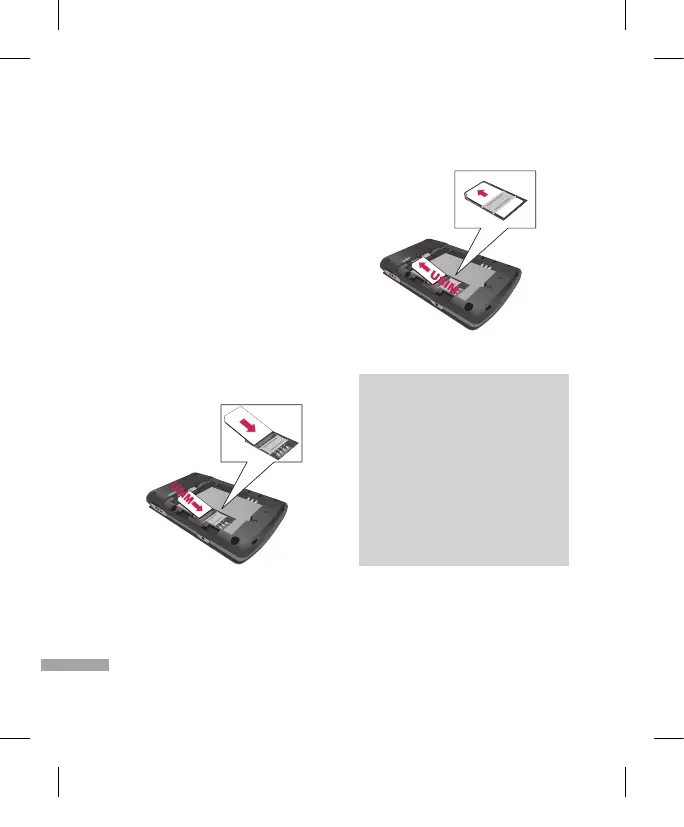
1. Installing the SIM card.
Your SIM card contains your phone number,
service details and contacts and must be
inserted into your handset. If your SIM card
is removed then your handset becomes
unusable (except for emergency calls) until
a valid one is inserted. Always disconnect
the charger and other accessories from your
handset before inserting and removing your
SIM card.
To insert the SIM card
To remove the SIM card
Note
v
The metal contact of the SIM card
can easily be damaged by scratches.
Pay special attention to the SIM
card while handling. Follow the
instructions supplied with the SIM
card.
v
After removing the battery, insert
SIM card.
2. Installing the battery.
Slide the battery upwards until it snaps back
into place.


 To Next Page