EasyManua.ls Logo

LG HB806TM - User Manual

LG HB806TM
22 pages
Print Icon
To Next Page IconTo Next Page
Loading...
Please read this manual carefully before operating
your set and retain it for future reference.
SIMPLE MANUAL
3D Blu-ray
Home Theater
P/NO: MFL67164748
HB806TM (HB806TM, SH86TM-S/ C, SH85TM-W)
HB806TM-F0_BAUSLLK_SIM_ENG_4748.indd 1 2011-04-11 �� 10:53:43

Questions and Answers

Summary

Getting Started

Safety Precautions and Warnings

Provides essential safety precautions to prevent electric shock, fire hazards, and damage to the unit.

Power Cord and Laser System Safety

Details important precautions regarding the power cord and laser system to prevent hazards.

Safe Battery Handling and Disposal

Provides instructions for the safe removal and disposal of portable batteries or accumulators.

TV Color System Compatibility Guide

Explains how the player's color system interacts with different TV color systems (PAL/NTSC).

Supplied Accessories and Software Update

Lists included accessories and details the network software update procedure.

Introduction to Product Features

Provides an overview of the manual and key features.

Playable Media Types and Symbols

Details the types of discs supported and the symbols used throughout the manual.

Supported File Format Requirements

Specifies the required formats and specifications for media files playable on the unit.

Remote Control Functions Overview

Explains the functions and layout of the remote control buttons for operation.

Front Panel Controls and Ports

Details the buttons and ports located on the front of the unit for basic control.

Rear Panel Input;Output Ports

Identifies the various input and output ports located on the rear of the unit.

Connecting

System Unit and Speaker Placement

Illustrates optimal placement of speakers and the main unit for best surround sound.

Attaching Speaker Cables to Unit

Provides instructions on how to connect the speaker wires to the unit, including color coding.

System Setting

Navigating and Adjusting Setup Settings

Guides users on changing various player settings via the [Setup] menu.

Configuring Display Resolution Output

Explains how to change the output resolution for the HDMI OUT jack.

Setting Up Wired Network Connection

Details the steps for configuring a wired network connection for internet access.

Operating

Playback Operations and Home Menu

Covers basic playback functions and navigating the [HOME] menu.

Playing Media from Discs and USB

Instructions for playing movie, music, and photo files from discs or USB devices.

Basic Playback Controls (Stop, Pause, Scan)

Explains controls for stopping, pausing, scanning, and skipping during playback.

On-Screen Display Information and Settings

Details how to display and adjust content information and settings on-screen.

Troubleshooting

Troubleshooting Common Problems

Lists common symptoms and their corresponding causes and solutions.

Customer Support and Software Updates

Provides information on obtaining customer support and updating the player's software.

Appendix

Product Trademarks and Licenses

Lists all trademarks and licenses associated with the product's technologies.

Technical Product Specifications

Details the technical specifications of the home theater system, including inputs, outputs, and amplifier.

Summary

Getting Started

Safety Precautions and Warnings

Provides essential safety precautions to prevent electric shock, fire hazards, and damage to the unit.

Power Cord and Laser System Safety

Details important precautions regarding the power cord and laser system to prevent hazards.

Safe Battery Handling and Disposal

Provides instructions for the safe removal and disposal of portable batteries or accumulators.

TV Color System Compatibility Guide

Explains how the player's color system interacts with different TV color systems (PAL/NTSC).

Supplied Accessories and Software Update

Lists included accessories and details the network software update procedure.

Introduction to Product Features

Provides an overview of the manual and key features.

Playable Media Types and Symbols

Details the types of discs supported and the symbols used throughout the manual.

Supported File Format Requirements

Specifies the required formats and specifications for media files playable on the unit.

Remote Control Functions Overview

Explains the functions and layout of the remote control buttons for operation.

Front Panel Controls and Ports

Details the buttons and ports located on the front of the unit for basic control.

Rear Panel Input;Output Ports

Identifies the various input and output ports located on the rear of the unit.

Connecting

System Unit and Speaker Placement

Illustrates optimal placement of speakers and the main unit for best surround sound.

Attaching Speaker Cables to Unit

Provides instructions on how to connect the speaker wires to the unit, including color coding.

System Setting

Navigating and Adjusting Setup Settings

Guides users on changing various player settings via the [Setup] menu.

Configuring Display Resolution Output

Explains how to change the output resolution for the HDMI OUT jack.

Setting Up Wired Network Connection

Details the steps for configuring a wired network connection for internet access.

Operating

Playback Operations and Home Menu

Covers basic playback functions and navigating the [HOME] menu.

Playing Media from Discs and USB

Instructions for playing movie, music, and photo files from discs or USB devices.

Basic Playback Controls (Stop, Pause, Scan)

Explains controls for stopping, pausing, scanning, and skipping during playback.

On-Screen Display Information and Settings

Details how to display and adjust content information and settings on-screen.

Troubleshooting

Troubleshooting Common Problems

Lists common symptoms and their corresponding causes and solutions.

Customer Support and Software Updates

Provides information on obtaining customer support and updating the player's software.

Appendix

Product Trademarks and Licenses

Lists all trademarks and licenses associated with the product's technologies.

Technical Product Specifications

Details the technical specifications of the home theater system, including inputs, outputs, and amplifier.

Overview

This document is a simple manual for the LG HB806TM 3D Blu-ray Home Theater system, which includes the HB806TM main unit, SH86TM-S/C speakers, and SH85TM-W subwoofer. It provides essential information for safe operation, setup, and basic use of the device.

Function Description:

The LG HB806TM is a 3D Blu-ray Home Theater system designed to provide an immersive audio and video experience. It supports playback of various disc formats, including Blu-ray (2D and 3D), DVD, and Audio CD, as well as multimedia files from USB devices and network sources (DLNA). The system integrates a powerful amplifier with multiple speakers to deliver surround sound. Key features include network connectivity for software updates and streaming services (NetCast), HDMI output for high-definition video and audio, and a built-in FM tuner.

Important Technical Specifications:

General:

  • Power Requirements: Refer to main label.
  • Power Consumption: Refer to main label.
  • Dimensions (W x H x D): Approx. 360 x 59 x 307 mm (without foot).
  • Net Weight (Approx.): 2.8 kg.
  • Operating Temperature: 5 °C to 35 °C (41 °F to 95 °F).
  • Operating Humidity: 5% to 90%.

Inputs/Outputs:

  • VIDEO OUT: 1.0 V (p-p), 75 Ω, sync negative, RCA jack x 1.
  • HDMI OUT (video/audio): 19 pin (Type A, HDMI™ Connector) x 1.
  • ANALOG AUDIO IN: 2.0 Vrms (1 kHz, 0 dB), 600 Ω, RCA jack (L, R) x 1.
  • DIGITAL IN (OPTICAL): Optical Connector x 1.
  • PORT. IN: 0.5 Vrms (3.5 mm stereo jack).
  • LAN Port: Ethernet jack x 1, 10BASE-T / 100BASE-TX.
  • Bus Power Supply (USB): DC 5V 500 mA.

Tuner:

  • FM Tuning Range: 87.5 to 108.0 MHz or 87.50 to 108.00 MHz.

Amplifier (Power output at 3 Ω, RMS, THD 10%):

  • Total: 850 W.
  • Front (x 2): 141 W.
  • Center: 141 W.
  • Surround (x 2): 141 W.
  • Sub-Woofer: 145 W (Passive).

System:

  • Laser: Semiconductor laser.
  • Wavelength: 405 nm / 650 nm.
  • Signal System: Standard NTSC color TV system.
  • Frequency Response: 20 Hz to 20 kHz (48 kHz, 96 kHz, 192 kHz sampling).
  • Signal-to-Noise Ratio: More than 80 dB.
  • Total Harmonic Distortion: 0.05% at 1 W.
  • Dynamic Range: More than 85 dB.

Speakers:

  • Front Speaker (Left/Right):
    • Type: 2 Way 3 speaker.
    • Max. Input Power: 282 W.
    • Impedance Rated: 3 Ω.
    • Net Dimensions (W x H x D): 200 x 550 x 200 mm.
    • Input Power: 141 W.
    • Net Weight: 1.34 kg.
  • Rear Speaker (Left/Right):
    • Type: 2 Way 3 speaker.
    • Max. Input Power: 282 W.
    • Impedance Rated: 3 Ω.
    • Net Dimensions (W x H x D): 200 x 550 x 200 mm.
    • Input Power: 141 W.
    • Net Weight: 1.34 kg.
  • Center Speaker:
    • Type: 2 Way 3 speaker.
    • Max. Input Power: 282 W.
    • Impedance Rated: 3 Ω.
    • Net Dimensions (W x H x D): 311 x 96 x 69 mm.
    • Input Power: 141 W.
    • Net Weight: 1.04 kg.
  • Subwoofer:
    • Type: 1 Way 1 speaker.
    • Max. Input Power: 290 W.
    • Impedance Rated: 3 Ω.
    • Net Dimensions (W x H x D): 216 x 382 x 312 mm.
    • Input Power: 145 W.
    • Net Weight: 5.52 kg.

Usage Features:

  • Disc Playback: Supports Blu-ray Disc (2D and 3D), DVD-ROM, DVD-R/RW, DVD+R/RW, DVD-RW (VR), Audio CD, and CD-R/RW. It can play movie, music, and photo files from these discs.
  • File Playback: Capable of playing movie, music, and photo files from discs and USB devices. Supported movie file extensions include .avi, .divx, .mpg, .mpeg, .mkv, .mp4, .asf, .wmv, .m4v (DRM free) with various codecs (DIVX, XVID, MPEG1 SS, H.264/MPEG-4 AVC, MPEG2 PS/TS, VC-1 SM) and audio formats (Dolby Digital, DTS, MP3, WMA, AAC, AC3). Supported music files include .mp3, .wma, .wav, .m4a (DRM free). Supported photo files include .jpg, .jpeg, .png.
  • On-Screen Display (OSD): Provides various information during playback, such as title/chapter number, elapsed/total time, audio language/channel, subtitle, angle, TV aspect ratio, and picture mode.
  • Basic Playback Operations: Includes play, stop, pause/step, scan (forward/backward), skip (next/previous chapter/track/file), and slow motion.
  • Home Menu (HOME): A user-friendly interface to access different content categories: [Movie], [Photo], [Music], [NetCast] (for streaming services), [Input] (to change input mode), and [Setup] (for system settings).
  • System Settings: Allows adjustment of various parameters including display settings (TV Aspect Ratio, Resolution, HDMI Color Setting, 3D Mode, Wallpaper), language, audio settings, lock settings, network settings, and other options.
  • Resolution Setting: Offers multiple output resolutions for the HDMI OUT jack (576i, 576p, 720p, 1080i, 1080p) to match the connected TV's capabilities.
  • Wired Network Setup: Supports both dynamic (DHCP) and static IP configurations for connecting to a broadband home network, enabling software updates and NetCast features.
  • Remote Control: A comprehensive remote control with dedicated buttons for power, disc tray, search, info/display, home menu, disc menu, radio tuning, speaker level, sound effect, volume, optical input, mute, colored buttons, mono/stereo, sleep, record, numerical input, clear, repeat, back, title/popup, stop, play, pause/step, scan, and skip.
  • Front Panel Controls: Includes power, open/close, play/pause, stop, skip, and function (input source) buttons, along with a volume control and USB port.
  • Speaker Positioning: Guidelines for optimal placement of front, center, surround, and subwoofer speakers for the best surround sound experience.
  • Safety Information: Emphasizes precautions regarding electric shock, laser radiation, power cord handling, and proper ventilation. It also includes notes on copyright protection and TV color system compatibility.

Maintenance Features:

  • Network Software Update: The system can notify the user when new software updates are available via a broadband home network connection. Updates can be initiated from the on-screen menu or the Home menu.
  • Customer Support: Users can obtain the latest software updates and support information from the LG service website (http://lgservice.com) or by contacting LG Electronics customer care center.
  • Open Source Software Notice: Information regarding the availability of source code under GPL, LGPL, and other open source licenses can be found at http://opensource.lge.com.
  • Troubleshooting Guide: Provides solutions for common issues such as power problems, disc playback errors, remote control malfunctions, no picture, picture noise, and 3D playback issues.
  • Battery Replacement: Instructions for installing and replacing batteries in the remote control.
  • Speaker Connection: Clear guidance on how to connect the speaker wires to the unit, ensuring correct polarity.

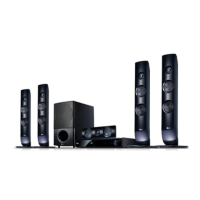
LG HB806TM Specifications

General IconGeneral
BrandLG
ModelHB806TM
CategoryHome Theater System
LanguageEnglish

Related product manuals