8
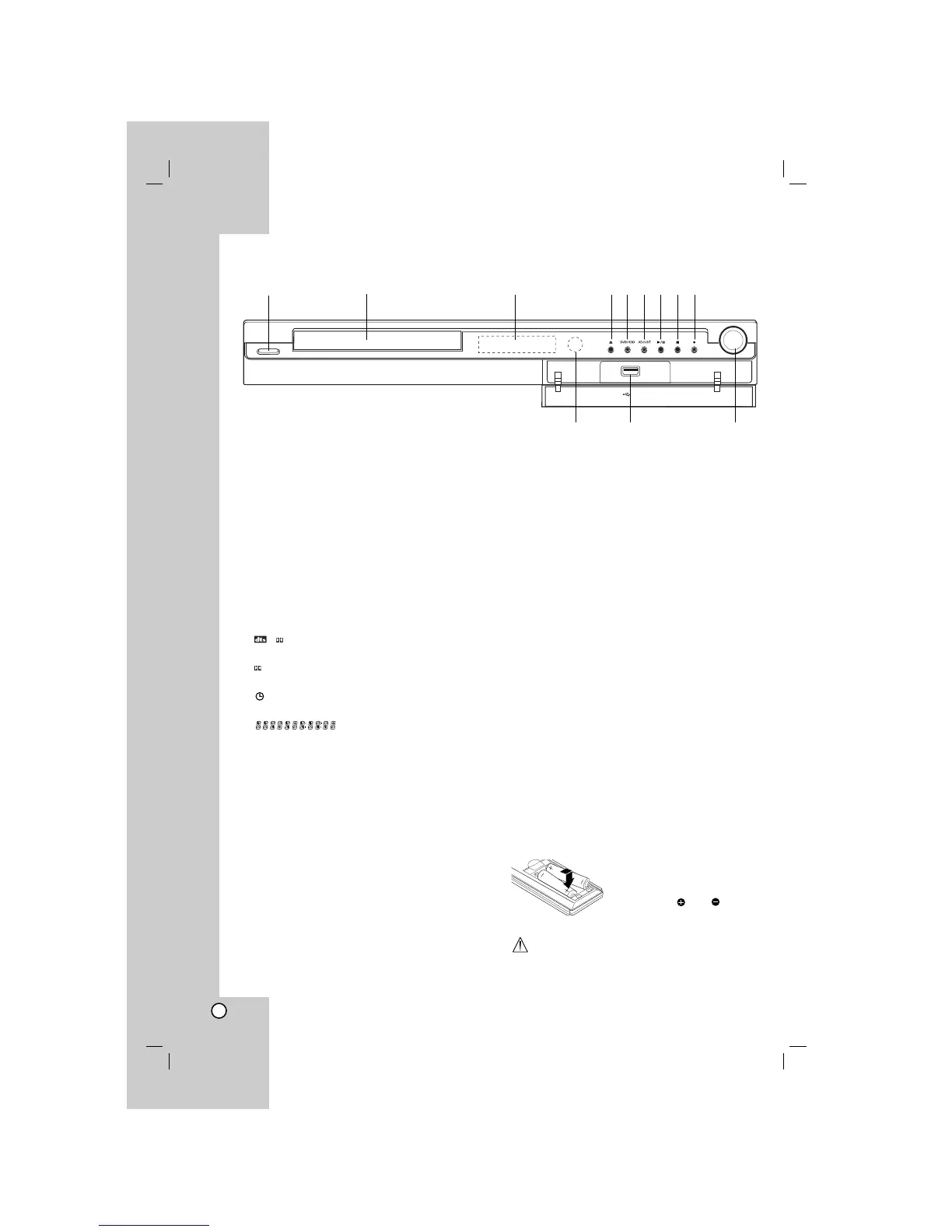
Front Panel
a POWER
Switches the HDD/DVD Recorder Receiver ON or
OFF.
b Disc Tray
Insert a disc here.
c Display window
Shows the current status of the recorder.
REC: The recorder is recording.
HDD: The recorder is HDD mode.
DVD: The recorder is DVD mode.
DVD bBHDD : The recorder is dubbing.
MUTE: The speaker sound is muted.
,
: Indicates encoding format of the current
disc.
: Indicates sound mode is DOLBY PRO
LOGIC or DOLBY PRO LOGIC II.
: Indicates when the recorder is in timer
recording or a timer recording is programmed.
: Indicates clock, total playing
time, elapsed time, title number, radio frequency,
volume, Surround, chapter/track number, channel,
etc.
d OPEN/CLOSE (Z)
Opens or closes the disc tray.
e DVD/HDD
Set the recorder’s mode to HDD or DVD.
f ADJUST
- Scans up or down through memorized channels.
- Selects menu options.
g B / X (PLAY / PAUSE)
Starts playback.
Pause playback or recording temporarily,
press again to exit pause mode.
h x (STOP)
Stops playback or recording.
i z (REC)
Starts recording. Press repeatedly to set the
recording time.
j Remote Sensor
Point the recorder remote control here.
k USB
Connect to a USB port of multimedia (USB
memory etc.)
l VOLUME CONTROL
Turn the knob clockwise to increase sound level,
counterclockwise to decrease sound level.
ba
j
d e f g h i
c
k
l
Remote Control Operation
Point the Remote Control at the remote sensor and
press the buttons.
Remote Control Battery Installation
Remove the battery cover on the
rear of the Remote Control, and
insert two R03 (size AAA)
batteries with and matched
correctly.
Caution
Do not mix old and new batteries. Never mix different
types of batteries (standard, alkaline, etc.).



 To Next Page