Remote control
a
b
c
d
e
f
• • • • • • • • • •
d
• • • • • • • • •
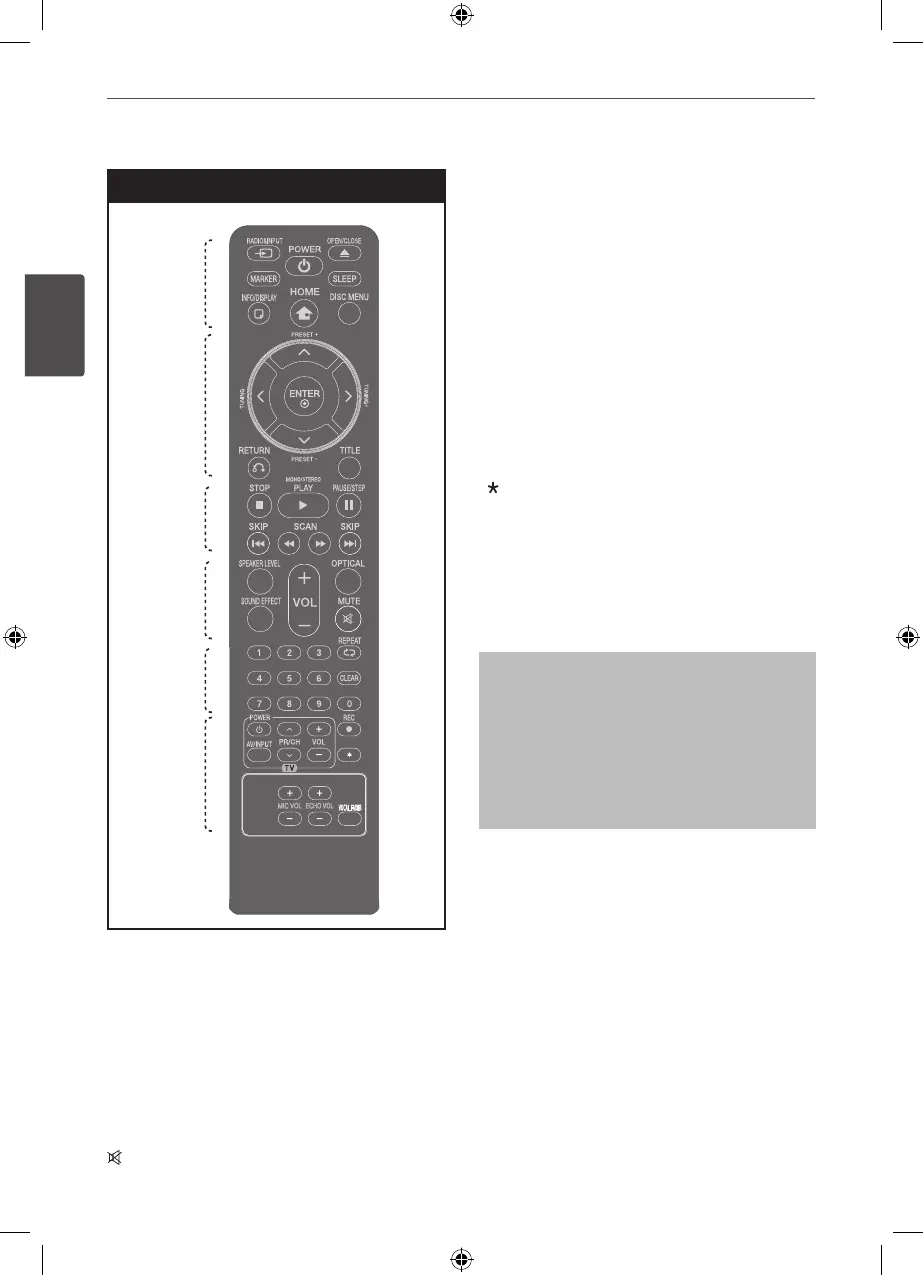
SPEAKER LEVEL: Sets the sound level of
desired speaker.
SOUND EFFECT: Selects a sound eect mode.
VOL -/+ (Volume) : Adjusts speaker volume.
OPTICAL: Changes input source to optical
directly.
MUTE : Mutes the sound.
• • • • • • • • • •
e
• • • • • • • • •
0-9 numerical buttons : Selects numbered
options in a menu.
CLEAR : Removes a number when setting the
password.
s
REPEAT : Selects a play mode. (Repeat/
Random)
• • • • • • • • • •
f
• • • • • • • • •
TV Control buttons : Controls the TV. (LG TV
only)
z
REC : USB Direct Recording.
: This button is not available.
ECHO VOL : Adjusts echo volume.
MIC VOL : Adjusts microphone volume.
VOCAL FADER : You can enjoy the function as
karaoke, by reducing singer vocal of music in
the various source.
Controlling the TV
You can control the sound level, input
source, and power switching of LG TVs as
well. Hold POWER (TV) and press PR/CH
(
U
/
u
) button repeatedly until the TV turns
on or o.



 To Next Page