Need help?
Do you have a question about the LG LAD-9600 and is the answer not in the manual?
Covers electrical safety, driving, temperature, and handling advice.
Covers laser system warnings, maintenance, and general product usage advice.
Explains disc type symbols and notes on DVD/VCD compatibility.
Lists supported disc types like DVD, VCD, CD, MP3, WMA, and DivX.
Covers proper disc handling, cleaning, and size restrictions.
Details DVD regional code settings and playback restrictions.
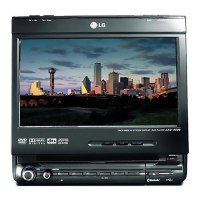
Details each button and port on the main unit's front panel.
Explains how to adjust screen mode and brightness.
Lists all items included with the unit.
Details the purpose and operation of each button on the remote.
Instructions for battery replacement and basic remote use.
How to reset the unit using the reset button.
Details power, ground, dimmer, and optional optical connections.
Instructions for installing the microphone with the sun visor.
Details connections for ACC, ignition, hand brake, and speaker outputs.
Guidance on using the ISO connector plug.
Explains connections for audio/video inputs, outputs, and the rear camera.
Step-by-step guide for connecting the reverse lamp lead.
How to remove and re-install the detachable front panel.
Instructions for securely installing the hide-away unit.
Covers initial installation, removing old units, and standard mounting.
Steps for fitting the unit into an ISO-DIN opening.
Instructions for turning the unit on/off and operating the LCD screen.
How to adjust the monitor angle and flip the panel horizontally.
Steps to insert a disc into the player.
How to eject discs and adjust the audio volume and mute function.
How to switch between different audio/video sources and adjust sound profiles.
Explains playing two sources simultaneously and selecting them.
Describes how the rear camera view is activated and displayed.
Covers language, LCD panel position, brightness, and contrast settings.
Details the auto-dimmer function for display brightness.
Adjusts background animations and clock settings including summer time.
Sets up automatic display of the rear camera when the vehicle is in reverse.
Adjusts audio output balance, fader, and woofer parameters.
Details SRS WOW, User EQ, and High Pass Filter settings.
Controls rear speaker output, beep patterns, and volume.
Allows changing audio, subtitle, and menu languages for DVD playback.
Adjusts screen display format for different video types.
Sets up content restrictions and secures the unit with a password.
Instructions for changing the unit's password and setting the DVD region code.
Guidance on registering for DivX VOD services.
Details how to choose between various audio/video inputs and the setup menu.
Describes the behavior of the SOURCE OFF setting.
Guide to setting up the wireless link between the unit and a phone.
Detailed steps for searching, connecting, and registering a Bluetooth phone.
Instructions for entering the PIN code and confirming successful phone pairing.
Explains how the unit automatically connects to registered Bluetooth phones.
Steps to connect by initiating from the mobile phone.
Details on using the unit as a headset for hands-free calls.
How to view phone details, search for devices, and manage entries.
Explains the auto and manual connection options for registered phones.
Options for renaming, showing/hiding Bluetooth visibility.
How to transfer, view, and search contacts from the phone.
Deleting all contacts, editing entries, and setting a main number.
How to make calls directly from the contact details screen.
Instructions for direct dialing and calling from recent call history.
How to set up and use speed dial numbers for making calls.
Covers handling incoming calls and making calls from recent records.
How to switch audio output between the car speakers and the phone.
Guide to tuning into radio stations using seek and manual methods.
How to use Auto Scan and store/recall favorite stations.
How to play discs and understand MP3/WMA file requirements.
Instructions for skipping, searching, and moving through content.
How to display and select files from a list.
Details on playback repeat, random, and scan functions.
How to display CD TEXT and ID3 TAG information for tracks and files.
How to play DVDs/VCDs and navigate their menu structures.
Using numeric keys for VCD menu selection.
How to control playback of DVDs and VCDs.
Instructions for skipping, restarting, and searching content.
How to bring up the main menu for DVDs and VCDs.
How to search for content and change audio/subtitle languages on DVDs.
How to select different camera angles for DVD playback.
Options for repeating chapters, titles, tracks, or all content.
How to use the menu selection for playing DVDs.
How to play DivX discs and important compatibility information.
Lists the types of DivX files, codecs, and audio formats supported.
How to play, stop, pause, and navigate between DivX files.
How to find files using a list and perform searches.
Options for repeating files, folders, or all content.
How to change audio tracks and subtitle languages.
How to display JPG images, navigate them, and use rotate functions.
How to use the slide show feature and understand picture format limitations.
How to connect a USB device and play its content.
How to browse files and important usage guidelines for USB devices.
Solutions for power, unit malfunction, and playback errors.
How to fix issues with no sound or audio skipping.
List of codes for setting display language.
List of codes for selecting area codes.
Notes on Bluetooth profiles and potential functional differences.
A list of specific phone models compatible with the unit.
Details on power, dimensions, weight, and LCD characteristics.
Technical data for CD/DVD/VCD playback and radio reception.
Contact numbers for LG subsidiaries in various countries.
 General
| Brand | LG |
|---|---|
| Model | LAD-9600 |
| Category | Portable Multimedia Player |
| Language | English |

 To Next Page