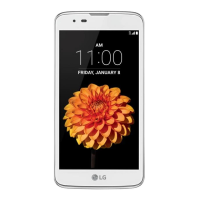
This document serves as a user guide for the LG Stylo 3 Plus (LGMP450), a smartphone designed for safe and proper use. It covers various aspects of the device, from custom-designed features to basic functions, useful applications, phone settings, and safety information.
Function Description
The LG Stylo 3 Plus is a smartphone that offers a range of functionalities, including communication, multimedia, and productivity tools. It supports various apps, allows for customization of settings, and provides features for data management and security. The device is designed to be user-friendly, with touch screen gestures for navigation and interaction.
Important Technical Specifications
- Stylus Pen: The device includes a stylus pen for creating memos and accessing "Pen Pop" features like Pop Memo, Capture+, and GIF Capture. The Pen Pop options allow for quick access to memo apps, screen capture, and animated GIF creation (up to 15 seconds). It also features a magnifying window with adjustable size and color contrast, and the ability to add app shortcuts.
- Multi-Window: This feature enables users to run two applications simultaneously by splitting the screen into multiple windows.
- Fingerprint Recognition: The device incorporates a fingerprint sensor on the Power/Lock key for secure unlocking of the screen, viewing locked content in Gallery or QuickMemo+, and confirming purchases. It supports registration of multiple fingerprints for enhanced security and reliability.
- SIM Card: The device supports Nano SIM cards. Users are advised to use factory-made SIM cards from their service provider for optimal performance.
- Memory Card: The device supports microSD cards up to 2 TB. Memory card encryption is available to protect data, with options for new data encryption, full encryption, and exclusion of media files.
- Battery: The guide provides instructions for installing and removing the battery, as well as charging the device. It emphasizes using genuine LG accessories for charging and offers tips for efficient battery usage, such as turning off Bluetooth/Wi-Fi, minimizing screen brightness, and setting a screen lock.
- Touch Screen: The touch screen supports various gestures including tapping, touching and holding, double-tapping, dragging, swiping, pinching, and spreading for intuitive navigation and control.
- Display Modes: Users can select from three Home screen modes: Home (default), EasyHome (simplified for first-time smartphone users), and Home & app drawer (separate layout for Home screen and apps list).
- Screen Lock: Multiple screen lock options are available for security, including None, Swipe, Knock Code, Pattern, PIN, Password, and Fingerprints. Secure start-up can also be enabled for additional device security.
- KnockON: This feature allows users to turn the screen on or off by double-tapping the screen.
- Keyboard: The Smart keyboard offers features like cursor movement by dragging the space bar, word suggestions based on usage patterns, customizable QWERTY keyboard layout, adjustable keyboard height, landscape keyboard modes, and a split keyboard option. It also supports one-handed operation and voice input.
- Connectivity: The device supports Wi-Fi, Wi-Fi Direct, Bluetooth, Mobile Data, NFC, USB tethering, and Mobile HotSpot for various connectivity needs.
- Printing: The device can connect to wireless printers for printing photos and documents.
- LG Bridge: An application for managing files, backing up data, and updating device software from a computer.
- Software Update: The device supports firmware updates via the Internet (OTA) or through LG Bridge, ensuring the device runs on the latest software version.
Usage Features
- Quick Share: Allows immediate sharing of photos or videos after capture to selected apps.
- Phone Functions: Includes making and answering calls, rejecting calls with messages, checking incoming calls while using other apps, viewing missed calls, accessing in-call functions (hold, contacts, end, dialpad, speaker, mute, Bluetooth), making three-way calls, viewing call records, and configuring call options.
- Messaging: Users can send and receive messages, attach files, and customize messaging settings.
- Camera: Features include taking photos and recording videos with various options such as flash control, switching between front/rear cameras, film filters, camera modes (Auto, Panorama), HDR, timer, cheese shutter (voice commands), steady recording, tag locations (GPS), grid display, and storage location selection. Front camera options include selfie shot settings (Gesture shot, Auto shot), Gesture view, and Save as flipped. Burst shot allows continuous photo capture.
- Gallery: For viewing and managing photos and videos, with options to edit images, play videos (with QSlide, sound adjustment, screen brightness adjustment, and playback controls), delete files (with a Trash feature for recovery within 7 days), and share content.
- QuickMemo+: An advanced notepad for creating notes, writing notes on photos, and taking notes on screenshots. It supports various memo tools (save, undo, redo, keypad input, handwritten notes, erase, crop) and folder management (All memos, My memos, Pop Scanner, Capture+, Pop Memo, Trash, New category).
- Clock: Includes Alarm, World clock, and Timer functions.
- Calendar: For managing events and tasks, adding events, syncing events, and using an "Event pocket" for temporary storage of images, text, and memos.
- Email: Allows registration and management of email accounts, checking and sending emails, and accessing multiple accounts.
- Calculator: Provides simple and scientific calculator functionalities.
- File Manager: For viewing and managing files stored on the device or cloud.
- Voice Recorder: For recording and playing back voice files, with options to save location details and add events.
- FM Radio: For listening to FM radio (requires earphones as antenna).
- Downloads: For viewing, deleting, and sharing downloaded files.
- Contacts: For saving, managing, searching, editing, deleting, adding to favorites, and creating groups for contacts.
- Music: For playing and managing songs and music albums, with playlist, search, repeat, and playback controls.
- Tasks: For registering and managing schedules.
- LG SmartWorld: An app store for downloading games, audio content, apps, and fonts provided by LG Electronics.
- LG Backup: For backing up, restoring, and moving data saved on the device.
- Chrome: For browsing the internet, with options to sign in and import data.
- Google Apps: Includes Google Search, Gmail, Maps, YouTube, Drive, Play Music, Play Movies & TV, Duo, Photos, Docs, Sheets, Slides, and Android Pay.
- Do Not Disturb: Allows users to limit or mute notifications for specific periods.
- Accessibility: Offers various settings for users with disabilities, including TalkBack (voice notifications), Message/call voice notifications, Font size, Bold text, Display size, Touch zoom, Window zoom, Large mouse pointer, High contrast screen, Screen color inversion, Screen color adjustment, Grayscale, End call with Power key, Captions, Notification LED, Flash alerts, Turn off all sounds, Audio type, Sound balance, Touch assistant, Touch input, Physical keyboard, Auto mouse click, Touch and hold for calls, Screen timeout, Touch control areas, Accessibility features shortcut, Auto-rotate screen, Switch Access, and Lookout.
Maintenance Features
- Battery Care: Tips for efficient battery usage to prolong lifespan.
- Device Cleaning: Advised to wipe camera lens with a soft cloth before use. Avoid harsh chemicals or detergents.
- Software Updates: Regular software updates are recommended to ensure optimal performance and security.
- Data Backup: LG Backup and Google account sync options are available to prevent data loss.
- Troubleshooting (FAQ): The guide includes a section for common problems and their corrective measures, such as SIM card errors, network issues, codes not matching, application problems, charging errors, screen issues, and device freezes.
- Anti-Theft Guide: Provides instructions on setting up screen lock and adding a Google account to protect the device from unauthorized use after a factory reset.
- Safety Information: Comprehensive guidelines on safe use and operation, including precautions for battery handling, charging, exposure to heat, and avoiding physical damage. It also includes information on FCC RF Exposure, HAC statement, and driver safety tips.

 Need help?
 General

 To Next Page