Need help?
Do you have a question about the LG Lotus and is the answer not in the manual?
Explains the keypad, soft keys, navigation, and function keys on the phone.
Guide to composing and sending SMS messages using the QWERTY keyboard and dedicated key.
How to navigate, search, and purchase music from the Sprint Music Store.
How to play music in the background while multitasking on the phone.
Steps to pair the phone with wireless accessories like headsets and speakers.
Guide for entering the PIN code to establish a Bluetooth connection.
 General
| Network Technology | GSM / CDMA |
|---|---|
| 2G bands | CDMA 800 / 1900 |
| GPRS | No |
| EDGE | No |
| Status | Discontinued |
| SIM | Mini-SIM |
| Type | TFT, 256K colors |
| Card slot | microSD (dedicated slot) |
| Call records | Yes |
| Camera | 2 MP |
| Video | Yes |
| Alert types | Vibration; Downloadable polyphonic, MP3 ringtones |
| Loudspeaker | Yes |
| 3.5mm jack | No |
| WLAN | No |
| GPS | No |
| Radio | No |
| USB | microUSB 2.0 |
| Messaging | SMS, MMS, Email |
| Browser | WAP 2.0/xHTML |
| Games | Yes |
| Java | Yes, MIDP 2.0 |
| Stand-by | Up to 300 h |
| Talk time | Up to 5 h |
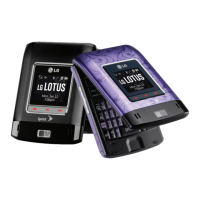
| Colors | Black, Pink |
| Operating System | Proprietary |
| RAM | No |
| 3G bands | CDMA2000 1x |
| Announced | 2008, September |
| Resolution | 240 x 320 pixels |
| Phonebook | Photocall |
| Bluetooth | v2.0, A2DP |
| Battery | Removable Li-Ion 950 mAh battery |

 To Next Page