43
MAINTENANCE
ENGLISH
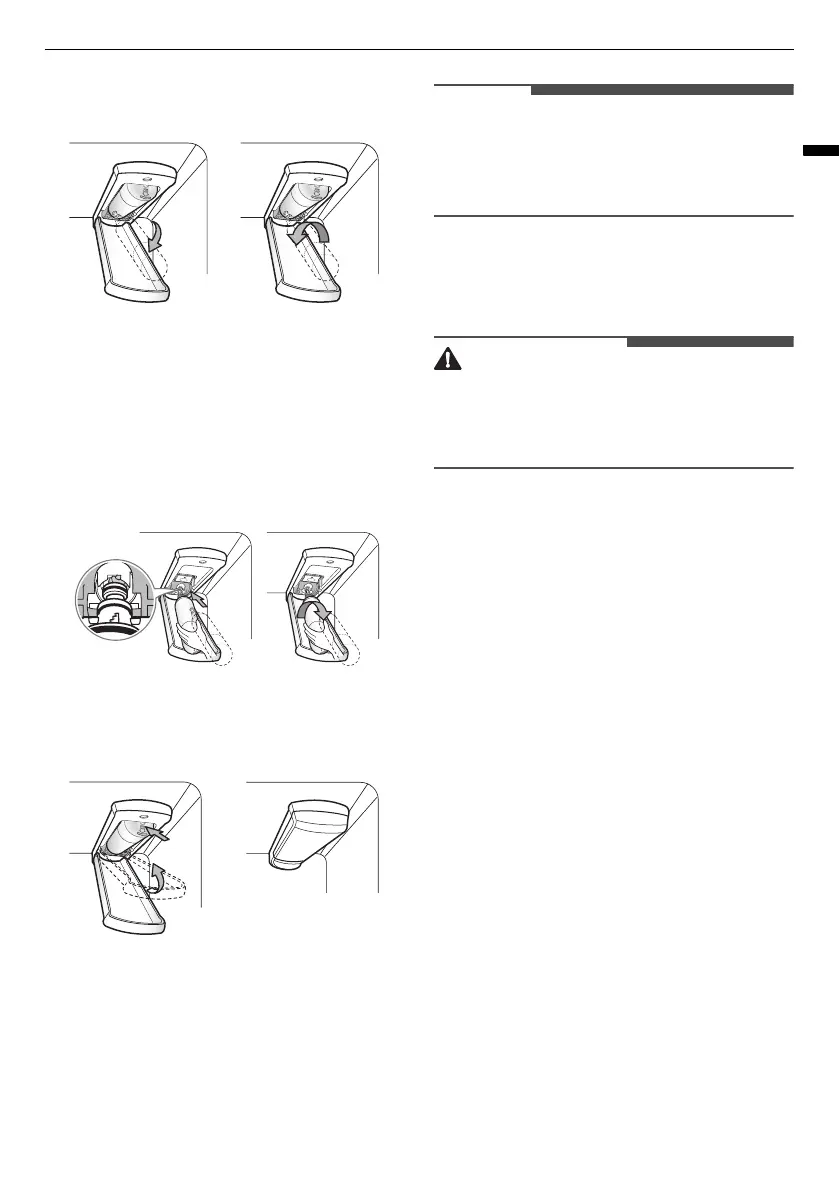
sure to rotate the filter down completely
before pulling it out of the manifold hole.
4
Replace with a new water filter.
• Take the new water filter out of its packing
and remove the protective cover from the o-
rings. With the water filter tabs in the
horizontal position, push the new water filter
into the manifold hole and turn it clockwise
until it stops.
5
Close the water filter cover. The cover will click
when closed correctly.
6
After the water filter is replaced, dispense
about 10 liters of water (flush for
approximately 5 minutes) to remove trapped
air and contaminants from the system.
• Do not dispense the entire 10 liters amount
continuously. Press and release the dispenser
pad for cycles of 30 seconds ON and 60 seconds
OFF.
7
After changing the filter, press and hold the
Water Filter
button for three seconds to reset
the indicator light.
• Failure to replace filters when required or using
non LG authorised water filters can cause the
filter cartridge to leak and result in property
damage.
Application Guidelines/Water
Supply Parameters
• Service Flow: 1.9 lpm
• Water Supply: Community or Private Well -
Potable Water
• Water Pressure: 138 - 827 kPa
• Water Temperature: 0.6 - 37.8 °C
• Capacity: 757 litres



 To Next Page