Need help?
Do you have a question about the LG LSP-340 and is the answer not in the manual?
Details safe distance for body-worn operation to comply with RF exposure requirements.
Warnings to reduce fire or electric shock risk, avoid moisture and pools.
Guidelines for antenna handling, damaged antennas, and RF energy effects on medical devices.
Instructions for cleaning, handling failures, and service procedures.
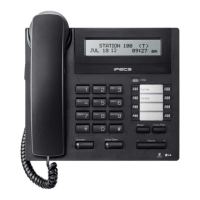
Illustrates and labels the front view of the telephone and its function keys.
Explains the icons and indicators displayed on the phone's LCD screen.
Provides a comprehensive step-by-step guide for setting up the CDMA Fixed Wireless Telephone.
Explains how to initiate and conduct a phone call using the device.
Details the process to redial the most recent outgoing phone number.
Describes how to answer an incoming call and end a conversation.
Explains how signal strength affects call quality and how to interpret the signal icon.
Informs about receiving and clearing missed call notifications on the display.
Adjusts ring, key, and ear volumes for the telephone.
Allows selection from 10 different ring types for incoming calls.
Configuration for key-tone length, minute alert, Rx call mode, and SIO baud rate.
Allows muting the microphone during a call while still hearing the other party.
How to adjust the earpiece volume while actively on a call.
Guide to finding stored phone numbers using names in the phonebook.
Instructions for retrieving phone numbers based on their memory address or location.
Steps to find a phone number by entering the number itself.
Method for quickly browsing through the stored phone numbers list.
Procedure to erase all stored phone numbers from the phonebook.
How to locate stored numbers if the memory location is forgotten.
How to view, read, and delete incoming text and voice messages.
Allows selection of tones for new message notifications.
Step-by-step guide for composing and sending new text messages.
Instructions for clearing sent text messages from the device's memory.
How to display the phone's own telephone number on the screen.
Function to redial the last outgoing number by picking up the handset.
Explains the function of the hook switch for flash and call termination.
Describes the flash function, similar to a single-line phone.
Details the phone's return to normal idle state after being misplaced.
Guide for saving frequently used phone numbers into memory locations.
Procedure to delete specific phone numbers stored in memory.
Technical specifications for the main unit, including frequency, size, and temperature.
Details specifications for the AC/DC adapter and the phone's battery.
 General
| Caller ID | Yes |
|---|---|
| Call Waiting | Yes |
| Display | LCD |
| Number of Handsets | 1 |
| Speakerphone | Yes |
| Intercom | Yes |


 To Next Page